
File Centipede
File Centipede: A Windows/Linux manager combining torrents, browser capture, scheduling, and remote file control. Ranked #33 of 58 in Download Manager Software by our editors (5.9/10); pricing: Free plan; best for users needing torrents plus remote file-management tools.
At a glance
- Editor score5.9 / 10
- PricingFree plan
- Best forUsers needing torrents plus remote file-management tools
- Free planYes
- Video downloadingYes
- Founded2022
- Facts checked23 Sep 2026
Where it wins
- Handles HTTP/HTTPS, FTP/FTPS, BitTorrent, WebDAV, SSH and SFTP
- Captures browser downloads and media through Chrome, Firefox and Edge
- Adds scheduling, speed limits, remote management and checksum tools
Where it doesn't
- Desktop coverage is limited to Windows and Linux
- Support is provided through documentation channels
- The feature set may exceed the needs of users wanting simple downloads
Our verdict on File Centipede
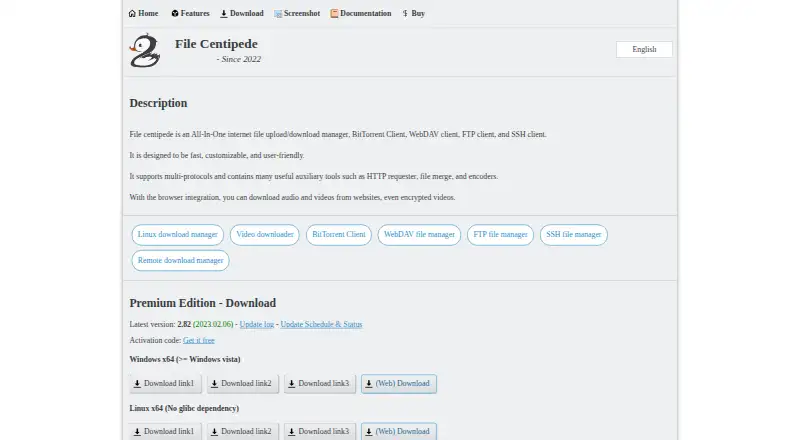
File Centipede is a desktop internet file-transfer manager for Windows and Linux, with a browser extension for capturing downloads and media. It targets solo users and small teams that need more than a basic downloader, especially people combining torrent work with remote file management. Its scope covers HTTP, HTTPS, FTP, FTPS, BitTorrent, WebDAV, SSH and SFTP tasks, alongside tools for torrent creation, seeding, file merging and checksum checks.
The vendor presents File Centipede as a paid product with a free option. Trial activation codes are described as permanent and without usage limitations, while the official site also links to a lifetime-license purchase. The site notes that the software may no longer be free in the future. This arrangement gives budget-conscious users a way to start with the currently available free access while leaving a lifetime license as the paid path.
Its strongest differentiator is the combination of transfer protocols and controls in one application. Users can set download and upload speed limits, schedule downloads, manage torrents and connect to a configured remote host. Browser integration works with Chrome, Firefox and Microsoft Edge, and the deployment model combines desktop software with a browser extension. The listed Windows/Linux coverage and documentation-based support make it a focused choice for users on those platforms. Choose File Centipede when torrent handling, remote downloads and multi-protocol file operations matter together; users seeking a simpler downloader or a wider platform footprint should look elsewhere.
Your product? Our editors can test File Centipede in depth and publish a review, labelled as paid · from $149/mo →
File Centipede pricing
File Centipede fact sheet
| Free plan | Yes |
|---|---|
| Paid from | Not verified |
| Supported platforms | Windows, Linux |
| Browser integration | Yes |
| Video downloading | Yes |
| Download scheduling | Not verified |
| Concurrent downloads | Not verified |
| Remote control | Yes |
| Portable version | Not verified |
| Deployment | Desktop, Browser extension |
| Platforms | Windows, Linux, Chrome extension |
| Support | Docs |
| Built for | Solo, Small business (editorial estimate) |
| Integrations | 3 integrations: Chrome, Firefox, Microsoft Edge |
| Pricing | Free plan (source) |
| Website | filecxx.com |
| Facts checked | 23 Sep 2026 |
File Centipede integrations
File Centipede lists 3 integrations on its own site.
- Chrome
- Firefox
- Microsoft Edge
Alternatives to File Centipede
- Free Download ManagerA broad free manager with acceleration, torrents, scheduling, and multi-platform support.9.3
- JDownloaderA broad free download manager for queues, plugins, archives, streams, and remote control.9.2
- Internet Download ManagerA capable paid Windows manager for organized, resumable and scheduled downloads.9.1


See all File Centipede alternatives →
Used File Centipede? Be the first to review it
The editor score above is our own research. What this page doesn't have yet is a reader's view — what you used File Centipede for, what worked and what didn't. No stars are seeded and no review is paid for; an editor reads every one before it appears.
Write a reviewTwo minutes · verified accounts only · read by an editor before it appears
Featured on iTechGuides

File Centipede is listed in our Download Manager Software directory. Add the badge to your site — it links back to this page.
<a href="https://www.itechguides.com/products/file-centipede/"><img src="https://www.itechguides.com/best/badge/file-centipede.svg" alt="Featured on iTechGuides" width="230" height="46"></a>
Reviewed by iTechGuides Editors · Editorial team · Updated Oct 2026
Advertiser disclosure: iTechGuides is reader-supported. Vendors can pay for top positions in our rankings and for a place on other products' pages, and we may earn a commission when you click some links. Bought places stand at the number bought; this page and our disclosure say so. Paying vendors may get a fuller, more detailed review from our editors, and that review can change their score. How we rank.
Last updated · How we research and update