
FieldAx
FieldAx: A broad field-service suite for teams that need inventory and offline mobile access. Ranked #12 of 27 in Handyman Software by our editors (8.1/10); pricing: 15-day trial; best for field teams needing inventory and offline mobile tools.
At a glance
- Editor score8.1 / 10
- Pricing15-day trial
- Best forField teams needing inventory and offline mobile tools
- Free planNo
- Paid from$35/user/mo
- Lead captureYes
- Facts checked21 Sep 2026
Where it wins
- Offline mobile access with signatures, maps, alerts, and job updates
- Dispatch, scheduling, estimates, and automatic invoicing in one workflow
- Inventory tools plus portals, booking, reminders, and payment integrations
Where it doesn't
- No free plan is available
- Annual billing starts at $35 per user per month
- The feature set may exceed the needs of simpler teams
Our verdict on FieldAx
FieldAx is field service management software for handyman and other service businesses. It brings customer and lead management, online booking, scheduling, dispatching, estimates, invoicing, payments, inventory, work orders, technician tracking, reporting, and mobile access into one system. It is particularly suited to field teams that need to coordinate technicians, manage stock, collect customer information, and keep work moving when mobile connectivity is limited.
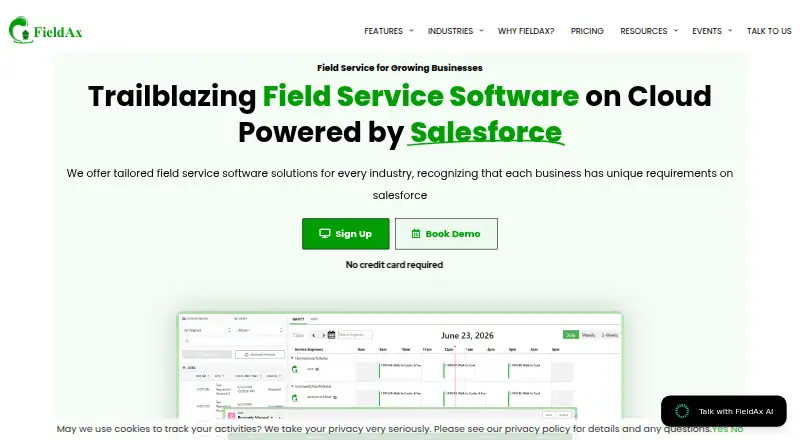
Its operational coverage is the main strength. A drag-and-drop dispatch board supports technician assignment and rescheduling, while scheduling views span daily, weekly, two-week, and monthly planning. Estimates can use predefined service templates and convert into invoices, with automatic invoice generation after job completion. Customers can follow work orders, service progress, invoices, and payments through a portal. Inventory management adds stock visibility and replenishment support, and online booking with automated reminders supports lead capture before a job begins.
The mobile and ecosystem fit also stand out. FieldAx runs on web, iOS, and Android, with mobile job management, calendar access, signatures, alerts, maps, customer calling, and offline functionality. Integrations include Salesforce, QuickBooks, PayPal, Stripe, and Xero. The published plans show an Unlimited plan with all features included: $35 per user per month with annual billing or $39 per user per month with quarterly billing. A 15-day free trial is available, while the product remains a paid subscription rather than a free-plan tool. Choose FieldAx when dispatch, inventory, customer portals, and mobile field work belong in one workflow; simpler teams may prefer a narrower scheduling product.
Your product? Our editors can test FieldAx in depth and publish a review, labelled as paid · from $149/mo →
FieldAx pricing
All 1 FieldAx plans and prices →
FieldAx fact sheet
| Free plan | No |
|---|---|
| Paid from | $35/user/mo |
| Lead capture | Yes |
| Estimate templates | Yes |
| Online booking | Yes |
| Dispatch board | Yes |
| Invoices and payments | Yes |
| Customer messaging | Yes |
| Free trial | 15 days · no card needed |
| Deployment | Cloud, Mobile |
| Platforms | Web, iOS, Android |
| Support | Email, Docs |
| Built for | Small business, Mid-market (editorial estimate) |
| Integrations | 5 integrations: Salesforce, QuickBooks, PayPal, Stripe, Xero |
| Pricing | 15-day trial (source) |
| Website | fieldax.com |
| Facts checked | 21 Sep 2026 |
FieldAx integrations
FieldAx lists 5 integrations on its own site.
- Salesforce
- QuickBooks
- PayPal
- Stripe
- Xero
Alternatives to FieldAx
- JobberA broad field-service system for scheduling, customer work, payments, and mobile operations.9.4
- Housecall ProA full field-service suite for dispatch, payments, customer portals, and mobile teams.9.2
- MarkateA broad field-service platform with unusually deep job-costing controls.8.9



See all FieldAx alternatives →
Also Ranked In
FieldAx is ranked in 2 of our directories.
Used FieldAx? Be the first to review it
The editor score above is our own research. What this page doesn't have yet is a reader's view — what you used FieldAx for, what worked and what didn't. No stars are seeded and no review is paid for; an editor reads every one before it appears.
Write a reviewTwo minutes · verified accounts only · read by an editor before it appears
Featured on iTechGuides

FieldAx is listed in our Handyman Software directory. Add the badge to your site — it links back to this page.
<a href="https://www.itechguides.com/products/fieldax/"><img src="https://www.itechguides.com/best/badge/fieldax.svg" alt="Featured on iTechGuides" width="230" height="46"></a>
Reviewed by iTechGuides Editors · Editorial team · Updated Oct 2026
Advertiser disclosure: iTechGuides is reader-supported. Vendors can pay for top positions in our rankings and for a place on other products' pages, and we may earn a commission when you click some links. Bought places stand at the number bought; this page and our disclosure say so. Paying vendors may get a fuller, more detailed review from our editors, and that review can change their score. How we rank.
Last updated · How we research and update