Ferrix
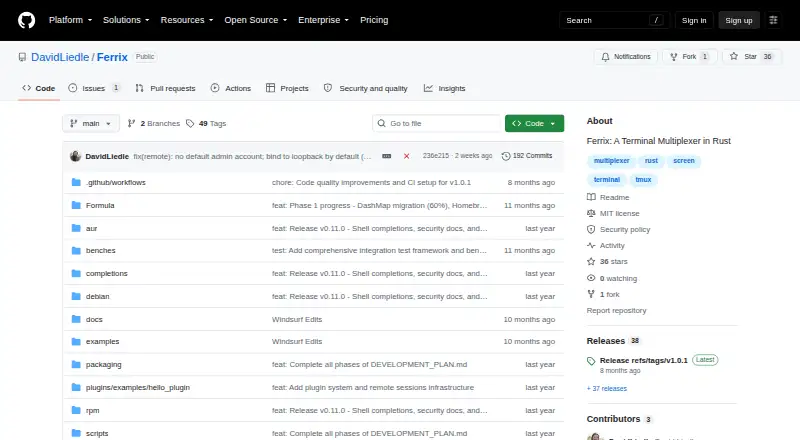
Ferrix: A feature-rich terminal multiplexer for local, persistent, plugin-enabled workflows. Ranked #10 of 29 in Terminal Multiplexers by our editors (8.3/10); pricing: Free plan; best for plugin-enabled macOS and Linux sessions.
At a glance
- Editor score8.3 / 10
- PricingFree plan
- Best forPlugin-enabled macOS and Linux sessions
- Free planYes
- Paid fromFree
- Persistence scopeLocal
- Facts checked20 Sep 2026
Where it wins
- Persistent sessions with restoration, snapshots, recording, and replay
- WASM plugins with hot loading and configurable layouts
- Remote sessions over TCP/TLS, SSH, and Mosh
Where it doesn't
- Persistence is local rather than synchronized across sessions
- No built-in multi-user collaboration
- Supports macOS and Linux environments only
Our verdict on Ferrix
Ferrix is an open-source terminal multiplexer written in Rust for developers and system administrators who work across multiple terminal windows and panes. It supports session creation, attachment, detachment, termination, multiple windows, split panes, navigation, zoom, scrollback, and Vim-style copy mode with search and clipboard support. The command-line application is available for macOS and Linux environments installed with Cargo or from source, making it a focused option for users comfortable with terminal-based installation and workflows.
Its strongest area is session control. Ferrix can preserve and restore local sessions, create snapshots, manage configurable layouts, resize panes, and synchronize input across panes. Recording and replay add a way to review terminal activity, while shell completions cover Bash, Zsh, Fish, PowerShell, and Elvish. WASM-based plugins can be hot loaded, giving technically oriented users an extension path beyond the core multiplexer. These capabilities make Ferrix a good fit for repeatable local environments and complex pane arrangements rather than basic tab management.
Ferrix also fits workflows that span local and remote terminals, with optional sessions over TCP/TLS, SSH, and Mosh, plus integrations with Vim and common shells. Its limits are important for teams: persistence is local, session synchronization is not provided, and collaboration is not available as a current category capability. Collaboration and AI assistance are described as experimental, while multi-user collaboration is a future enhancement. Choose Ferrix if you want an open-source, plugin-enabled multiplexer with persistence and remote-session options; choose another tool if shared sessions, cross-device synchronization, or a broader platform reach are central requirements.
Your product? Our editors can test Ferrix in depth and publish a review, labelled as paid · from $149/mo →
Ferrix pricing
Ferrix fact sheet
| Free plan | Yes |
|---|---|
| Paid from | Free |
| Persistence scope | Local |
| Session synchronization | No |
| Collaboration features | No |
| Custom pane layouts | Yes |
| Plugins or extensions | Yes |
| Access platforms | macOS, Linux, and command-line environments installed with Cargo or from source |
| Maximum sessions | Not verified |
| Deployment | Self-hosted |
| Platforms | macOS, Linux |
| Support | Docs, Community |
| Built for | Solo, Small business, Mid-market, Enterprise (editorial estimate) |
| Integrations | 8 integrations: SSH, Mosh, Vim, Bash, Zsh, Fish … |
| Pricing | Free plan |
| Website | github.com |
| Facts checked | 20 Sep 2026 |
Ferrix integrations
Ferrix lists 8 integrations on its own site.
- SSH
- Mosh
- Vim
- Bash
- Zsh
- Fish
- PowerShell
- Elvish
Alternatives to Ferrix
- ZellijA free, open-source multiplexer with layouts, plugins, persistence, and collaboration.9.4
- tmuxA free, scriptable way to manage persistent local terminal sessions across Unix platforms.9.2
- muxelA free, open-source workspace for managing multiple local and remote coding sessions.9.0


Used Ferrix? Be the first to review it
The editor score above is our own research. What this page doesn't have yet is a reader's view — what you used Ferrix for, what worked and what didn't. No stars are seeded and no review is paid for; an editor reads every one before it appears.
Write a reviewTwo minutes · verified accounts only · read by an editor before it appears
Featured on iTechGuides

Ferrix is listed in our Terminal Multiplexers directory. Add the badge to your site — it links back to this page.
<a href="https://www.itechguides.com/products/ferrix/"><img src="https://www.itechguides.com/best/badge/ferrix.svg" alt="Featured on iTechGuides" width="230" height="46"></a>
Reviewed by iTechGuides Editors · Editorial team · Updated Oct 2026
Advertiser disclosure: iTechGuides is reader-supported. Vendors can pay for top positions in our rankings and for a place on other products' pages, and we may earn a commission when you click some links. Bought places stand at the number bought; this page and our disclosure say so. Paying vendors may get a fuller, more detailed review from our editors, and that review can change their score. How we rank.
Last updated · How we research and update