
FenrirFS
FenrirFS: A free Windows file manager for labels, smart folders, previews, and synchronization. Ranked #75 of 100 in File Manager Software by our editors (3.0/10); pricing: Free plan; best for windows users organizing files with labels and smart folders.
At a glance
- Editor score3.0 / 10
- PricingFree plan
- Best forWindows users organizing files with labels and smart folders
- Free planYes
- Paid fromFree
- Supported platformsWindows 10 and 11
- Founded2005 · Osaka, Japan
- Facts checked22 Sep 2026
Where it wins
- Multiple labels, smart folders, aliases, and incremental search
- Previews for images, PDFs, text, music, video, and ZIP contents
- Free Windows 10 and 11 app with automatic synchronization
Where it doesn't
- Available for Windows platforms only
- No verified dual-pane or tabbed interface
- No verified batch-renaming feature
Our verdict on FenrirFS
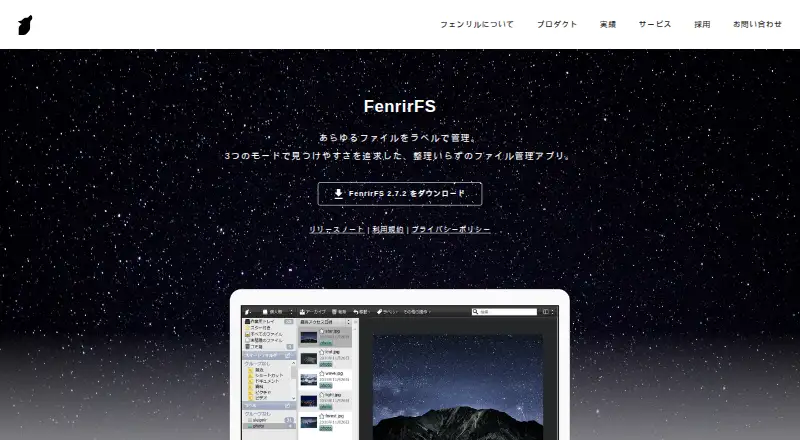
FenrirFS is a free file-management application from Fenrir Inc. for Windows users who want to organize files by meaning as well as location. Its system supports multiple labels, stars, comments, smart folders, incremental search, aliases, and automatic classification filters. Quick previews cover images, PDFs, text, music, and video, while ZIP-file interaction adds archive browsing without leaving the application. A portable edition is also available for running the software from USB storage.
The single FenrirFS plan is free, so the product does not divide its capabilities across paid tiers. The published feature set includes label-based file management, automatic folder synchronization, previews, smart folders, aliases, and search. Automatic synchronization modes are useful for keeping folders aligned, while aliases let users manage files without moving their underlying locations. For users who mainly need structured organization and quick access rather than a conventional folder-only workflow, the free plan covers the core product.
FenrirFS also supports Google Drive profiles, giving it a defined cloud-storage connection alongside local Windows file management. Its current edition supports Windows 10 and 11, and a separate portable edition extends the format to older Windows versions. The narrower platform coverage and the absence of verified dual-pane, tabbed, and batch-renaming capabilities make it less suitable for users seeking a traditional power-user file manager. Choose FenrirFS for label-driven organization, previews, synchronization, and smart folders on Windows; choose an alternative if dual-pane navigation, tabs, or batch renaming are central requirements.
Your product? Our editors can test FenrirFS in depth and publish a review, labelled as paid · from $149/mo →
FenrirFS pricing
All 1 FenrirFS plans and prices →
FenrirFS fact sheet
| Free plan | Yes |
|---|---|
| Paid from | Free |
| Supported platforms | Windows 10 and 11 |
| Dual-pane view | Not verified |
| Tabbed interface | Not verified |
| Batch rename | Not verified |
| Archive support | Yes |
| Cloud storage access | Yes |
| Portable version | Yes |
| Deployment | Desktop, Self-hosted |
| Platforms | Windows |
| Support | |
| Built for | Solo, Small business (editorial estimate) |
| Integrations | 1 integrations: Google Drive |
| Pricing | Free plan (source) |
| Website | fenrir-inc.com |
| Facts checked | 22 Sep 2026 |
FenrirFS integrations
FenrirFS lists 1 integrations on its own site.
- Google Drive
Alternatives to FenrirFS
- Total CommanderA feature-rich file manager for Windows users who want power beyond Explorer.9.3
- DolphinA capable free file manager, especially for Linux and KDE-oriented desktops.9.1
- WinSCPA capable Windows file manager for secure transfers, automation, and synchronization.9.0



See all FenrirFS alternatives →
Used FenrirFS? Be the first to review it
The editor score above is our own research. What this page doesn't have yet is a reader's view — what you used FenrirFS for, what worked and what didn't. No stars are seeded and no review is paid for; an editor reads every one before it appears.
Write a reviewTwo minutes · verified accounts only · read by an editor before it appears
Featured on iTechGuides

FenrirFS is listed in our File Manager Software directory. Add the badge to your site — it links back to this page.
<a href="https://www.itechguides.com/products/fenrirfs/"><img src="https://www.itechguides.com/best/badge/fenrirfs.svg" alt="Featured on iTechGuides" width="230" height="46"></a>
Reviewed by iTechGuides Editors · Editorial team · Updated Oct 2026
Advertiser disclosure: iTechGuides is reader-supported. Vendors can pay for top positions in our rankings and for a place on other products' pages, and we may earn a commission when you click some links. Bought places stand at the number bought; this page and our disclosure say so. Paying vendors may get a fuller, more detailed review from our editors, and that review can change their score. How we rank.
Last updated · How we research and update