Fatpack
Fatpack: A focused, free open-source packer for native Windows x64 PE executables. Ranked #21 of 28 in Executable Packers by our editors (6.2/10); pricing: Free plan; best for free x64 Windows executable compression.
At a glance
- Editor score6.2 / 10
- PricingFree plan
- Best forFree x64 Windows executable compression
- Free planYes
- Paid fromFree
- Protection featuresNo
- Facts checked20 Sep 2026
Where it wins
- LZMA compression with resource and section packing modes
- Handles TLS, imports, relocations, delay imports, and exception handlers
- Loader stubs unpack and execute packed files
Where it doesn't
- Supports Windows x64 executables rather than cross-platform binaries
- Does not support .NET executables
- Provides no verified protection features
Our verdict on Fatpack
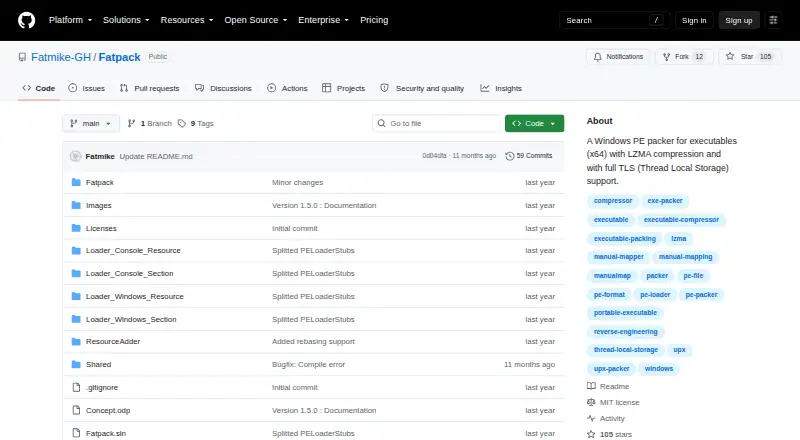
Fatpack is an open-source command-line packer for native x64 Windows Portable Executable files. It is aimed at developers who need free executable compression for Windows console or GUI applications, including projects using Rust or Delphi. The tool uses LZMA compression and supports Thread Local Storage callbacks and data, helping it handle executables that rely on TLS behavior. It is distributed under a perpetual license model and has a free plan.
Its strongest capability is the range of PE details it can preserve while packing. Fatpack can embed packed files as resources or append them as a section, then use loader stubs to unpack and execute them. It also supports icon and application manifest extraction, relocations, imports, delay imports, exception handlers, and memory section protection. That makes it more suitable for native Windows binaries with nontrivial executable structure than a narrowly focused compressor. The published project also includes native Windows console and GUI executable support.
Fatpack is a focused choice rather than a general-purpose executable protection platform. Its supported platform is Windows, its architecture support is 64-bit, and .NET executables are outside its scope. Protection features are not included, so teams seeking verified anti-analysis or similar protections should choose an alternative. The latest release page documents Windows Defender interference as a known issue, which is an important operational consideration. Choose Fatpack for free, open-source compression of native x64 PE files; choose another tool when you need .NET support, broader platform coverage, or protection capabilities.
Your product? Our editors can test Fatpack in depth and publish a review, labelled as paid · from $149/mo →
Fatpack pricing
Fatpack fact sheet
| Free plan | Yes |
|---|---|
| Paid from | Free |
| Supported platforms | Windows |
| Binary formats | Windows PE executables |
| Compression levels | Not verified |
| Protection features | No |
| Architecture support | 64-bit |
| License model | Perpetual |
| Deployment | Self-hosted |
| Platforms | Windows |
| Built for | Solo, Small business (editorial estimate) |
| Pricing | Free plan |
| Website | github.com |
| Facts checked | 20 Sep 2026 |
Alternatives to Fatpack
- Sentinel EnvelopeA broad executable-protection toolkit for vendors distributing software across major platforms.9.2
- UPXA free, cross-platform packer with broad format support and detailed compression controls.8.9
- StarForce CryptoA mature Windows packer for native and managed-code protection with configurable defenses.8.7

See all Fatpack alternatives →
Used Fatpack? Be the first to review it
The editor score above is our own research. What this page doesn't have yet is a reader's view — what you used Fatpack for, what worked and what didn't. No stars are seeded and no review is paid for; an editor reads every one before it appears.
Write a reviewTwo minutes · verified accounts only · read by an editor before it appears
Featured on iTechGuides

Fatpack is listed in our Executable Packers directory. Add the badge to your site — it links back to this page.
<a href="https://www.itechguides.com/products/fatpack/"><img src="https://www.itechguides.com/best/badge/fatpack.svg" alt="Featured on iTechGuides" width="230" height="46"></a>
Reviewed by iTechGuides Editors · Editorial team · Updated Oct 2026
Advertiser disclosure: iTechGuides is reader-supported. Vendors can pay for top positions in our rankings and for a place on other products' pages, and we may earn a commission when you click some links. Bought places stand at the number bought; this page and our disclosure say so. Paying vendors may get a fuller, more detailed review from our editors, and that review can change their score. How we rank.
Last updated · How we research and update