
ExtraBar
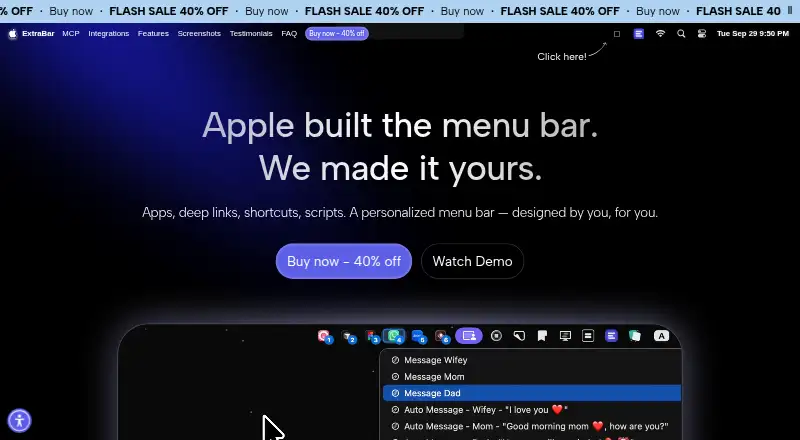
ExtraBar: A focused macOS launcher for custom actions, scripts, shortcuts, and grouped workflows. Ranked #23 of 25 in Menu Bar Customization Software by our editors (6.4/10); pricing: Paid; best for users building automation-heavy menu workflows.
At a glance
- Editor score6.4 / 10
- PricingPaid
- Best forUsers building automation-heavy menu workflows
- Free planNo
- Hide menu itemsNo
- Facts checked20 Sep 2026
Where it wins
- Runs shell, Python, AppleScript, and other scripts
- Supports folders, presets, keyboard shortcuts, and deep links
- Offers broad integrations plus export and import between Macs
Where it doesn't
- macOS only
- Does not hide existing menu bar items
- Does not rearrange existing third-party menu bar items
Our verdict on ExtraBar
ExtraBar is a paid macOS menu bar customization app for designers, developers, managers, and power users who want quick access to apps, bookmarks, scripts, shortcuts, and other actions. It creates a separate customizable bar rather than changing the arrangement of existing third-party menu bar items. Users can organize actions into folders and choose menu bar, floating, collapsed, launcher, or notch display modes.
Its strongest fit is automation-heavy work. ExtraBar supports custom menu actions, deep links, keyboard shortcuts, keyboard navigation, Apple Shortcuts, and scripts written in shell, Python, AppleScript, and other languages. Integrations include Keyboard Maestro, BetterTouchTool, Raycast, Obsidian, Notion, Things 3, Drafts, Fantastical, DEVONthink, OmniFocus, Bear, Craft, Todoist, and 1Password. Presets help switch between configurations, while export and import support moving settings between Macs. The app works offline and stores configuration locally.
ExtraBar is sold through permanent licenses rather than a free plan. The One Year License provides one year of access for one Mac and one year of updates. Lifetime Access provides lifetime access for Mac with one year of updates, while the Forever Edition covers up to five Macs, includes forever updates, and includes all future app versions. Each plan includes a 14-day money-back guarantee. Choose ExtraBar if you want a configurable action hub with scripting and ecosystem connections. Choose another option if your priority is hiding or rearranging existing menu bar items, since ExtraBar does not provide those functions.
Your product? Our editors can test ExtraBar in depth and publish a review, labelled as paid · from $149/mo →
ExtraBar pricing
All 3 ExtraBar plans and prices →
ExtraBar fact sheet
| Free plan | No |
|---|---|
| Paid from | Not verified |
| Hide menu items | No |
| Rearrange items | No |
| Group menu items | Yes |
| Custom menu items | Yes |
| Keyboard shortcuts | Yes |
| Multiple displays | Not verified |
| Notch support | Yes |
| Money-back guarantee | 14 days |
| Deployment | Desktop |
| Platforms | macOS |
| Support | Email, Docs |
| Built for | Solo, Small business, Mid-market (editorial estimate) |
| Integrations | 18 integrations: Keyboard Maestro, BetterTouchTool, Raycast, Apple Shortcuts, Obsidian, Notion … |
| Pricing | Paid (source) |
| Website | extrabar.app |
| Facts checked | 20 Sep 2026 |
ExtraBar integrations
ExtraBar lists 18 integrations on its own site.
- Keyboard Maestro
- BetterTouchTool
- Raycast
- Apple Shortcuts
- Obsidian
- Notion
- Things 3
- Drafts
- Fantastical
- DEVONthink
- OmniFocus
- Bear
- Craft
- Todoist
- 1Password
- GoodTask
- Spark Mail
- Ulysses
Alternatives to ExtraBar
- ThawA free, highly configurable way to organize, hide, and search macOS menu bar items.9.4
- BartenderA broad Mac menu bar toolkit for users who need profiles, triggers, widgets, and layouts.9.2
- SaneBarA capable free option for organizing crowded Mac menu bars.8.9


See all ExtraBar alternatives →
Used ExtraBar? Be the first to review it
The editor score above is our own research. What this page doesn't have yet is a reader's view — what you used ExtraBar for, what worked and what didn't. No stars are seeded and no review is paid for; an editor reads every one before it appears.
Write a reviewTwo minutes · verified accounts only · read by an editor before it appears
Featured on iTechGuides

ExtraBar is listed in our Menu Bar Customization Software directory. Add the badge to your site — it links back to this page.
<a href="https://www.itechguides.com/products/extrabar/"><img src="https://www.itechguides.com/best/badge/extrabar.svg" alt="Featured on iTechGuides" width="230" height="46"></a>
Reviewed by iTechGuides Editors · Editorial team · Updated Oct 2026
Advertiser disclosure: iTechGuides is reader-supported. Vendors can pay for top positions in our rankings and for a place on other products' pages, and we may earn a commission when you click some links. Bought places stand at the number bought; this page and our disclosure say so. Paying vendors may get a fuller, more detailed review from our editors, and that review can change their score. How we rank.
Last updated · How we research and update