
Extend
Extend: A cost-conscious platform for virtual cards, controls, approvals, and expense workflows. Ranked #17 of 21 in Card Issuing Platforms by our editors (7.5/10); pricing: Free plan; best for teams wanting affordable virtual cards.
At a glance
- Editor score7.5 / 10
- PricingFree plan
- Best forTeams wanting affordable virtual cards
- Free planYes
- Paid from$8.99/user/mo
- Virtual cardsYes
- Facts checked20 Sep 2026
Where it wins
- Free Starter plan supports up to 100 virtual cards monthly
- Pro adds approvals, QuickBooks Online sync, and priority support
- APIs, webhooks, controls, and accounting integrations support automation
Where it doesn't
- Starter is limited to 5 users and 10 guests
- Pro pricing rises to $11.99 per user monthly when billed monthly
- Core issuing focus is virtual cards rather than physical-card programs
Our verdict on Extend
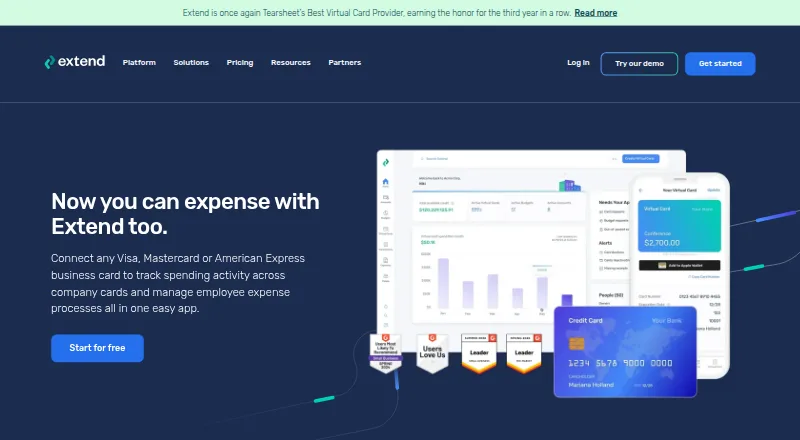
Extend is a virtual card issuing and spend management platform for businesses and financial institutions. It supports virtual card creation and distribution, budgets, employee card requests, spending controls, approval workflows, receipt and invoice attachments, transaction tracking, expense categorization, and reconciliation. Teams can access it through web, iOS, and Android applications, while APIs and webhooks support embedded virtual card issuance. Virtual card availability depends on participating bank and card program partners across Visa, Mastercard, and American Express.
Pricing is structured around a free Starter plan and paid Pro and Enterprise tiers. Starter costs $0 per month and includes up to 5 users, up to 10 guests, up to 100 virtual cards per month, budgets, and email and chat support. Pro includes the first 10 users, supports up to 50 guest users and 500 virtual cards per month, and adds two-layer approval workflows, QuickBooks Online sync, and priority customer support. It costs $11.99 per user per month with monthly billing or $8.99 per user per month when billed annually. Enterprise adds no user minimum, discounted user packages, a designated account manager, custom implementation, API-key virtual card issuance, and custom reporting.
The platform fits teams that need controlled virtual spending connected to finance operations. Its spend controls include limits, expiration dates, frequency controls, and MCC restrictions, while integrations cover QuickBooks Online, QuickBooks Desktop, NetSuite, Xero, Sage Intacct, and Microsoft Dynamics 365 Business Central. Extend is a strong choice for organizations prioritizing affordable virtual cards, approval processes, and accounting connections. Teams seeking a broader physical-card issuing program should compare alternatives, because the described core workflow centers on virtual cards and partner-dependent availability.
Your product? Our editors can test Extend in depth and publish a review, labelled as paid · from $149/mo →
Extend pricing
All 3 Extend plans and prices →
Extend fact sheet
| Free plan | Yes |
|---|---|
| Paid from | $8.99/user/mo |
| Virtual cards | Yes |
| Physical cards | Not verified |
| Issuing API | Yes |
| Spend controls | Yes |
| Funding and balances | Yes |
| Card program support | Multi |
| KYC/KYB tools | Yes |
| Deployment | Cloud, Mobile |
| Platforms | Web, iOS, Android |
| Support | Email, Live chat, Docs |
| Built for | Small business, Mid-market, Enterprise (editorial estimate) |
| Integrations | 6 integrations: QuickBooks Online, QuickBooks Desktop, NetSuite, Xero, Sage Intacct, Microsoft Dynamics 365 Business Central See all → |
| Pricing | Free plan (source) |
| Website | paywithextend.com |
| Facts checked | 20 Sep 2026 |
Extend integrations
Extend lists 6 integrations on its own site.
- QuickBooks Online
- QuickBooks Desktop
- NetSuite
- Xero
- Sage Intacct
- Microsoft Dynamics 365 Business Central
Alternatives to Extend
- OpenWay Way4A broad card-issuing platform for banks that need flexible deployment and processing depth.9.4
- FIS Total Issuing SolutionsA broad issuer-processing platform for financial institutions running multiple card programs.9.2
- HPS PowerCARDAn enterprise card-processing suite for complex, multi-product issuing programs.9.1

Used Extend? Be the first to review it
The editor score above is our own research. What this page doesn't have yet is a reader's view — what you used Extend for, what worked and what didn't. No stars are seeded and no review is paid for; an editor reads every one before it appears.
Write a reviewTwo minutes · verified accounts only · read by an editor before it appears
Featured on iTechGuides

Extend is listed in our Card Issuing Platforms directory. Add the badge to your site — it links back to this page.
<a href="https://www.itechguides.com/products/extend/"><img src="https://www.itechguides.com/best/badge/extend.svg" alt="Featured on iTechGuides" width="230" height="46"></a>
Reviewed by iTechGuides Editors · Editorial team · Updated Oct 2026
Advertiser disclosure: iTechGuides is reader-supported. Vendors can pay for top positions in our rankings and for a place on other products' pages, and we may earn a commission when you click some links. Bought places stand at the number bought; this page and our disclosure say so. Paying vendors may get a fuller, more detailed review from our editors, and that review can change their score. How we rank.
Last updated · How we research and update