
ExcelGPT
ExcelGPT: A browser-based AI assistant for spreadsheet analysis, transformations, and SQL queries. Ranked #12 of 27 in AI Data Analysis Tools by our editors (7.3/10); pricing: Free plan; best for spreadsheet users needing broad AI assistance.
At a glance
- Editor score7.3 / 10
- PricingFree plan
- Best forSpreadsheet users needing broad AI assistance
- Free planYes
- Natural-language queriesYes
- Facts checked19 Sep 2026
Where it wins
- Answers natural-language questions and generates, explains, or fixes formulas
- Cleans data, creates charts and pivots, and exports pivot tables to XLSX
- Works with spreadsheets, connected databases, and saved reusable workflows
Where it doesn't
- Free access is limited to 90 credits per month via daily check-in
- Pro usage is capped at 300 credits per month
- The product is web-based, so it may not suit desktop-only workflows
Our verdict on ExcelGPT
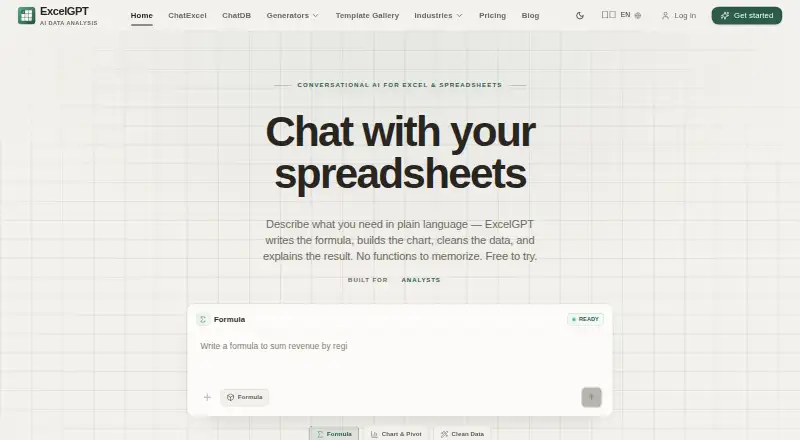
ExcelGPT brings natural-language AI assistance to spreadsheet-heavy work. In a browser, users can ask questions about data, generate or repair formulas, clean and reshape tables, recommend charts, create pivot tables, and produce reports. Its audience includes analysts, operations and finance teams, founders, and other people who spend time in spreadsheets. It also accepts supported documents and images for table conversion to Excel, and can generate code such as VBA, SQL, regex, and Google Apps Script.
The feature set reaches beyond a single spreadsheet file. ExcelGPT supports Excel, CSV, Google Sheets, MySQL, and PostgreSQL workflows, with read-only SQL database querying and XLSX export. Saved analyses, templates, and reusable workflows may help repeat common tasks. The product is web-based, which suits browser-centered work, while teams seeking a desktop application should look elsewhere. Buyers should also distinguish generated code and analysis assistance from a full database editing workflow: SQL access is described as read-only.
The published plans show a Free tier with up to 90 credits per month through daily check-in and AI data analysis. Pro provides 300 monthly credits, described as approximately 150 formulas or 75 charts and analyses. Max adds unlimited usage, team collaboration, and API access; Lifetime offers unlimited lifetime access, usage, formula generation, and chart analysis. ExcelGPT is a fit for spreadsheet users who want a broad set of AI tasks in one browser tool and can work within a credit-based plan, or choose an unlimited tier. Those needing desktop software or write-capable SQL connections should consider alternatives.
Your product? Our editors can test ExcelGPT in depth and publish a review, labelled as paid · from $149/mo →
ExcelGPT pricing
All 4 ExcelGPT plans and prices →
ExcelGPT fact sheet
| Free plan | Yes |
|---|---|
| Paid from | Not verified |
| File imports | Excel (.xlsx, .xls), CSV, ODS, PDF, PNG, JPG |
| SQL connections | Yes |
| Natural-language queries | Yes |
| AI visualizations | Yes |
| Maximum upload size | Not verified |
| Export formats | XLSX |
| Team collaboration | Yes |
| Deployment | Cloud |
| Platforms | Web |
| Integrations | 6 integrations: Excel, CSV, Google Sheets, MySQL, PostgreSQL, API |
| Pricing | Free plan (source) |
| Website | excelgpt.app |
| Facts checked | 19 Sep 2026 |
ExcelGPT integrations
ExcelGPT lists 6 integrations on its own site.
- Excel
- CSV
- Google Sheets
- MySQL
- PostgreSQL
- API
Alternatives to ExcelGPT
- H2O.aiA broad enterprise suite for automated ML, forecasting, governance, and deployment.9.1
- Julius AIAsk questions of files and connected data, then generate charts, analysis, and reports.8.8
- VeezooConversational analytics with governed metrics, broad warehouse support, and sales-led pricing.8.5



See all ExcelGPT alternatives →
Also Ranked In
ExcelGPT is ranked in 2 of our directories.
Used ExcelGPT? Be the first to review it
The editor score above is our own research. What this page doesn't have yet is a reader's view — what you used ExcelGPT for, what worked and what didn't. No stars are seeded and no review is paid for; an editor reads every one before it appears.
Write a reviewTwo minutes · verified accounts only · read by an editor before it appears
Featured on iTechGuides

ExcelGPT is listed in our AI Data Analysis Tools directory. Add the badge to your site — it links back to this page.
<a href="https://www.itechguides.com/products/excelgpt/"><img src="https://www.itechguides.com/best/badge/excelgpt.svg" alt="Featured on iTechGuides" width="230" height="46"></a>
Reviewed by iTechGuides Editors · Editorial team · Updated Oct 2026
Advertiser disclosure: iTechGuides is reader-supported. Vendors can pay for top positions in our rankings and for a place on other products' pages, and we may earn a commission when you click some links. Bought places stand at the number bought; this page and our disclosure say so. Paying vendors may get a fuller, more detailed review from our editors, and that review can change their score. How we rank.
Last updated · How we research and update