
ExaVault
ExaVault: A capable free appliance for teams needing secure transfer inside their own infrastructure. Ranked #15 of 28 in Secure File Transfer Software by our editors (7.9/10); pricing: Free plan; best for small teams with up to 50 users.
At a glance
- Editor score7.9 / 10
- PricingFree plan
- Best forSmall teams with up to 50 users
- Free planYes
- Paid from$99/unit/mo
- Audit logsYes
- Founded2009
- Facts checked22 Sep 2026
Where it wins
- Free plan supports up to 50 users
- Supports FTP, SFTP, FTPS, WebDAV and browser access
- Includes permissions, share links and audit logging
Where it doesn't
- Self-hosted deployment requires customer-managed infrastructure
- API access is not provided
- Advanced support and security features require paid plans
Our verdict on ExaVault
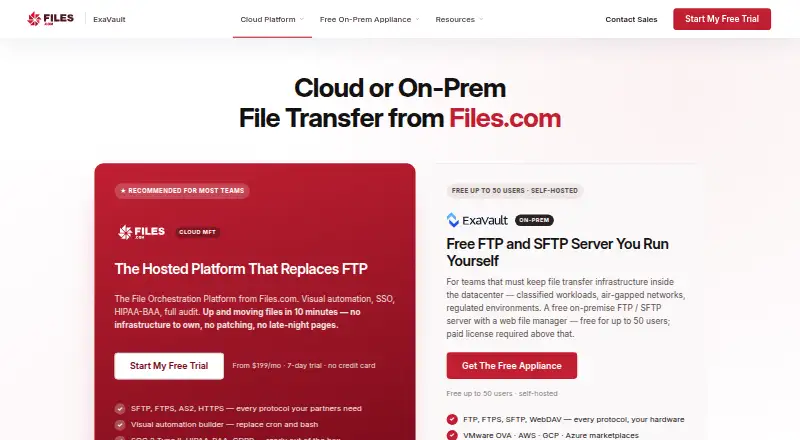
ExaVault is a self-hosted file-transfer appliance for organizations that need FTP, SFTP, FTPS, WebDAV and browser-based file access within infrastructure they operate. It suits small teams managing up to 50 users, as well as organizations that need user, group and folder permissions, share links, notifications and activity records. The Free plan includes the core transfer protocols, a browser-based web file manager, share links, audit logging and self-hosted deployment. Password-protected and time-limited links support controlled file sharing for uploads and downloads.
Pricing is structured around three plans. Free costs $0 for up to 50 users. Paid costs $99 per 50-user pack per month and adds email and phone support, automatic updates, SAML single sign-on, two-factor authentication and Syslog export to a SIEM. Enterprise costs $7,499 per 50 users annually and adds 24/7/365 support, managed deployment assistance, managed SIEM integration assistance, and deployment and migration support. This makes the free tier a strong fit when the team can operate the appliance, while paid plans address ongoing maintenance, identity controls and operational support.
The feature set also covers Active Directory, LDAP, SAML and SCIM integrations, plus connections with VMware vSphere, AWS, Google Cloud and Microsoft Azure. Configurable TLS and SSH cipher controls, audit logging for logins, transfers and administrative actions, and notifications for uploads, share-link use and administrative actions provide administrative visibility. The appliance remains actively maintained, while ExaVault Cloud was sunset and replaced by Files.com Cloud. Choose ExaVault when self-hosting and protocol coverage matter; teams seeking a cloud-hosted service or API access should consider an alternative.
Your product? Our editors can test ExaVault in depth and publish a review, labelled as paid · from $149/mo →
ExaVault pricing
All 3 ExaVault plans and prices →
ExaVault fact sheet
| Free plan | Yes |
|---|---|
| Paid from | $99/unit/mo |
| Maximum file size | Not verified |
| Link expiration | Custom |
| Password protection | Yes |
| Recipient verification | Not verified |
| Audit logs | Yes |
| API access | No |
| Admin controls | Yes |
| Deployment | Self-hosted |
| Platforms | Web |
| Compliance & security | SSO/SAML, 2FA |
| Support | Email, Phone, Docs · 24/7 |
| Built for | Small business, Mid-market, Enterprise (editorial estimate) |
| Integrations | 8 integrations: Active Directory, LDAP, SAML, SCIM, VMware vSphere, AWS … |
| Pricing | Free plan (source) |
| Website | exavault.com |
| Facts checked | 22 Sep 2026 |
ExaVault integrations
ExaVault lists 8 integrations on its own site.
- Active Directory
- LDAP
- SAML
- SCIM
- VMware vSphere
- AWS
- Google Cloud
- Microsoft Azure
Alternatives to ExaVault
- GoAnywhere MFTA broad enterprise MFT platform for secure transfers, workflows, APIs, and audits.9.4
- JSCAPE Managed File TransferA hybrid MFT platform for complex, integrated file exchanges.9.3
- Files.comBroad managed file transfer and sharing with automation, APIs, and desktop and mobile access.9.1


See all ExaVault alternatives →
Also Ranked In
ExaVault is ranked in 4 of our directories.
Used ExaVault? Be the first to review it
The editor score above is our own research. What this page doesn't have yet is a reader's view — what you used ExaVault for, what worked and what didn't. No stars are seeded and no review is paid for; an editor reads every one before it appears.
Write a reviewTwo minutes · verified accounts only · read by an editor before it appears
Featured on iTechGuides

ExaVault is listed in our Secure File Transfer Software directory. Add the badge to your site — it links back to this page.
<a href="https://www.itechguides.com/products/exavault/"><img src="https://www.itechguides.com/best/badge/exavault.svg" alt="Featured on iTechGuides" width="230" height="46"></a>
Reviewed by iTechGuides Editors · Editorial team · Updated Oct 2026
Advertiser disclosure: iTechGuides is reader-supported. Vendors can pay for top positions in our rankings and for a place on other products' pages, and we may earn a commission when you click some links. Bought places stand at the number bought; this page and our disclosure say so. Paying vendors may get a fuller, more detailed review from our editors, and that review can change their score. How we rank.
Last updated · How we research and update