Espresso
Espresso: A paid macOS editor for web developers who want local AI and publishing tools. Ranked #30 of 44 in Code Editors by our editors (6.1/10); pricing: Paid; best for mac web developers wanting local AI tools.
At a glance
- Editor score6.1 / 10
- PricingPaid
- Best forMac web developers wanting local AI tools
- Free planNo
- Paid from$119 one-time
- Extension supportYes
- Facts checked20 Sep 2026
Where it wins
- Local AI completion, chat, and inline editing
- Live browser preview with Xray and CSS overrides
- Server synchronization and direct remote file editing
Where it doesn't
- Available only for macOS
- No free plan is offered
- Updates and new features are included for 12 months
Our verdict on Espresso
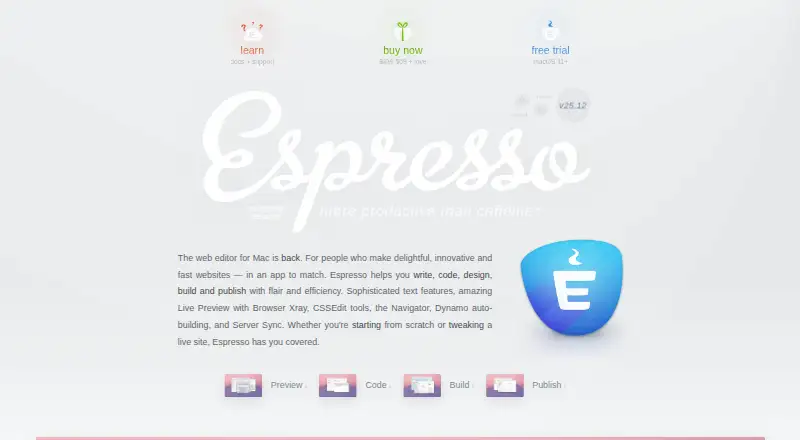
Espresso is a desktop code and web editor for Mac users who build and maintain websites. Its feature set covers syntax-aware editing, CodeSense completions, code folding, snippets, project navigation, live browser previews, CSS tools, static-site builds, and server publishing. It supports HTML, CSS, SCSS, LESS, JavaScript, PHP, Ruby, Python, Apache, and XML, with plug-ins and syntax extensions for added flexibility. Local AI completion, chat, and inline editing are included for developers who want AI assistance within a Mac-native editor.
The editor’s strongest fit is a web workflow that connects writing, previewing, styling, building, and publishing in one desktop application. Live browser preview adds Xray and CSS overrides, while visual CSS tools support SCSS and LESS editing. Dynamo provides build infrastructure for static sites, and server synchronization supports quick publishing and direct editing of remote server files. Built-in Language Server Protocol support and plug-in compatibility extend the editor beyond its core syntax-aware tools. Developers focused on local website work should find this breadth more relevant than those seeking a general-purpose editor across multiple operating systems.
Espresso uses a paid, one-time license priced at $119, with 12 months of free updates and new features and no subscription. There is no free plan, and the editor is available only on macOS, which narrows its audience from the outset. The product suits Mac web developers who value local AI features, visual CSS workflows, live previews, and integrated remote publishing. Developers who need Windows or Linux support, a free entry point, or a broader cross-platform deployment should choose an alternative instead.
Your product? Our editors can test Espresso in depth and publish a review, labelled as paid · from $149/mo →
Espresso pricing
All 1 Espresso plans and prices →
Espresso fact sheet
| Free plan | No |
|---|---|
| Paid from | $119 one-time |
| Supported platforms | macos |
| Extension support | Yes |
| Built-in debugger | Not verified |
| Remote development | Yes |
| Language server support | Yes |
| Editor type | Desktop |
| Money-back guarantee | 30 days |
| Deployment | Desktop |
| Platforms | macOS |
| Support | Email, Docs |
| Built for | Solo, Small business (editorial estimate) |
| Pricing | Paid (source) |
| Website | espressoapp.com |
| Facts checked | 20 Sep 2026 |
Alternatives to Espresso
- Visual Studio CodeA free, open-source editor with editing, debugging, Git, terminal, and extension support.9.4
- ZedA fast, open-source editor with strong native tooling and flexible AI integrations.9.1
- VSCodiumA familiar desktop editor for VS Code users who want telemetry-disabled binaries.8.9



See all Espresso alternatives →
Also Ranked In
Espresso is ranked in 2 of our directories.
Used Espresso? Be the first to review it
The editor score above is our own research. What this page doesn't have yet is a reader's view — what you used Espresso for, what worked and what didn't. No stars are seeded and no review is paid for; an editor reads every one before it appears.
Write a reviewTwo minutes · verified accounts only · read by an editor before it appears
Featured on iTechGuides

Espresso is listed in our Code Editors directory. Add the badge to your site — it links back to this page.
<a href="https://www.itechguides.com/products/espresso-code-editor/"><img src="https://www.itechguides.com/best/badge/espresso-code-editor.svg" alt="Featured on iTechGuides" width="230" height="46"></a>
Reviewed by iTechGuides Editors · Editorial team · Updated Oct 2026
Advertiser disclosure: iTechGuides is reader-supported. Vendors can pay for top positions in our rankings and for a place on other products' pages, and we may earn a commission when you click some links. Bought places stand at the number bought; this page and our disclosure say so. Paying vendors may get a fuller, more detailed review from our editors, and that review can change their score. How we rank.
Last updated · How we research and update