Empoli
Empoli: A fast route from architectural plans to editable 3D scenes and browser walkthroughs. Ranked #21 of 23 in AI Architectural Rendering Software by our editors (6.0/10); pricing: Free plan; best for quick plan-to-walkthrough 3D conversion.
At a glance
- Editor score6.0 / 10
- PricingFree plan
- Best forQuick plan-to-walkthrough 3D conversion
- Free planYes
- Workflow modeMixed
- Facts checked20 Sep 2026
Where it wins
- Converts floor plans into 3D scenes and Revit-compatible models
- Supports FBX imports from Revit, ArchiCAD, SketchUp, and other software
- Adds browser walkthroughs, client sharing, editing, and live co-viewing
Where it doesn't
- Rendering controls are narrower than the rest of its workflow
- BIM validation is still described as in development
- The current platform is web-based, with the mobile app coming soon
Our verdict on Empoli
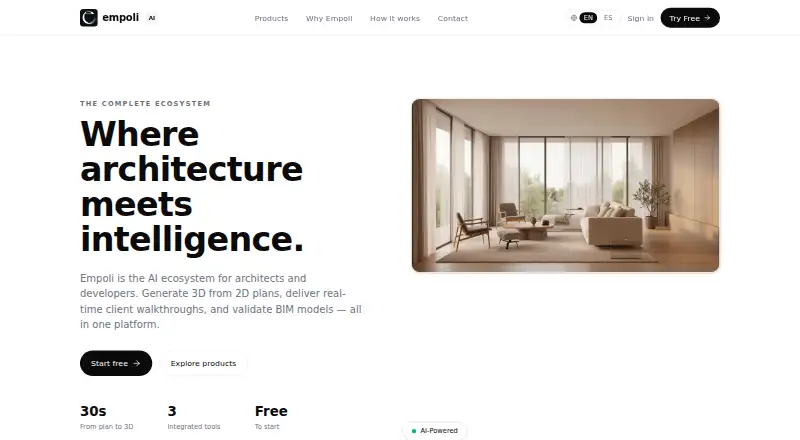
Empoli is a web-based architectural visualization platform for architects and developers who need to turn plans or existing 3D assets into presentable scenes. It converts floor-plan images and other architectural inputs into 3D scenes or Revit-compatible models, while also accepting FBX files exported from Revit, ArchiCAD, SketchUp, or other 3D software. The workflow supports floor-plan images, 2D drawings, PDF, AutoCAD files, FBX, and ZIP archives with textures, giving teams several ways to start a project.
Its strongest angle is the path from model creation to client presentation. Empoli automatically applies lighting, materials, and detail to uploaded models, then turns projects into browser-based interactive walkthroughs. Client sharing through a single link reduces friction for review, while 3D wall and material editing gives teams a way to adjust scenes without returning immediately to the originating software. Live co-viewing adds a collaborative layer for teams reviewing the same project together.
The free plan makes Empoli accessible for initial exploration, and the published plans show that paid monthly options are also available. The main trade-off is focus: Empoli emphasizes fast conversion, presentation, and collaboration rather than a broad set of rendering controls. BIM validation is presented as an in-development product, so teams that need that capability as a mature part of the workflow should look elsewhere. Choose Empoli for quick plan-to-walkthrough conversion, browser sharing, and compatibility with common architectural modeling workflows; choose an alternative when advanced rendering control or established BIM validation matters more.
Your product? Our editors can test Empoli in depth and publish a review, labelled as paid · from $149/mo →
Empoli pricing
Empoli fact sheet
| Free plan | Yes |
|---|---|
| Paid from | Not verified |
| Workflow mode | Mixed |
| Supported inputs | floor-plan images, 2D drawings, PDF, AutoCAD files, FBX, ZIP archives with textures |
| Maximum output resolution | Not verified |
| Commercial use rights | Not verified |
| CAD/BIM import | Yes |
| Monthly credits | Not verified |
| API access | Not verified |
| Deployment | Cloud |
| Platforms | Web |
| Support | |
| Built for | Small business, Mid-market, Enterprise (editorial estimate) |
| Integrations | 4 integrations: Autodesk Revit, ArchiCAD, SketchUp, Autodesk FBX |
| Pricing | Free plan |
| Website | empoli.ai |
| Facts checked | 20 Sep 2026 |
Empoli integrations
Empoli lists 4 integrations on its own site.
- Autodesk Revit
- ArchiCAD
- SketchUp
- Autodesk FBX
Alternatives to Empoli
- HarthA web-based rendering workspace for BIM teams with broad model imports and credit-based plans.7.9
- Luw.ai StudioA broad browser-based workspace for architectural planning, modeling, furnishing, and rendering.7.8
- TreformA broad AI architecture workspace for early-stage modeling, massing, and site studies.7.7



Used Empoli? Be the first to review it
The editor score above is our own research. What this page doesn't have yet is a reader's view — what you used Empoli for, what worked and what didn't. No stars are seeded and no review is paid for; an editor reads every one before it appears.
Write a reviewTwo minutes · verified accounts only · read by an editor before it appears
Featured on iTechGuides

Empoli is listed in our AI Architectural Rendering Software directory. Add the badge to your site — it links back to this page.
<a href="https://www.itechguides.com/products/empoli/"><img src="https://www.itechguides.com/best/badge/empoli.svg" alt="Featured on iTechGuides" width="230" height="46"></a>
Reviewed by iTechGuides Editors · Editorial team · Updated Oct 2026
Advertiser disclosure: iTechGuides is reader-supported. Vendors can pay for top positions in our rankings and for a place on other products' pages, and we may earn a commission when you click some links. Bought places stand at the number bought; this page and our disclosure say so. Paying vendors may get a fuller, more detailed review from our editors, and that review can change their score. How we rank.
Last updated · How we research and update