EMCO UnLock IT
EMCO UnLock IT: A free Windows utility for finding locks and resolving inaccessible files and folders. Ranked #95 of 100 in File Manager Software by our editors (3.0/10); pricing: Free plan; best for unlocking inaccessible Windows files and folders.
At a glance
- Editor score3.0 / 10
- PricingFree plan
- Best forUnlocking inaccessible Windows files and folders
- Free planYes
- Paid fromFree
- Supported platformsWindows
- Facts checked22 Sep 2026
Where it wins
- Detects processes, handles, permissions issues, and open shares
- Closes handles, terminates locking processes, and grants permissions
- Free for personal and commercial use with no stated usage limitations
Where it doesn't
- Available only for Windows client and Server platforms
- Focused on file-access troubleshooting rather than general file management
- No AI features or open-source distribution
Our verdict on EMCO UnLock IT
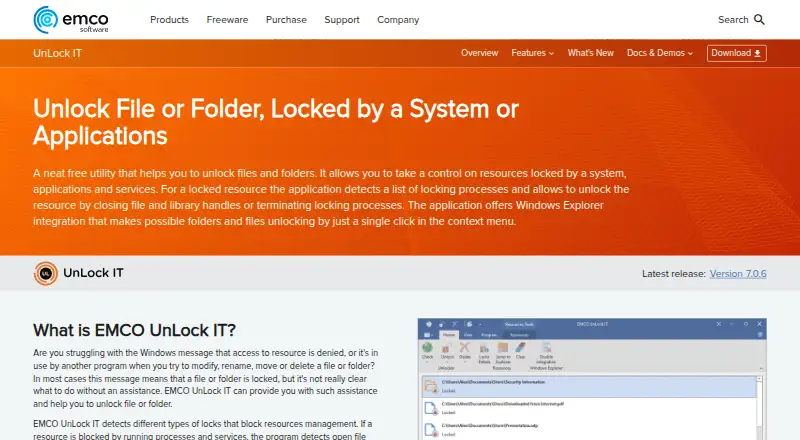
EMCO UnLock IT is a freeware Windows utility for investigating and unlocking files and folders held by applications, services, or system processes. It is aimed at people who need to identify why a resource is inaccessible and take a targeted action, whether that means closing a handle, terminating a locking process, granting permissions, or scheduling deletion at the next system boot. Windows client and Server platforms are supported, and the utility is available for personal and commercial use.
The published Freeware plan covers the full product without stated usage limitations. Its main capability is tracing the cause of a lock: EMCO UnLock IT detects processes holding locks on files and folders, identifies file and library handles, and detects handles for open shares. Once the source is identified, users can close handles, terminate locking processes, grant permissions to inaccessible resources, or schedule a locked-file deletion for the next boot. This gives the product a focused set of actions for access problems rather than a broad collection of file-management tools.
Integration is centered on Windows itself. Windows Explorer context-menu integration makes the utility available from the file-management workflow, while command-line usage supports invocation outside the graphical interface. That narrow platform and scope are the key considerations: EMCO UnLock IT fits Windows users dealing with locked resources, permissions issues, or open shares, but it is not positioned as a general file manager. Choose it when unlocking and troubleshooting access is the priority; choose a broader file-management tool when organizing and managing files is the main requirement.
Your product? Our editors can test EMCO UnLock IT in depth and publish a review, labelled as paid · from $149/mo →
EMCO UnLock IT pricing
All 1 EMCO UnLock IT plans and prices →
EMCO UnLock IT fact sheet
| Free plan | Yes |
|---|---|
| Paid from | Free |
| Supported platforms | Windows |
| Dual-pane view | Not verified |
| Tabbed interface | Not verified |
| Batch rename | Not verified |
| Archive support | Not verified |
| Cloud storage access | Not verified |
| Portable version | Not verified |
| Deployment | Desktop |
| Platforms | Windows |
| Support | Email, Phone |
| Built for | Solo, Small business (editorial estimate) |
| Integrations | 1 integrations: Windows Explorer |
| Pricing | Free plan (source) |
| Website | emcosoftware.com |
| Facts checked | 22 Sep 2026 |
EMCO UnLock IT integrations
EMCO UnLock IT lists 1 integrations on its own site.
- Windows Explorer
Alternatives to EMCO UnLock IT
- Total CommanderA feature-rich file manager for Windows users who want power beyond Explorer.9.3
- DolphinA capable free file manager, especially for Linux and KDE-oriented desktops.9.1
- WinSCPA capable Windows file manager for secure transfers, automation, and synchronization.9.0



See all EMCO UnLock IT alternatives →
Used EMCO UnLock IT? Be the first to review it
The editor score above is our own research. What this page doesn't have yet is a reader's view — what you used EMCO UnLock IT for, what worked and what didn't. No stars are seeded and no review is paid for; an editor reads every one before it appears.
Write a reviewTwo minutes · verified accounts only · read by an editor before it appears
Featured on iTechGuides

EMCO UnLock IT is listed in our File Manager Software directory. Add the badge to your site — it links back to this page.
<a href="https://www.itechguides.com/products/emco-unlock-it/"><img src="https://www.itechguides.com/best/badge/emco-unlock-it.svg" alt="Featured on iTechGuides" width="230" height="46"></a>
Reviewed by iTechGuides Editors · Editorial team · Updated Oct 2026
Advertiser disclosure: iTechGuides is reader-supported. Vendors can pay for top positions in our rankings and for a place on other products' pages, and we may earn a commission when you click some links. Bought places stand at the number bought; this page and our disclosure say so. Paying vendors may get a fuller, more detailed review from our editors, and that review can change their score. How we rank.
Last updated · How we research and update