Eclipse GlassFish
Eclipse GlassFish: A free, security-focused Jakarta EE server with broad administration and deployment options. Ranked #3 of 28 in Application Servers by our editors (9.0/10); pricing: Free plan; best for free Jakarta EE deployments needing security depth.
At a glance
- Editor score9.0 / 10
- PricingFree plan
- Best forFree Jakarta EE deployments needing security depth
- Free planYes
- Paid fromFree
- Java standardJakarta_ee
- Facts checked20 Sep 2026
Where it wins
- Free, open-source Jakarta EE Platform and Web Profile implementations
- Clustering, load balancing, embedded deployment, and REST administration
- TLS, RBAC, realms, and audit logging support security-focused deployments
Where it doesn't
- Requires JDK 21 or higher for GlassFish 8.0.4
- Self-hosted deployment leaves installation and operations to your team
- Its focus on Jakarta EE may not fit non-Jakarta application stacks
Our verdict on Eclipse GlassFish
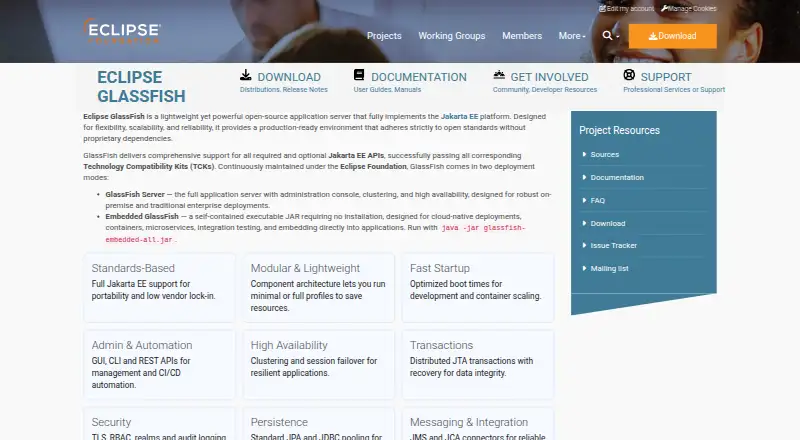
Eclipse GlassFish is an open-source application server for developing and deploying Jakarta EE applications and web services. It offers both full and Web Profile distributions, making it relevant for teams that need Jakarta EE runtime capabilities across Linux, macOS, UNIX, or Windows. The project supports self-hosted deployment, API-based administration, and container-oriented and cloud deployment scenarios for its embedded variant. GlassFish 8.0.4 implements Jakarta EE 11 and requires JDK 21 or higher.
Administration is a central strength. Teams can manage deployments through a browser-based console, the asadmin command-line tool, or REST interfaces for administration, monitoring, and configuration. The server also includes application deployment and undeployment, JPA and JDBC connection pooling, JMS and JCA integration, and an embedded executable JAR distribution. High-availability clustering and load balancing extend its fit beyond a single-server setup, while the published feature set gives operators several management paths rather than tying them to one interface.
Security capabilities make GlassFish a strong candidate for Jakarta EE environments with defined access-control and audit requirements. TLS, role-based access control, realms, and audit logging are included alongside the broader Jakarta EE platform. Because it is self-hosted and open source, organizations should be prepared to handle deployment and ongoing operations within their own environment rather than selecting a managed subscription tier. Choose GlassFish for free Jakarta EE deployments that value administration depth, clustering, and security controls; consider an alternative if the application stack is outside Jakarta EE or the team wants a hosted service instead.
Your product? Our editors can test Eclipse GlassFish in depth and publish a review, labelled as paid · from $149/mo →
Eclipse GlassFish pricing
Eclipse GlassFish fact sheet
| Free plan | Yes |
|---|---|
| Paid from | Free |
| Java standard | Jakarta_ee |
| Deployment model | Self_hosted |
| Clustering | Yes |
| Admin console | Yes |
| Container support | Yes |
| Supported operating systems | Linux, macOS, UNIX, Windows |
| Deployment | Self-hosted, Cloud |
| Platforms | Windows, macOS, Linux |
| Support | Community, Docs |
| Built for | Small business, Mid-market, Enterprise (editorial estimate) |
| Pricing | Free plan |
| Website | glassfish.org |
| Facts checked | 20 Sep 2026 |
Alternatives to Eclipse GlassFish
- Open LibertyA free, open-source Java runtime for containerized Jakarta EE, Java EE, and MicroProfile apps.9.3
- WildFlyA free, self-hosted full server for Jakarta EE and MicroProfile teams.9.1
- Azul Payara ServerA supported Payara deployment option with strong clustering, containers, and observability.8.9


See all Eclipse GlassFish alternatives →
Eclipse GlassFish vs the competition
- Eclipse GlassFish vs Open Liberty
- Eclipse GlassFish vs WildFly
- Eclipse GlassFish vs Azul Payara Server
- Eclipse GlassFish vs Apache TomEE
- Eclipse GlassFish vs IBM WebSphere Liberty
- Eclipse GlassFish vs Red Hat JBoss Enterprise Application Platform



Compare Eclipse GlassFish with any tool side by side →
Used Eclipse GlassFish? Be the first to review it
The editor score above is our own research. What this page doesn't have yet is a reader's view — what you used Eclipse GlassFish for, what worked and what didn't. No stars are seeded and no review is paid for; an editor reads every one before it appears.
Write a reviewTwo minutes · verified accounts only · read by an editor before it appears
Featured on iTechGuides

Eclipse GlassFish is listed in our Application Servers directory. Add the badge to your site — it links back to this page.
<a href="https://www.itechguides.com/products/eclipse-glassfish/"><img src="https://www.itechguides.com/best/badge/eclipse-glassfish.svg" alt="Featured on iTechGuides" width="230" height="46"></a>
Reviewed by iTechGuides Editors · Editorial team · Updated Oct 2026
Advertiser disclosure: iTechGuides is reader-supported. Vendors can pay for top positions in our rankings and for a place on other products' pages, and we may earn a commission when you click some links. Bought places stand at the number bought; this page and our disclosure say so. Paying vendors may get a fuller, more detailed review from our editors, and that review can change their score. How we rank.
Last updated · How we research and update