Easy PC Optimizer
Easy PC Optimizer: A free Windows 10 utility covering cleanup, tuning, backups, and scheduled maintenance. Ranked #27 of 97 in PC Optimization Software by our editors (6.8/10); pricing: Free plan; best for free basic Windows optimization.
At a glance
- Editor score6.8 / 10
- PricingFree plan
- Best forFree basic Windows optimization
- Free planYes
- Paid fromFree
- Junk cleanupYes
- Facts checked21 Sep 2026
Where it wins
- Covers cleanup, startup, services, registry, privacy, and internet tweaks
- Creates backups and restore points before system changes
- Includes scheduled scans and optimization without a paid tier
Where it doesn't
- Supports Windows 10 but does not document Windows 11 support
- Does not provide verified driver updates
- The download is described as a trial limited to scanning
Our verdict on Easy PC Optimizer
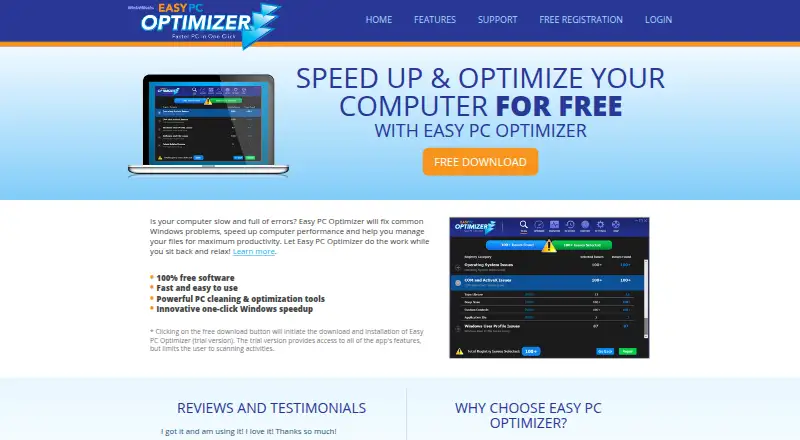
Easy PC Optimizer is a Windows desktop utility for maintaining and tuning PCs. It is aimed at people who want one tool for junk-file and browser-history cleanup, startup and service management, registry maintenance, internet optimization, privacy tweaks, and restore-point creation. The published feature set also includes scheduled scans, registry change monitoring, and automatic backups before changes, making it suited to routine Windows maintenance rather than a single-purpose cleanup task.
Its main strength is breadth. Users can scan and repair the registry, defragment it, adjust Windows settings, manage startup items and services, and tune internet-related settings from the same utility. Automatic backups and restore-point creation add safeguards around system changes, while scheduled scans and optimization support recurring maintenance. The published plans show a free product, and the registration page describes free registration; the download is also described as a trial that limits users to scanning. Buyers should review that distinction before expecting unrestricted changes from the downloaded version.
Platform fit is the clearest boundary. Easy PC Optimizer supports Windows 10 in the documented category specification, while the vendor description lists Windows XP through Windows 10 and does not document Windows 11 support. It also does not provide verified driver updates, so it is not a complete choice for users seeking driver maintenance. Pick it for broad, free Windows cleanup and system-tuning features with backup and scheduling tools. Choose an alternative when Windows 11 support or verified driver updates is required.
Your product? Our editors can test Easy PC Optimizer in depth and publish a review, labelled as paid · from $149/mo →
Easy PC Optimizer pricing
Easy PC Optimizer fact sheet
| Free plan | Yes |
|---|---|
| Paid from | Free |
| Junk cleanup | Yes |
| Startup manager | Yes |
| Driver updates | No |
| Scheduled maintenance | Yes |
| Windows support | Windows 10 |
| Device limit | Not verified |
| Restore-point tools | Yes |
| Deployment | Desktop |
| Platforms | Windows |
| Support | Tickets, Docs |
| Built for | Solo, Small business (editorial estimate) |
| Pricing | Free plan |
| Website | easypcoptimizer.com |
| Facts checked | 21 Sep 2026 |
Alternatives to Easy PC Optimizer
- Microsoft PC ManagerA broad free toolkit for routine Windows cleanup, health checks, and maintenance.9.4
- CCleanerA mature PC cleaner with broad maintenance tools and a useful free plan.9.3
- Advanced SystemCareA broad Windows optimizer with a capable free plan and one-device scope.9.2


See all Easy PC Optimizer alternatives →
Used Easy PC Optimizer? Be the first to review it
The editor score above is our own research. What this page doesn't have yet is a reader's view — what you used Easy PC Optimizer for, what worked and what didn't. No stars are seeded and no review is paid for; an editor reads every one before it appears.
Write a reviewTwo minutes · verified accounts only · read by an editor before it appears
Featured on iTechGuides

Easy PC Optimizer is listed in our PC Optimization Software directory. Add the badge to your site — it links back to this page.
<a href="https://www.itechguides.com/products/easy-pc-optimizer/"><img src="https://www.itechguides.com/best/badge/easy-pc-optimizer.svg" alt="Featured on iTechGuides" width="230" height="46"></a>
Reviewed by iTechGuides Editors · Editorial team · Updated Oct 2026
Advertiser disclosure: iTechGuides is reader-supported. Vendors can pay for top positions in our rankings and for a place on other products' pages, and we may earn a commission when you click some links. Bought places stand at the number bought; this page and our disclosure say so. Paying vendors may get a fuller, more detailed review from our editors, and that review can change their score. How we rank.
Last updated · How we research and update