
DU Meter
DU Meter: A focused Windows monitor for real-time traffic visibility, alerts, and usage reports. Ranked #28 of 33 in Bandwidth Monitoring Software by our editors (6.2/10); pricing: 30-day trial; best for simple Windows usage tracking.
At a glance
- Editor score6.2 / 10
- Pricing30-day trial
- Best forSimple Windows usage tracking
- Free planNo
- Paid from$29.95/device one-time
- Founded1997 · London, Ontario, Canada
- Facts checked20 Sep 2026
Where it wins
- Real-time upload and download graphs with taskbar integration
- Threshold alerts, email notifications, and optional connectivity prevention
- One-time pricing includes updates and technical support
Where it doesn't
- Windows-only support limits platform flexibility
- Regular licensing covers one computer
- No free plan and no AI features
Our verdict on DU Meter
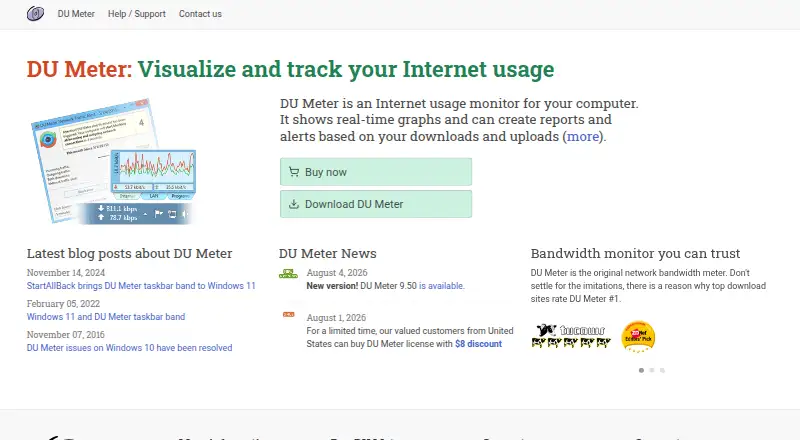
DU Meter is a Windows desktop application for monitoring Internet usage on an individual computer. It is aimed at home users, parents, small businesses, and organizations that need visibility into bandwidth consumption or data-transfer limits. The software displays real-time upload and download activity, produces network traffic reports, and monitors traffic even when users are not logged in. It supports Windows 10, Windows 11, and supported Windows Server versions on Intel x64 systems.
Pricing is structured around one-time licenses rather than a recurring subscription. The Regular license costs $29.95 and includes single-user and business licensing, free updates to version 9.x, free technical support, and minor version upgrades. The Family Pack costs $59.90, is for personal use only, and covers up to five computers in the same household. A 30-day trial is available, but there is no free plan. For a single Windows computer, the published plans provide a straightforward way to obtain ongoing monitoring without a recurring charge.
Its strongest feature set is focused bandwidth oversight. Users can review real-time graphs, examine traffic reports, set weekly and monthly thresholds, and receive email alerts when those thresholds are exceeded. DU Meter can also calculate data-transfer costs and optionally prevent further Internet connectivity after an alert condition. That focus suits people managing usage on a Windows computer, but the product is not designed as a broad, cross-platform monitoring system: its platform scope is Windows, its regular licensing is limited to one computer, and alerts are provided by email. Choose DU Meter for direct desktop usage tracking and threshold control; consider an alternative if you need broader platform coverage or multi-device monitoring.
Your product? Our editors can test DU Meter in depth and publish a review, labelled as paid · from $149/mo →
DU Meter pricing
All 2 DU Meter plans and prices →
DU Meter fact sheet
| Free plan | No |
|---|---|
| Paid from | $29.95/device one-time |
| Application monitoring | Not verified |
| User monitoring | Not verified |
| Flow protocol support | Not verified |
| SNMP monitoring | Not verified |
| Monitored device limit | Not verified |
| Historical data retention | Not verified |
| Bandwidth alerts | Not verified |
| Free trial | 30 days |
| Money-back guarantee | 30 days |
| Deployment | Desktop |
| Platforms | Windows |
| Support | Docs, Tickets |
| Built for | Solo, Small business, Enterprise (editorial estimate) |
| Pricing | 30-day trial (source) |
| Website | hageltech.com |
| Facts checked | 20 Sep 2026 |
Alternatives to DU Meter
- ntopngA broad self-hosted toolkit for real-time, historical, and infrastructure visibility.9.4
- ManageEngine NetFlow AnalyzerA broad flow-monitoring suite for enterprise networks, with free and scalable paid editions.9.2
- Progress FlowmonA broad hybrid monitoring platform for teams needing flow, topology, performance and security analysis.9.0



See all DU Meter alternatives →
Also Ranked In
DU Meter is ranked in 2 of our directories.
Used DU Meter? Be the first to review it
The editor score above is our own research. What this page doesn't have yet is a reader's view — what you used DU Meter for, what worked and what didn't. No stars are seeded and no review is paid for; an editor reads every one before it appears.
Write a reviewTwo minutes · verified accounts only · read by an editor before it appears
Featured on iTechGuides

DU Meter is listed in our Bandwidth Monitoring Software directory. Add the badge to your site — it links back to this page.
<a href="https://www.itechguides.com/products/du-meter/"><img src="https://www.itechguides.com/best/badge/du-meter.svg" alt="Featured on iTechGuides" width="230" height="46"></a>
Reviewed by iTechGuides Editors · Editorial team · Updated Oct 2026
Advertiser disclosure: iTechGuides is reader-supported. Vendors can pay for top positions in our rankings and for a place on other products' pages, and we may earn a commission when you click some links. Bought places stand at the number bought; this page and our disclosure say so. Paying vendors may get a fuller, more detailed review from our editors, and that review can change their score. How we rank.
Last updated · How we research and update