
DTNT
DTNT: A low-cost Windows analyzer with broad free diagnostics and focused Pro tools. Ranked #12 of 29 in Wi-Fi Analyzer Software by our editors (7.8/10); pricing: Free plan; best for low-cost Windows diagnostics.
At a glance
- Editor score7.8 / 10
- PricingFree plan
- Best forLow-cost Windows diagnostics
- Free planYes
- Paid from$59 one-time
- Site survey toolsYes
- Facts checked20 Sep 2026
Where it wins
- Free plan covers surveying, channel views, scanning, discovery, and speed tests
- Pro adds best-channel guidance, exports, port checks, and traceroute
- One-time pricing avoids a recurring subscription for the listed plans
Where it doesn't
- Windows-only, with no listed support for other desktop platforms
- Advanced guidance, exports, key reveal, and continuous diagnostics require Pro
- Its focus is Wi-Fi diagnostics rather than broader spectrum analysis
Our verdict on DTNT
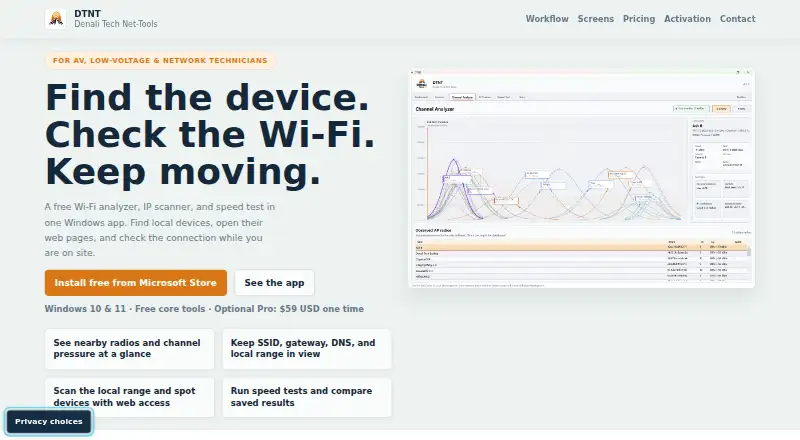
DTNT is a Windows desktop utility for field technicians, installers, business owners, and others who need practical network diagnostics. Its core toolkit combines nearby Wi-Fi surveying, live channel analysis, IP scanning, device discovery, speed tests, saved profile review, and ping checks. DTNT supports Windows 10 and Windows 11 and is distributed primarily through the Microsoft Store. The free plan gives it a low-cost entry point for routine Wi-Fi and local-network checks.
Pricing is straightforward: the Free plan costs $0 one time and includes the main inspection workflows, including live channel views, device discovery, speed tests with saved in-app history, saved profile review, and ping-once checks. The Pro plan costs $59 one time at the vendor's current launch price. It adds best-channel guidance, lane-pressure detail, selected-host browser follow-up, port checks, JSON and CSV exports, saved Wi-Fi key reveal, continuous ping, and traceroute. That structure suits users who want to start with basic diagnostics and pay once for deeper troubleshooting and evidence capture.
DTNT is a focused fit for Windows users who need field-ready Wi-Fi checks without the broader scope of a full survey suite. Pro is the more useful choice for installers and technicians who need channel recommendations, repeatable exports, or extended path diagnostics. Users who work on macOS or other platforms should choose an alternative, as DTNT is Windows-only. Its published feature set also centers on Wi-Fi diagnostics rather than non-Wi-Fi spectrum analysis, so it is better suited to wireless configuration and network troubleshooting than broad radio-environment work.
Your product? Our editors can test DTNT in depth and publish a review, labelled as paid · from $149/mo →
DTNT pricing
DTNT fact sheet
| Free plan | Yes |
|---|---|
| Paid from | $59 one-time |
| Site survey tools | Yes |
| Spectrum analysis | Not verified |
| Channel recommendations | Yes |
| Supported platforms | windows |
| Report export | Yes |
| Historical analysis | Not verified |
| Money-back guarantee | 14 days |
| Deployment | Desktop |
| Platforms | Windows |
| Support | |
| Built for | Solo, Small business (editorial estimate) |
| Pricing | Free plan (source) |
| Website | dt-nt.com |
| Facts checked | 20 Sep 2026 |
Alternatives to DTNT
- NetSpotA cross-platform analyzer for inspection, surveys, planning, and Wi-Fi troubleshooting.9.4
- WiFi ScannerA deep Wi-Fi analysis suite for teams that need surveys, diagnostics, and exports.9.2
- TamoGraph Site SurveyA mature survey suite for teams that need measurement, modeling, and reporting.9.0



Used DTNT? Be the first to review it
The editor score above is our own research. What this page doesn't have yet is a reader's view — what you used DTNT for, what worked and what didn't. No stars are seeded and no review is paid for; an editor reads every one before it appears.
Write a reviewTwo minutes · verified accounts only · read by an editor before it appears
Featured on iTechGuides

DTNT is listed in our Wi-Fi Analyzer Software directory. Add the badge to your site — it links back to this page.
<a href="https://www.itechguides.com/products/dtnt/"><img src="https://www.itechguides.com/best/badge/dtnt.svg" alt="Featured on iTechGuides" width="230" height="46"></a>
Reviewed by iTechGuides Editors · Editorial team · Updated Oct 2026
Advertiser disclosure: iTechGuides is reader-supported. Vendors can pay for top positions in our rankings and for a place on other products' pages, and we may earn a commission when you click some links. Bought places stand at the number bought; this page and our disclosure say so. Paying vendors may get a fuller, more detailed review from our editors, and that review can change their score. How we rank.
Last updated · How we research and update