
DSTX
DSTX: A free Linux tool for remapping modern gamepads with profiles and virtual Xbox output. Ranked #18 of 29 in Controller Mapping Software by our editors (7.4/10); pricing: Free plan; best for linux users tuning modern gamepads.
At a glance
- Editor score7.4 / 10
- PricingFree plan
- Best forLinux users tuning modern gamepads
- Free planYes
- Paid fromFree
- Facts checked20 Sep 2026
Where it wins
- Supports DualShock 4, DualSense, and Nintendo Switch Pro controllers
- Offers profiles, sensitivity, deadzone, LEDs, rumble, and remapping
- Provides GTK4, terminal, daemon, command-line, and D-Bus interfaces
Where it doesn't
- Runs on Linux only
- Does not provide verified keyboard/mouse remapping or macros
- Virtual output is limited to Xbox 360 controller emulation
Our verdict on DSTX
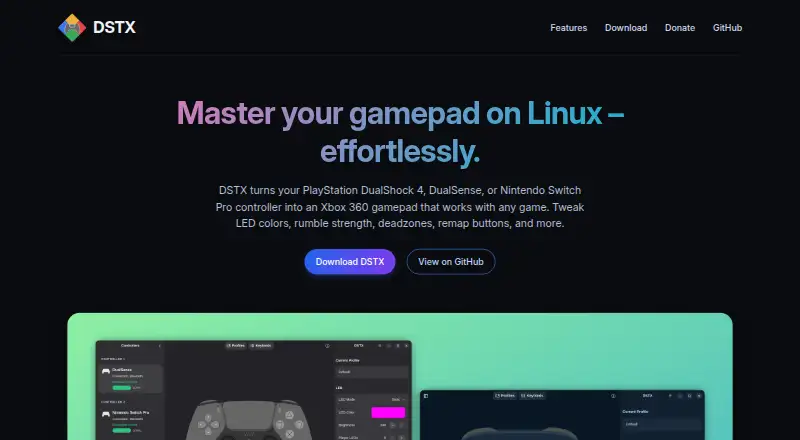
DSTX is a free, open-source controller mapping application for Linux users who want to use DualShock 4, DualSense, or Nintendo Switch Pro controllers with games. It connects over USB or Bluetooth and emulates an Xbox 360 controller, helping supported gamepads work through a familiar virtual-controller format. The product supports up to four connected controllers and includes both graphical and terminal-based ways to manage them.
Its strongest area is controller configuration depth. Button remapping is paired with saved custom profiles and auto-save, while stick settings include sensitivity, dead zones, and Y-axis inversion. DSTX also provides rumble enablement with gain control, LED colors, dynamic effects, and background daemon operation. These options make it suitable for users who want persistent per-controller tuning rather than only basic button reassignment. The GTK4 interface, terminal interface, command-line tools, and D-Bus access offer several ways to fit the application into a Linux setup.
DSTX is focused rather than broad. Its platform support is Linux, and its virtual output is Xbox 360 controller emulation. The listed feature set does not provide verified keyboard/mouse remapping or macros, so it is not the right choice for users looking for a general input automation tool or expanded desktop remapping. Choose DSTX for modern PlayStation and Switch Pro controller support, profile-based adjustments, and detailed stick, rumble, and lighting controls on Linux. Choose an alternative if you need keyboard and mouse mappings, macros, or support beyond Linux.
Your product? Our editors can test DSTX in depth and publish a review, labelled as paid · from $149/mo →
DSTX pricing
DSTX fact sheet
| Free plan | Yes |
|---|---|
| Paid from | Free |
| Supported platforms | linux |
| Per-app profiles | Not verified |
| Profile switching | Yes |
| Macro support | Not verified |
| Keyboard and mouse remap | Not verified |
| Virtual controller output | Yes |
| Simultaneous devices | Not verified |
| Deployment | Desktop |
| Platforms | Linux |
| Support | Docs |
| Built for | Solo, Small business (editorial estimate) |
| Pricing | Free plan |
| Website | dstxapp.org |
| Facts checked | 20 Sep 2026 |
Alternatives to DSTX
- Steam InputA free, flexible mapping system for Steam players across Windows, macOS, and Linux.9.4
- JoyShockMapperA powerful free mapper for players who want advanced gyro and layered controller configurations.9.2
- DS4WindowsA capable free mapper for Windows users who need profiles, emulation, and advanced input controls.9.0


Used DSTX? Be the first to review it
The editor score above is our own research. What this page doesn't have yet is a reader's view — what you used DSTX for, what worked and what didn't. No stars are seeded and no review is paid for; an editor reads every one before it appears.
Write a reviewTwo minutes · verified accounts only · read by an editor before it appears
Featured on iTechGuides

DSTX is listed in our Controller Mapping Software directory. Add the badge to your site — it links back to this page.
<a href="https://www.itechguides.com/products/dstx/"><img src="https://www.itechguides.com/best/badge/dstx.svg" alt="Featured on iTechGuides" width="230" height="46"></a>
Reviewed by iTechGuides Editors · Editorial team · Updated Oct 2026
Advertiser disclosure: iTechGuides is reader-supported. Vendors can pay for top positions in our rankings and for a place on other products' pages, and we may earn a commission when you click some links. Bought places stand at the number bought; this page and our disclosure say so. Paying vendors may get a fuller, more detailed review from our editors, and that review can change their score. How we rank.
Last updated · How we research and update