dosbox-automation
dosbox-automation: A programmable DOS emulator for teams that need control, inspection, and replay. Ranked #15 of 26 in MS-DOS Emulators by our editors (5.9/10); pricing: Free plan; best for automating and testing DOS software.
At a glance
- Editor score5.9 / 10
- PricingFree plan
- Best forAutomating and testing DOS software
- Free planYes
- Paid fromNone
- Supported host platformsWindows, Linux
- Facts checked20 Sep 2026
Where it wins
- REST API, Lua scripting, and frame-accurate automation
- Input recording and replay plus screen-text reading
- Memory inspection, capture, installation recipes, and controller support
Where it doesn't
- Not aimed at general consumer emulation
- Official builds are limited to Windows and Linux
- macOS builds are not official and compilation is described as untested
Our verdict on dosbox-automation
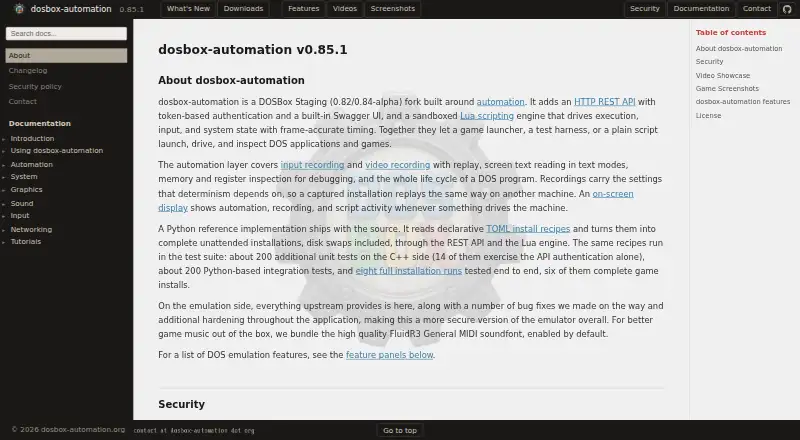
dosbox-automation is an open-source DOSBox Staging fork for running MS-DOS applications and games on modern desktop systems. It is designed for launcher developers, test-harness authors, researchers, and gamers who need to control DOS software programmatically rather than only launch it interactively. Official builds are provided for Windows and Linux, with an API platform also listed. The project supports gamepads, CD audio, and modern controllers alongside its automation features.
Its strongest distinction is the depth of programmatic control. An HTTP REST API with bearer-token authentication and Swagger UI provides a service-oriented interface, while sandboxed Lua scripting adds frame-accurate timing. Keyboard and mouse input can be injected, recorded, and replayed. Screen-text reading in text modes, memory and CPU-register inspection, video recording, and single-frame capture give test and research workflows more visibility into running software. TOML-based unattended installation recipes with disk swapping further support repeatable setup, making this a better fit for automation pipelines than a conventional emulator configuration.
The platform fit is clear but narrow. Windows and Linux users get official builds, while macOS does not have an official build and compilation is described as untested. That limits it for teams requiring a supported macOS deployment path. The project also prioritizes control, inspection, and repeatability over a general-purpose consumer experience. Choose dosbox-automation when REST control, scripting, input replay, installation automation, or runtime inspection are central requirements. Choose a more conventional DOS emulator when the goal is primarily straightforward desktop play or application use without programmatic orchestration.
dosbox-automation pricing
dosbox-automation fact sheet
| Free plan | Yes |
|---|---|
| Paid from | None |
| Supported host platforms | Windows, Linux |
| DOS target versions | Ms-dos |
| Disk image formats | Not verified |
| Gamepad support | Yes |
| Save states | Not verified |
| Audio CD support | Yes |
| Source available | Yes |
| Deployment | Desktop |
| Platforms | Windows, Linux |
| Support | Email, Community, Docs |
| Built for | Solo, Small business, Mid-market, Enterprise (editorial estimate) |
| Pricing | Free plan |
| Website | dosbox-automation.org |
| Facts checked | 20 Sep 2026 |
Alternatives to dosbox-automation
- DOSBox StagingA capable free emulator for DOS software, games, and Windows 3.1 environments.9.0
- DOSBox PureA focused, free DOS emulator with convenient archive loading and Libretro support.8.8
- DOSBox-XA free, highly configurable choice for advanced DOS and legacy Windows emulation.7.7


See all dosbox-automation alternatives →
Used dosbox-automation? Be the first to review it
The editor score above is our own research. What this page doesn't have yet is a reader's view — what you used dosbox-automation for, what worked and what didn't. No stars are seeded and no review is paid for; an editor reads every one before it appears.
Write a reviewTwo minutes · verified accounts only · read by an editor before it appears
Featured on iTechGuides

dosbox-automation is listed in our MS-DOS Emulators directory. Add the badge to your site — it links back to this page.
<a href="https://www.itechguides.com/products/dosbox-automation/"><img src="https://www.itechguides.com/best/badge/dosbox-automation.svg" alt="Featured on iTechGuides" width="230" height="46"></a>
Reviewed by iTechGuides Editors · Editorial team · Updated Sep 2026
Advertiser disclosure: iTechGuides is reader-supported. We may earn a commission when you click some links. How we rank.
Last updated · How we research and update