
DocuOCR
DocuOCR: A strong fit for teams extracting fields, tables, and line items at scale. Ranked #12 of 40 in OCR Software by our editors (7.5/10); pricing: Paid; best for business document data extraction.
At a glance
- Editor score7.5 / 10
- PricingPaid
- Best forBusiness document data extraction
- Free planNo
- Paid from$24/mo
- Facts checked23 Sep 2026
Where it wins
- Extracts printed and handwritten text into named fields
- Handles tables, line items, classification, and batch processing
- Provides confidence scores, review queues, and multiple exports
Where it doesn't
- Starter is limited to one user seat
- Starter caps documents at 25 pages
- No recurring free plan is available
Our verdict on DocuOCR
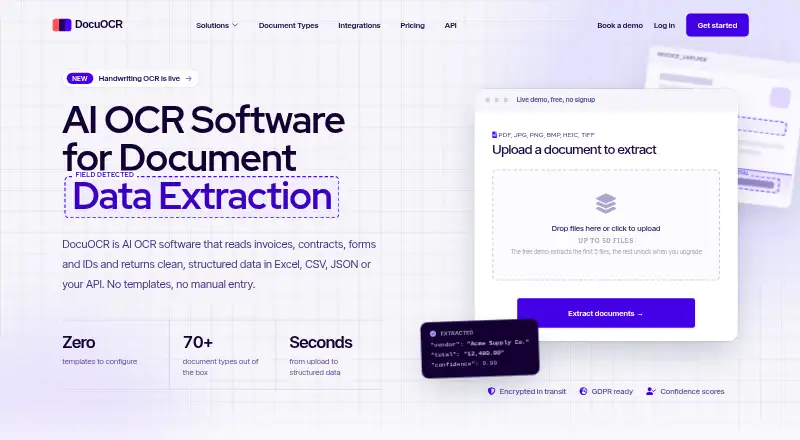
DocuOCR is a web-based OCR and document data extraction platform for finance, operations, healthcare, insurance, and other teams processing business documents at scale. It reads scans, photographs, PDFs, and handwritten forms, then extracts named fields, tables, and line items into structured JSON, Excel, or CSV. Its focus is operational document processing rather than general-purpose text recognition, with support for both web access and API-based workflows.
Pricing is organized around page allowances and workflow needs. Starter costs $24 per month when billed annually and includes 2,500 Base AI pages, 500 Pro AI pages, documents of up to 25 pages, Excel and CSV export, and one user seat. Plus costs $74 per month when billed annually, raises the allowances to 10,000 Base AI pages and 2,000 Pro AI pages, adds bulk upload for up to 50 files, QuickBooks export, and up to three seats. Pro adds REST API access, role-based access, up to five seats, and adjustable page tiers. Enterprise adds custom page volumes, dedicated infrastructure, custom ERP and RPA integrations, and unlimited user seats.
The standout value is structured extraction with control points for business workflows. Confidence scores identify uncertain fields, while a human review queue supports validation of low-confidence values. Checkbox and signature detection, document classification, asynchronous processing, and batch processing extend the product beyond basic OCR. Excel, CSV, and JSON exports suit different downstream processes, while QuickBooks support and the REST API improve system fit as requirements grow. Choose DocuOCR if your team needs repeatable extraction from complex business documents, including handwriting and line items. It is less suited to a single user needing occasional basic text recognition, especially when the 25-page Starter document limit or paid-only model does not fit.
Your product? Our editors can test DocuOCR in depth and publish a review, labelled as paid · from $149/mo →
DocuOCR pricing
All 4 DocuOCR plans and prices →
DocuOCR fact sheet
| Free plan | No |
|---|---|
| Paid from | $24/mo |
| Searchable PDF | Not verified |
| Word export | Not verified |
| Handwriting OCR | Yes |
| Supported languages | Not verified |
| Monthly page limit | 2500 pages/mo |
| Primary platform | Web |
| Supported inputs | Both |
| Money-back guarantee | 14 days |
| Deployment | Cloud |
| Platforms | Web |
| Compliance & security | GDPR |
| Support | Email, Docs |
| Built for | Solo, Small business, Mid-market, Enterprise (editorial estimate) |
| Integrations | 50+ integrations: QuickBooks, Xero, Sage, NetSuite, FreshBooks, Zoho Books … See all → |
| Pricing | Paid (source) |
| Website | docuocr.com |
| Facts checked | 23 Sep 2026 |
DocuOCR integrations
DocuOCR lists 50+ integrations on its own site — the 20 named here are the ones its pages call out.
- QuickBooks
- Xero
- Sage
- NetSuite
- FreshBooks
- Zoho Books
- Wave
- MYOB
- SAP
- Microsoft Dynamics 365
- Odoo
- Salesforce
- HubSpot
- Pipedrive
- Microsoft Excel
- Google Sheets
- Airtable
- Power BI
- Tableau
- Google Drive
See all DocuOCR integrations →
Alternatives to DocuOCR
- PaddleOCRA developer-focused OCR toolkit with multilingual, handwriting, and document parsing workflows.9.3
- Tesseract OCRA mature, developer-focused OCR engine with broad outputs and self-hosting flexibility.9.1
- ABBYY FineReader PDFA broad desktop PDF suite for OCR, editing, conversion, forms, and document control.9.0

See all DocuOCR alternatives →
Used DocuOCR? Be the first to review it
The editor score above is our own research. What this page doesn't have yet is a reader's view — what you used DocuOCR for, what worked and what didn't. No stars are seeded and no review is paid for; an editor reads every one before it appears.
Write a reviewTwo minutes · verified accounts only · read by an editor before it appears
Featured on iTechGuides

DocuOCR is listed in our OCR Software directory. Add the badge to your site — it links back to this page.
<a href="https://www.itechguides.com/products/docuocr/"><img src="https://www.itechguides.com/best/badge/docuocr.svg" alt="Featured on iTechGuides" width="230" height="46"></a>
Reviewed by iTechGuides Editors · Editorial team · Updated Oct 2026
Advertiser disclosure: iTechGuides is reader-supported. Vendors can pay for top positions in our rankings and for a place on other products' pages, and we may earn a commission when you click some links. Bought places stand at the number bought; this page and our disclosure say so. Paying vendors may get a fuller, more detailed review from our editors, and that review can change their score. How we rank.
Last updated · How we research and update