
Document Cyborg
Document Cyborg: A focused, low-cost way to turn public webpages into clean, editable documents. Ranked #45 of 69 in File Conversion Software by our editors (4.7/10); pricing: Paid; best for turning webpages into editable documents.
At a glance
- Editor score4.7 / 10
- PricingPaid
- Best forTurning webpages into editable documents
- Free planNo
- Facts checked22 Sep 2026
Where it wins
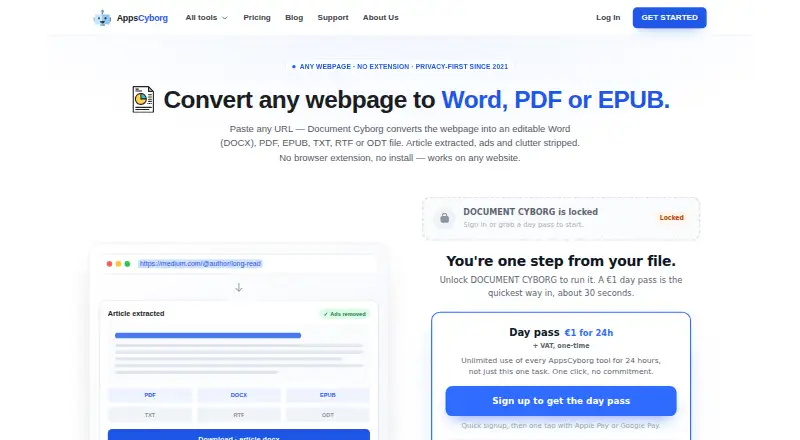
- Exports webpages to DOCX, PDF, EPUB, TXT, RTF and ODT
- Removes ads and clutter while extracting article content
- Runs in a browser without extensions or software installation
Where it doesn't
- Converts public webpage URLs rather than broader file types
- Download links remain active for only 60 minutes
- Paid access starts at €1; there is no free plan
Our verdict on Document Cyborg
Document Cyborg is a browser-based conversion tool from AppsCyborg for individuals and small teams that need reusable copies of online articles. Paste a public webpage URL, and it extracts the article while removing ads and page clutter. The result can be exported as an editable DOCX file or as PDF, EPUB, TXT, RTF and ODT. It runs through a browser on computers and mobile devices, without an extension or software installation, and EPUB output supports offline reading.
Pricing is structured around one-time payments rather than subscriptions. The Day pass costs €1 and provides unlimited use for 24 hours, with no subscription or automatic renewal. The €6 Yearly licence provides unlimited access for one year and includes all 79 AppsCyborg web applications, also without automatic renewal. The €30 Lifetime licence provides unlimited access forever, includes all 79 AppsCyborg web applications, and includes future updates. These plans make the service suited to occasional conversion needs as well as repeated use, while the paid-only model gives buyers no free tier for evaluating the workflow.
Its strongest feature is the narrow URL-to-document process: article extraction, clutter removal and multiple export formats are combined in one browser workflow. EPUB is useful for offline reading, while DOCX supports further editing and the other formats cover sharing, archiving and plain-text use. The main boundary is scope: Document Cyborg is designed for public webpages, not a broad file-conversion workflow. Download links remain active for 60 minutes, which adds a time limit to retrieving converted files. Choose it when clean article conversion is the priority; choose another category tool when you need wider input coverage or a free plan.
Your product? Our editors can test Document Cyborg in depth and publish a review, labelled as paid · from $149/mo →
Document Cyborg pricing
All 3 Document Cyborg plans and prices →
Document Cyborg fact sheet
| Free plan | No |
|---|---|
| Paid from | Not verified |
| Max file size | Not verified |
| Batch conversion | Not verified |
| Cloud conversion | Yes |
| API access | Not verified |
| OCR conversion | Not verified |
| Deployment | Web |
| Money-back guarantee | 7 days |
| Deployment | Cloud |
| Platforms | Web, iOS, Android |
| Compliance & security | GDPR |
| Support | |
| Built for | Solo, Small business (editorial estimate) |
| Pricing | Paid (source) |
| Website | appscyborg.com |
| Facts checked | 22 Sep 2026 |
Alternatives to Document Cyborg
- PandocA broad, programmable converter for technical documents, markup, and publishing workflows.9.3
- ConvertioA broad converter for documents, media, batch jobs, OCR, and automated workflows.9.1
- Zamzar APIA broad, asynchronous conversion API with flexible imports, exports, and extraction workflows.9.0



See all Document Cyborg alternatives →
Used Document Cyborg? Be the first to review it
The editor score above is our own research. What this page doesn't have yet is a reader's view — what you used Document Cyborg for, what worked and what didn't. No stars are seeded and no review is paid for; an editor reads every one before it appears.
Write a reviewTwo minutes · verified accounts only · read by an editor before it appears
Featured on iTechGuides

Document Cyborg is listed in our File Conversion Software directory. Add the badge to your site — it links back to this page.
<a href="https://www.itechguides.com/products/document-cyborg/"><img src="https://www.itechguides.com/best/badge/document-cyborg.svg" alt="Featured on iTechGuides" width="230" height="46"></a>
Reviewed by iTechGuides Editors · Editorial team · Updated Oct 2026
Advertiser disclosure: iTechGuides is reader-supported. Vendors can pay for top positions in our rankings and for a place on other products' pages, and we may earn a commission when you click some links. Bought places stand at the number bought; this page and our disclosure say so. Paying vendors may get a fuller, more detailed review from our editors, and that review can change their score. How we rank.
Last updated · How we research and update