DiskBoss
DiskBoss: Broad Windows storage analysis with enterprise controls, but a high one-time price limits its value. Ranked #91 of 104 in Disk Space Analyzers by our editors (3.0/10); pricing: Paid; best for windows enterprises managing network storage.
At a glance
- Editor score3.0 / 10
- PricingPaid
- Best forWindows enterprises managing network storage
- Free planNo
- Paid from$450 one-time
- Desktop platformswindows
- Facts checked22 Sep 2026
Where it wins
- Analyzes local disks, network shares, NAS devices, and enterprise storage
- Combines classification, duplicate cleanup, synchronization, and automation
- Supports command-line management and HTML, PDF, Excel, XML, CSV, and text exports
Where it doesn't
- Windows-only coverage limits platform flexibility
- The starting price is $450 paid as a one-time purchase
- No free plan is available for evaluating the product
Our verdict on DiskBoss
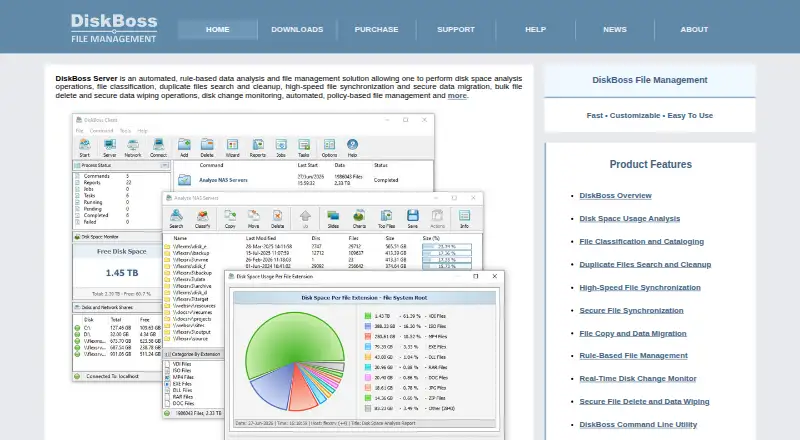
DiskBoss is Windows software for analyzing disk usage and managing files across local disks, network shares, NAS devices, and enterprise storage systems. It is aimed at consumers, small businesses, enterprises, educational institutions, and governments, with particular relevance for Windows organizations managing network storage. Its scope extends beyond reporting: users can classify files by type, extension, size, dates, or user; locate and clean up duplicates; copy, move, and delete files; synchronize data; monitor disk changes; and apply rule-based automated actions.
The published plans show two one-time purchase options. Server costs $450 and includes disk-space analysis, file classification, duplicate-file search and cleanup, scheduled operations, a command-line utility, and support for up to 100 million files and 100 TB. Enterprise costs $850 and adds unlimited files, unlimited storage capacity, batch analysis, multi-user configurations, a web-based management interface, and a programming API and SDK. SQL databases are listed as an integration, which may suit organizations connecting storage analysis with database-centered workflows. The pricing structure is straightforward, but the entry cost places DiskBoss toward buyers with defined operational needs rather than casual disk cleanup requirements.
DiskBoss stands out for breadth. It combines file-level analysis with network-server and NAS discovery, synchronization, secure data migration, automated management rules, scheduled work, command-line control, and exports in six listed formats. That combination can support recurring storage administration and reporting across more complex Windows environments. The tradeoff is focus: organizations needing broad platform coverage should choose another tool, since DiskBoss is Windows-only. Buyers seeking a no-cost starting point should also look elsewhere, while Windows enterprises that need classification, cleanup, automation, and network storage analysis in one product are the clearest fit.
Your product? Our editors can test DiskBoss in depth and publish a review, labelled as paid · from $149/mo →
DiskBoss pricing
All 2 DiskBoss plans and prices →
DiskBoss fact sheet
| Free plan | No |
|---|---|
| Paid from | $450 one-time |
| Desktop platforms | windows |
| Treemap view | No |
| Application sizes | No |
| File-type breakdown | Yes |
| External drive scans | Yes |
| Exportable reports | Yes |
| Scan scope | Files_folders |
| Deployment | Desktop, Self-hosted |
| Platforms | Windows |
| Support | Email, Tickets, Docs |
| Built for | Small business, Mid-market, Enterprise (editorial estimate) |
| Integrations | 1 integrations: SQL databases |
| Pricing | Paid (source) |
| Website | diskboss.com |
| Facts checked | 22 Sep 2026 |
DiskBoss integrations
DiskBoss lists 1 integrations on its own site.
- SQL databases
Alternatives to DiskBoss
- TreeSizeA broad Windows analyzer with strong free features and tiered automation tools.9.3
- WinDirStatA classic Windows analyzer with treemaps, file breakdowns, duplicate detection, and CSV export.9.1
- FilelightA free, open-source disk analyzer with strong KDE integrations and ring-based visuals.9.0



See all DiskBoss alternatives →
Also Ranked In
DiskBoss is ranked in 3 of our directories.
Used DiskBoss? Be the first to review it
The editor score above is our own research. What this page doesn't have yet is a reader's view — what you used DiskBoss for, what worked and what didn't. No stars are seeded and no review is paid for; an editor reads every one before it appears.
Write a reviewTwo minutes · verified accounts only · read by an editor before it appears
Featured on iTechGuides

DiskBoss is listed in our Disk Space Analyzers directory. Add the badge to your site — it links back to this page.
<a href="https://www.itechguides.com/products/diskboss/"><img src="https://www.itechguides.com/best/badge/diskboss.svg" alt="Featured on iTechGuides" width="230" height="46"></a>
Reviewed by iTechGuides Editors · Editorial team · Updated Oct 2026
Advertiser disclosure: iTechGuides is reader-supported. Vendors can pay for top positions in our rankings and for a place on other products' pages, and we may earn a commission when you click some links. Bought places stand at the number bought; this page and our disclosure say so. Paying vendors may get a fuller, more detailed review from our editors, and that review can change their score. How we rank.
Last updated · How we research and update