
Direct Folders
Direct Folders: A focused Windows utility for faster folder access, not automatic desktop organization. Ranked #37 of 47 in Desktop Organization Software by our editors (6.0/10); pricing: Free plan; best for power users needing faster folder access.
At a glance
- Editor score6.0 / 10
- PricingFree plan
- Best forPower users needing faster folder access
- Free planYes
- Paid from$44.95 one-time
- Platform supportWindows_only
- Founded1999 · Brisbane, Queensland, Australia
- Facts checked22 Sep 2026
Where it wins
- Favorite and recent-folder menus speed up file-dialog navigation
- Syncs open file-manager folders with dialogs through ClickSwitch
- Supports Explorer, Total Commander, and Directory Opus
Where it doesn't
- Windows-only deployment limits cross-platform use
- No automatic sorting for broader desktop organization
- Commercial use requires the Direct Folders Business edition
Our verdict on Direct Folders
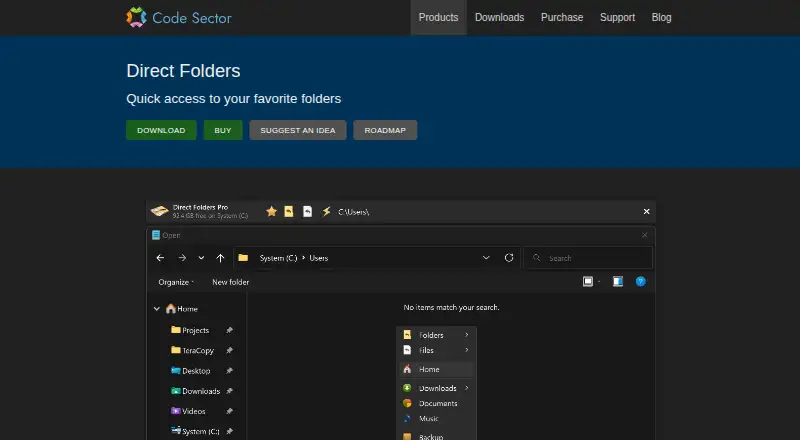
Direct Folders is a Windows desktop utility for people who want faster access to frequently used and recently used folders. It improves standard Open and Save dialogs with favorite-folder popup menus, recent-folder menus, application-specific default folders, and hierarchical submenus. The product is aimed at individuals, freelancers, teams, companies, government agencies, and educational institutions that spend substantial time navigating folders. Its focus is practical file access rather than broad desktop automation or automatic organization.
The Free plan is freeware for private, non-commercial, and educational use. The paid Direct Folders plan costs $44.95 USD as a one-time purchase and includes a lifetime license, a Personal Pro license option, and installation on all of the buyer’s own devices. Paid capabilities also include automatic resizing of standard file dialogs, a file-dialog information panel, file-list view options, and sorting and grouping controls. Commercial users need Direct Folders Business, so organizations should select the appropriate edition before purchasing.
Direct Folders fits workflows built around Windows Explorer, Total Commander, and Directory Opus. ClickSwitch synchronizes file dialogs with folders already open in supported file managers, while default-folder settings can be tailored to individual applications. The product remains narrow in scope: it runs on Windows, is deployed on the desktop, and lists documentation as its support channel. Choose it for faster folder selection and virtual-container-style access patterns; choose another category of tool if automatic sorting or broader cross-platform organization is the priority.
Your product? Our editors can test Direct Folders in depth and publish a review, labelled as paid · from $149/mo →
Direct Folders pricing
All 2 Direct Folders plans and prices →
Direct Folders fact sheet
| Free plan | Yes |
|---|---|
| Paid from | $44.95 one-time |
| Platform support | Windows_only |
| Organization model | Virtual_containers |
| Automatic sorting | Not verified |
| Maximum containers | Not verified |
| Saved layouts | Not verified |
| Multi-monitor support | Not verified |
| Money-back guarantee | 30 days |
| Deployment | Desktop |
| Platforms | Windows |
| Support | Docs |
| Built for | Solo, Small business, Mid-market, Enterprise (editorial estimate) |
| Integrations | 3 integrations: Windows Explorer, Total Commander, Directory Opus |
| Pricing | Free plan (source) |
| Website | codesector.com |
| Facts checked | 22 Sep 2026 |
Direct Folders integrations
Direct Folders lists 3 integrations on its own site.
- Windows Explorer
- Total Commander
- Directory Opus
Alternatives to Direct Folders
- AutoShelfDeep automated file sorting for Mac users who want precise control.9.4
- Desktop Frames+A flexible Windows desktop organizer with frames, profiles, rules, and search.9.3
- DeskBoxDeskBox combines automatic desktop organization with search, widgets, todos, and recovery tools.9.2


See all Direct Folders alternatives →
Used Direct Folders? Be the first to review it
The editor score above is our own research. What this page doesn't have yet is a reader's view — what you used Direct Folders for, what worked and what didn't. No stars are seeded and no review is paid for; an editor reads every one before it appears.
Write a reviewTwo minutes · verified accounts only · read by an editor before it appears
Featured on iTechGuides

Direct Folders is listed in our Desktop Organization Software directory. Add the badge to your site — it links back to this page.
<a href="https://www.itechguides.com/products/direct-folders/"><img src="https://www.itechguides.com/best/badge/direct-folders.svg" alt="Featured on iTechGuides" width="230" height="46"></a>
Reviewed by iTechGuides Editors · Editorial team · Updated Oct 2026
Advertiser disclosure: iTechGuides is reader-supported. Vendors can pay for top positions in our rankings and for a place on other products' pages, and we may earn a commission when you click some links. Bought places stand at the number bought; this page and our disclosure say so. Paying vendors may get a fuller, more detailed review from our editors, and that review can change their score. How we rank.
Last updated · How we research and update