
DesktopShelves
DesktopShelves: A focused Mac shelf organizer with useful Finder and text workflows. Ranked #31 of 47 in Desktop Organization Software by our editors (6.4/10); pricing: Paid; best for mac users wanting a traditional shelf organizer.
At a glance
- Editor score6.4 / 10
- PricingPaid
- Best forMac users wanting a traditional shelf organizer
- Free planNo
- Platform supportMacos_only
- Facts checked20 Sep 2026
Where it wins
- Visual shelves make frequently used files easy to access
- Finder drag-and-drop, sorting, previews, and keyboard shortcuts
- Text snippets and file creation support Mail and TextEdit workflows
Where it doesn't
- Works only on macOS
- Paid product with no free plan
- Lacks verified multi-monitor support
Our verdict on DesktopShelves
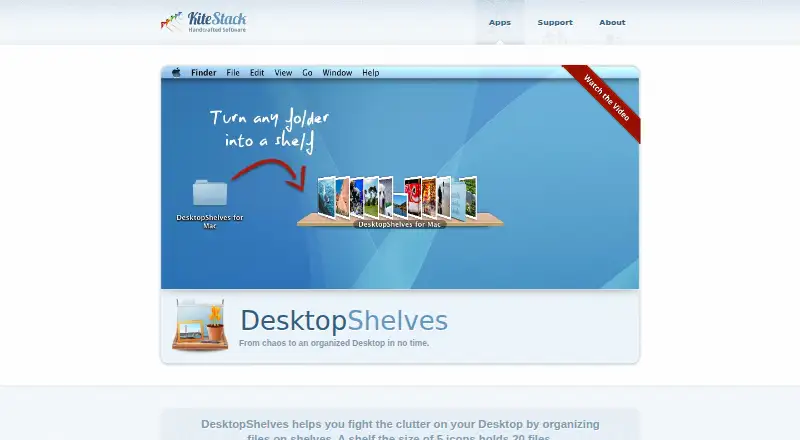
DesktopShelves is a macOS utility for organizing files and folders into visual shelves on the desktop. It suits Mac users who want quick access to frequently used items without relying solely on Finder folder navigation. Users can open folders as shelves from Finder, move files between shelves and applications, sort shelf items, preview files with Quick Look, and show or hide shelves with keyboard shortcuts. Its shelf-based model is more visual than a standard folder-only workflow while remaining closely connected to familiar Mac tools.
The published plan structure is simple: DesktopShelves is a paid product with one plan named DesktopShelves, listed at 14.99. That plan includes folders as shelves and the Mac-only utility, alongside the product’s broader feature set. There is no free plan. For buyers who prefer a focused desktop utility rather than a multi-platform organizer, the straightforward plan structure may be easier to evaluate. Users comparing tools across operating systems should look elsewhere because the platform support is limited to macOS.
DesktopShelves’ strongest distinction is the combination of visual organization and lightweight text workflows. Custom and downloadable shelf designs let users change the shelf presentation, while dropped text selections can create files and text snippets can be inserted into other applications. Finder, Mail, and TextEdit integrations support a workflow that keeps file access and short-form content close to the desktop. It also offers automatic sorting, Quick Look previews, and keyboard shortcuts. The product is a good fit for Mac users who value a traditional shelf organizer and direct Finder interaction. It is less suitable for buyers who need verified multi-monitor support, a free entry tier, or broader platform coverage.
Your product? Our editors can test DesktopShelves in depth and publish a review, labelled as paid · from $149/mo →
DesktopShelves pricing
All 1 DesktopShelves plans and prices →
DesktopShelves fact sheet
| Free plan | No |
|---|---|
| Paid from | Not verified |
| Platform support | Macos_only |
| Organization model | Shelves |
| Automatic sorting | Yes |
| Maximum containers | Not verified |
| Saved layouts | Not verified |
| Multi-monitor support | Not verified |
| Deployment | Desktop |
| Platforms | macOS |
| Support | Email, Docs |
| Built for | Solo, Small business (editorial estimate) |
| Integrations | 3 integrations: Finder, Mail, TextEdit |
| Pricing | Paid (source) |
| Website | kitestack.com |
| Facts checked | 20 Sep 2026 |
DesktopShelves integrations
DesktopShelves lists 3 integrations on its own site.
- Finder
- TextEdit
Alternatives to DesktopShelves
- AutoShelfDeep automated file sorting for Mac users who want precise control.9.4
- Desktop Frames+A flexible Windows desktop organizer with frames, profiles, rules, and search.9.3
- DeskBoxDeskBox combines automatic desktop organization with search, widgets, todos, and recovery tools.9.2


See all DesktopShelves alternatives →
Used DesktopShelves? Be the first to review it
The editor score above is our own research. What this page doesn't have yet is a reader's view — what you used DesktopShelves for, what worked and what didn't. No stars are seeded and no review is paid for; an editor reads every one before it appears.
Write a reviewTwo minutes · verified accounts only · read by an editor before it appears
Featured on iTechGuides

DesktopShelves is listed in our Desktop Organization Software directory. Add the badge to your site — it links back to this page.
<a href="https://www.itechguides.com/products/desktopshelves/"><img src="https://www.itechguides.com/best/badge/desktopshelves.svg" alt="Featured on iTechGuides" width="230" height="46"></a>
Reviewed by iTechGuides Editors · Editorial team · Updated Oct 2026
Advertiser disclosure: iTechGuides is reader-supported. Vendors can pay for top positions in our rankings and for a place on other products' pages, and we may earn a commission when you click some links. Bought places stand at the number bought; this page and our disclosure say so. Paying vendors may get a fuller, more detailed review from our editors, and that review can change their score. How we rank.
Last updated · How we research and update