Desktop Streamer
Desktop Streamer: A low-cost Windows encoder for screen capture, recording, and RTMP streaming. Ranked #61 of 70 in Live Streaming Encoders by our editors (5.5/10); pricing: 30-day trial; best for budget Windows screen capture and RTMP streaming.
At a glance
- Editor score5.5 / 10
- Pricing30-day trial
- Best forBudget Windows screen capture and RTMP streaming
- Free planNo
- Paid from$20/yr
- Encoder typeDesktop
- Facts checked22 Sep 2026
Where it wins
- Screen capture, MP4 recording, and streaming can run together.
- Scheduled recording, webcam PiP, audio capture, and quality controls.
- Uploads to YouTube, Facebook, Google Drive, OneDrive, and Dropbox.
Where it doesn't
- Windows is the only supported platform.
- Streaming output is limited to the RTMP protocol.
- There is no free plan after the 30-day trial.
Our verdict on Desktop Streamer
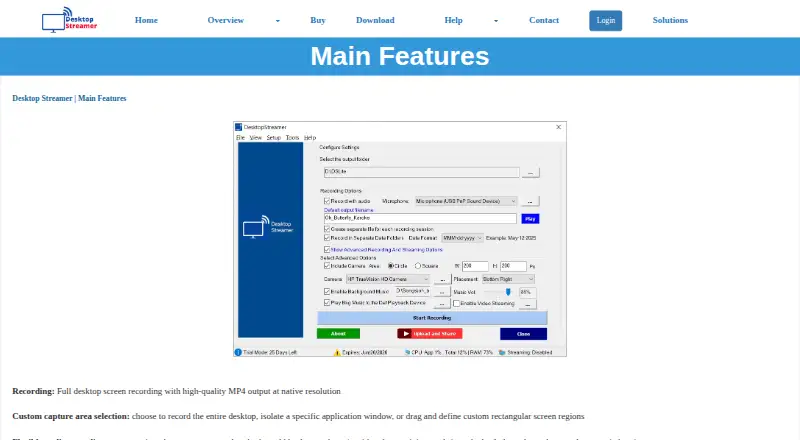
Desktop Streamer is a Windows application for recording screens to MP4 and streaming desktop content through RTMP. It suits tutorials, online classes, product demonstrations, gaming streams, and general screencasting. Users can capture the full desktop or a custom region, record at native resolution, add microphone and system audio, include background music, and place a resizable webcam overlay over the output. Local recording can continue while a stream is active.
Pricing is structured around a 30-day trial, subscriptions, and a lifetime license. The One Month Plan costs $5 per month and includes Desktop Streamer access, free updates, and online technical support. The Three Month Plan costs $10 per 3 months, the Six Month Plan costs $15 per 6 months, and the 12 Months Plan costs $20 per year, with the same listed subscription benefits. The Lifetime license costs $120 as a one-time purchase and includes screen recording, desktop streaming, audio and camera capture, and YouTube upload.
Its strongest fit is desktop-focused streaming where RTMP delivery and local recording are the main requirements. The application can stream to multiple servers or channels, adjust FPS, CRF, and quality presets, schedule automatic starts and stops, and upload recordings to Google Drive, OneDrive, or Dropbox. YouTube and Facebook support direct upload and sharing. The trade-off is a narrow platform and protocol scope: Windows is required, and RTMP is the stated output protocol. Choose Desktop Streamer for budget Windows screencasting and RTMP workflows; choose an alternative if you need another operating system or a different streaming protocol.
Your product? Our editors can test Desktop Streamer in depth and publish a review, labelled as paid · from $149/mo →
Desktop Streamer pricing
All 5 Desktop Streamer plans and prices →
Desktop Streamer fact sheet
| Free plan | No |
|---|---|
| Paid from | $20/yr |
| Encoder type | Desktop |
| Output protocols | RTMP |
| Maximum resolution | Not verified |
| Simultaneous outputs | Not verified |
| Local recording | Yes |
| Remote guest sources | Not verified |
| Free trial | 30 days |
| Deployment | Desktop |
| Platforms | Windows |
| Support | Phone, Docs |
| Built for | Solo, Small business (editorial estimate) |
| Integrations | 5 integrations: YouTube, Facebook, Google Drive, OneDrive, Dropbox |
| Pricing | 30-day trial (source) |
| Website | desktopstreamer.com |
| Facts checked | 22 Sep 2026 |
Desktop Streamer integrations
Desktop Streamer lists 5 integrations on its own site.
- YouTube
- Google Drive
- OneDrive
- Dropbox
Alternatives to Desktop Streamer
- AWS Elemental MediaLiveA capable cloud encoder for complex AWS-based broadcast workflows.9.4
- Bitmovin Live EncoderA broad live-encoding stack for platforms, broadcasters, and streaming service providers.9.3
- Google Cloud Live Stream APIA cloud API for multi-rendition live delivery, recording, captions, and distribution.9.2


See all Desktop Streamer alternatives →
Used Desktop Streamer? Be the first to review it
The editor score above is our own research. What this page doesn't have yet is a reader's view — what you used Desktop Streamer for, what worked and what didn't. No stars are seeded and no review is paid for; an editor reads every one before it appears.
Write a reviewTwo minutes · verified accounts only · read by an editor before it appears
Featured on iTechGuides

Desktop Streamer is listed in our Live Streaming Encoders directory. Add the badge to your site — it links back to this page.
<a href="https://www.itechguides.com/products/desktop-streamer/"><img src="https://www.itechguides.com/best/badge/desktop-streamer.svg" alt="Featured on iTechGuides" width="230" height="46"></a>
Reviewed by iTechGuides Editors · Editorial team · Updated Oct 2026
Advertiser disclosure: iTechGuides is reader-supported. Vendors can pay for top positions in our rankings and for a place on other products' pages, and we may earn a commission when you click some links. Bought places stand at the number bought; this page and our disclosure say so. Paying vendors may get a fuller, more detailed review from our editors, and that review can change their score. How we rank.
Last updated · How we research and update