
Desktop Groups
Desktop Groups: A simple Mac desktop organizer for draggable, resizable file groups. Ranked #34 of 47 in Desktop Organization Software by our editors (6.1/10); pricing: 7-day trial; best for mac users wanting basic draggable groups.
At a glance
- Editor score6.1 / 10
- Pricing7-day trial
- Best forMac users wanting basic draggable groups
- Free planNo
- Platform supportMacos_only
- Facts checked20 Sep 2026
Where it wins
- Drag and drop files into movable, resizable groups
- Quick Look previews files without leaving the desktop
- Dock and menu bar access plus appearance customization
Where it doesn't
- Available only for macOS
- No automation or AI features
- The trial lasts only 7 days
Our verdict on Desktop Groups
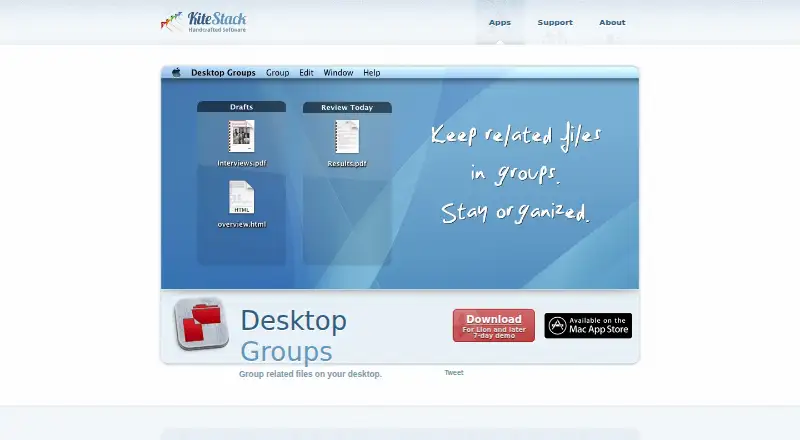
Desktop Groups is a macOS utility for arranging files and folders into movable groups on the desktop. It suits Mac users who want to sort items by project, task, or category without moving everything into a separate file manager. Groups can be created, renamed, resized, and repositioned, while files can be added or removed with drag and drop. The interface centers on visible desktop organization rather than automated filing or broader workspace management.
The single paid plan includes the core organization features: grouping related desktop files, dragging items into groups, moving and resizing groups, Quick Look integration, and Dock or menu bar access. Users can also customize the group view appearance and layout. The product has no free plan and includes a 7-day trial, making it suitable for buyers who already know they want this focused desktop workflow. Its standout strength is direct visual control: groups remain on the desktop and can be adjusted from their edges or corners.
Desktop Groups is a narrow choice for basic Mac organization rather than a full automation or multi-device system. It supports macOS only, has no AI features, and does not provide automation for sorting files as conditions change. The published App Store listing shows version 1.6, updated in 2016, and requires macOS 10.9.5 or later. Choose it if you want manually managed desktop areas with drag-and-drop interaction, Quick Look previews, and flexible placement. Choose an alternative if you need automated organization, multi-monitor support, a broader platform range, or a more actively updated workspace tool.
Your product? Our editors can test Desktop Groups in depth and publish a review, labelled as paid · from $149/mo →
Desktop Groups pricing
All 1 Desktop Groups plans and prices →
Desktop Groups fact sheet
| Free plan | No |
|---|---|
| Paid from | Not verified |
| Platform support | Macos_only |
| Organization model | Fenced_areas |
| Automatic sorting | Not verified |
| Maximum containers | Not verified |
| Saved layouts | Not verified |
| Multi-monitor support | Not verified |
| Free trial | 7 days |
| Deployment | Desktop |
| Platforms | macOS |
| Support | Email, Docs |
| Built for | Solo, Small business (editorial estimate) |
| Pricing | 7-day trial (source) |
| Website | kitestack.com |
| Facts checked | 20 Sep 2026 |
Alternatives to Desktop Groups
- AutoShelfDeep automated file sorting for Mac users who want precise control.9.4
- Desktop Frames+A flexible Windows desktop organizer with frames, profiles, rules, and search.9.3
- DeskBoxDeskBox combines automatic desktop organization with search, widgets, todos, and recovery tools.9.2


See all Desktop Groups alternatives →
Used Desktop Groups? Be the first to review it
The editor score above is our own research. What this page doesn't have yet is a reader's view — what you used Desktop Groups for, what worked and what didn't. No stars are seeded and no review is paid for; an editor reads every one before it appears.
Write a reviewTwo minutes · verified accounts only · read by an editor before it appears
Featured on iTechGuides

Desktop Groups is listed in our Desktop Organization Software directory. Add the badge to your site — it links back to this page.
<a href="https://www.itechguides.com/products/desktop-groups/"><img src="https://www.itechguides.com/best/badge/desktop-groups.svg" alt="Featured on iTechGuides" width="230" height="46"></a>
Reviewed by iTechGuides Editors · Editorial team · Updated Oct 2026
Advertiser disclosure: iTechGuides is reader-supported. Vendors can pay for top positions in our rankings and for a place on other products' pages, and we may earn a commission when you click some links. Bought places stand at the number bought; this page and our disclosure say so. Paying vendors may get a fuller, more detailed review from our editors, and that review can change their score. How we rank.
Last updated · How we research and update