
Deskloom
Deskloom: A free themed desktop tool that adds taskbar styles alongside broader Windows customization. Ranked #22 of 34 in Taskbar Customization Software by our editors (6.3/10); pricing: Free plan; best for A themed desktop with multiple taskbar styles.
At a glance
- Editor score6.3 / 10
- PricingFree plan
- Best forA themed desktop with multiple taskbar styles
- Free planYes
- Paid fromFree
- PlatformWindows
- Facts checked20 Sep 2026
Where it wins
- Free Windows desktop customization with no account required
- Reusable scenes combine wallpaper, taskbar styles, widgets and groups
- Rollback restores supported Windows appearance changes
Where it doesn't
- Windows-only and designed for Windows 11 25H2 or later on x64
- Broader desktop scope is less direct than dedicated taskbar tools
- Rollback applies only to supported appearance changes
Our verdict on Deskloom
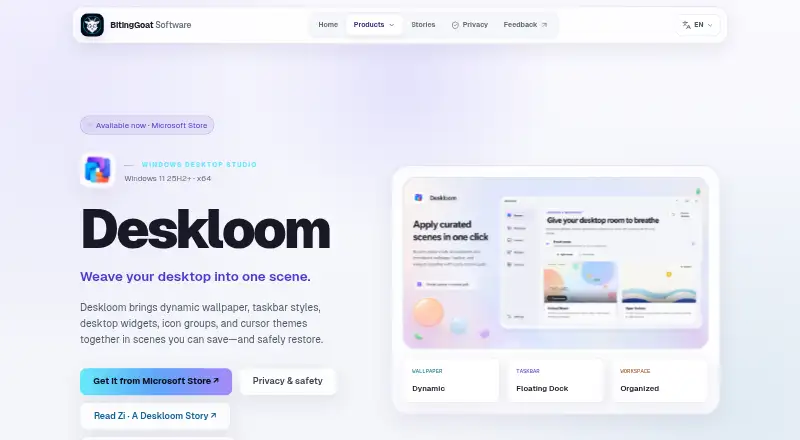
Deskloom is a free Windows desktop-customization application for people who want to coordinate taskbar appearance with the rest of the desktop. Its core elements include dynamic wallpaper, multiple taskbar styles such as Floating Dock, desktop widgets, visual groups and cursor themes. These can be combined into reusable scenes, giving users a way to switch between complete desktop arrangements rather than changing each element individually.
The standout feature is the scene system. A saved scene can combine wallpaper, taskbar style, widgets, groups and cursors, while widgets cover clocks, system readings, notes, network, storage and battery. Visual desktop groups organize items without moving the underlying files, which keeps the customization focused on presentation. Deskloom also includes recovery and rollback for supported Windows appearance changes, adding a way to restore those changes when needed.
Deskloom’s fit is specific: it is designed for Windows 11 25H2 or later on x64 systems, and its broader desktop focus means it is less direct than a tool dedicated only to taskbar customization. Scenes and settings are stored locally, with no account or runtime internet connection required. Choose Deskloom if you want a themed desktop built around multiple taskbar styles, saved layouts and widgets. Choose a narrower taskbar tool instead if taskbar changes are your only priority or if the stated Windows platform requirements do not fit your system.
Your product? Our editors can test Deskloom in depth and publish a review, labelled as paid · from $149/mo →
Deskloom pricing
All 1 Deskloom plans and prices →
Deskloom fact sheet
| Free plan | Yes |
|---|---|
| Paid from | Free |
| Platform | Windows |
| Taskbar positioning | Not verified |
| Transparency controls | Not verified |
| App grouping controls | Not verified |
| Multi-monitor support | Not verified |
| Taskbar sizing | Not verified |
| Portable version | Not verified |
| Deployment | Desktop |
| Platforms | Windows |
| Built for | Solo, Small business (editorial estimate) |
| Pricing | Free plan (source) |
| Website | bitinggoatsoft.win |
| Facts checked | 20 Sep 2026 |
Alternatives to Deskloom
- ObjectDockA feature-rich Windows dock replacement with strong customization and multi-monitor support.9.2
- TaskbarXA free, portable Windows 10 taskbar customizer with limited modern Windows 11 support.8.8
- YASB RebornA flexible Windows taskbar replacement for users comfortable with deep customization.8.6


See all Deskloom alternatives →
Used Deskloom? Be the first to review it
The editor score above is our own research. What this page doesn't have yet is a reader's view — what you used Deskloom for, what worked and what didn't. No stars are seeded and no review is paid for; an editor reads every one before it appears.
Write a reviewTwo minutes · verified accounts only · read by an editor before it appears
Featured on iTechGuides

Deskloom is listed in our Taskbar Customization Software directory. Add the badge to your site — it links back to this page.
<a href="https://www.itechguides.com/products/deskloom/"><img src="https://www.itechguides.com/best/badge/deskloom.svg" alt="Featured on iTechGuides" width="230" height="46"></a>
Reviewed by iTechGuides Editors · Editorial team · Updated Oct 2026
Advertiser disclosure: iTechGuides is reader-supported. Vendors can pay for top positions in our rankings and for a place on other products' pages, and we may earn a commission when you click some links. Bought places stand at the number bought; this page and our disclosure say so. Paying vendors may get a fuller, more detailed review from our editors, and that review can change their score. How we rank.
Last updated · How we research and update