
DemoAir
DemoAir: A free recorder with broad capture options, useful integrations, and modest editing. Ranked #42 of 131 in Screen Recording Software by our editors (4.8/10); pricing: Free plan; best for free recording with productivity integrations.
At a glance
- Editor score4.8 / 10
- PricingFree plan
- Best forFree recording with productivity integrations
- Free planYes
- Paid fromFree
- Webcam recordingYes
- Facts checked22 Sep 2026
Where it wins
- Records screens, browser tabs, webcams, microphones, and system audio
- Works across web, Windows, macOS, Linux, and Chrome
- Connects with Google Drive, Slack, Jira, Asana, and other tools
Where it doesn't
- Editing is limited to trimming, annotations, and drawing tools
- Recording-duration information differs across published product pages
- Primarily distributed through a Chrome extension and online interface
Our verdict on DemoAir
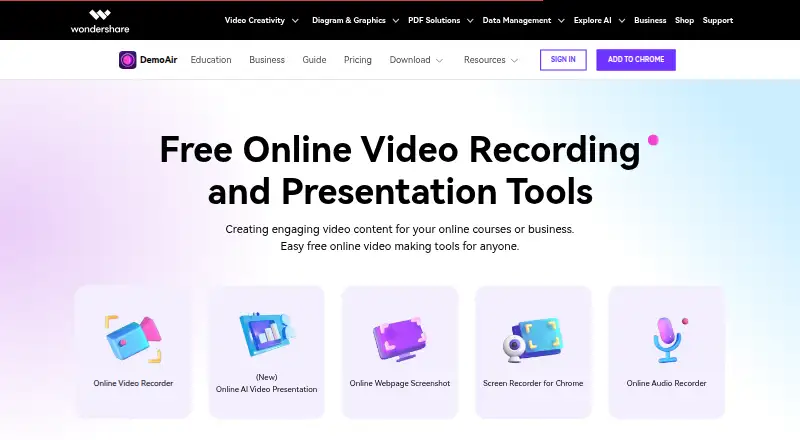
DemoAir is a free screen recording product from Wondershare for educators, marketers, support teams, developers, and other business users. It records a desktop, application window, browser tab, webcam, or webcam-only video, with microphone and system-audio capture available. Recordings can be paused and resumed, annotated, trimmed, downloaded as MP4 or WebM, saved to Google Drive, and shared through links or supported integrations. It is available through the web, Windows, macOS, Linux, and a Chrome extension.
Platform fit is a major strength. DemoAir connects with Google Drive, GitHub, Jira, Slack, Asana, Trello, Gmail, Google Classroom, and YouTube, giving teams several ways to move recordings into existing work, communication, education, and publishing workflows. The Free plan includes screen, browser-tab, webcam, and audio recording, along with sharing, downloading, and Google Drive saving. That makes it a practical choice for quick explanations, support updates, lessons, and product walkthroughs without a paid tier structure.
The product focuses on capture and sharing rather than advanced post-production. Its editing tools cover trimming, annotations, and drawing, so users seeking a deeper editing workflow may prefer a more specialized video editor. Published product pages also present different recording-duration information, which matters for longer sessions. Pick DemoAir when free recording, multiple capture modes, broad platform access, and productivity integrations matter most. Consider an alternative if sophisticated editing or a clearly defined long-session recording policy is central to the workflow.
Your product? Our editors can test DemoAir in depth and publish a review, labelled as paid · from $149/mo →
DemoAir pricing
All 1 DemoAir plans and prices →
DemoAir fact sheet
| Free plan | Yes |
|---|---|
| Paid from | Free |
| Webcam recording | Yes |
| System audio | Yes |
| Microphone recording | Yes |
| Max recording length | Not verified |
| Maximum video quality | 4k |
| Supported platforms | web, windows, macos, linux, chrome_extension |
| Deployment | Cloud, Browser extension |
| Platforms | Web, Windows, macOS, Linux, Chrome extension |
| Support | Docs |
| Built for | Small business, Mid-market, Enterprise (editorial estimate) |
| Integrations | 9 integrations: Google Drive, GitHub, Jira, Slack, Asana, Trello … See all → |
| Pricing | Free plan (source) |
| Website | demoair.wondershare.com |
| Facts checked | 22 Sep 2026 |
DemoAir integrations
DemoAir lists 9 integrations on its own site.
- Google Drive
- GitHub
- Jira
- Slack
- Asana
- Trello
- Gmail
- Google Classroom
- YouTube
See all DemoAir integrations →
Alternatives to DemoAir
- CamtasiaA deep desktop toolkit for training videos, tutorials, and structured learning content.9.3
- ScreenPalA feature-rich choice for budget-conscious creators who need more than basic recording.9.1
- LoomA broad screen recorder for teams that communicate through polished async video.9.0



See all DemoAir alternatives →
Used DemoAir? Be the first to review it
The editor score above is our own research. What this page doesn't have yet is a reader's view — what you used DemoAir for, what worked and what didn't. No stars are seeded and no review is paid for; an editor reads every one before it appears.
Write a reviewTwo minutes · verified accounts only · read by an editor before it appears
Featured on iTechGuides

DemoAir is listed in our Screen Recording Software directory. Add the badge to your site — it links back to this page.
<a href="https://www.itechguides.com/products/demoair/"><img src="https://www.itechguides.com/best/badge/demoair.svg" alt="Featured on iTechGuides" width="230" height="46"></a>
Guides on screen recording software
- The Best Screen Recording Software in 2026: Comparison and GuideAug 2026
- 16 Best Paid and Free Screen Recording Software for MacAug 2026
- Best Screen Recording Software for Product DemosOct 2026
Reviewed by iTechGuides Editors · Editorial team · Updated Oct 2026
Advertiser disclosure: iTechGuides is reader-supported. Vendors can pay for top positions in our rankings and for a place on other products' pages, and we may earn a commission when you click some links. Bought places stand at the number bought; this page and our disclosure say so. Paying vendors may get a fuller, more detailed review from our editors, and that review can change their score. How we rank.
Last updated · How we research and update