dbmate
dbmate: A focused open-source CLI for versioned SQL migrations, rollback, and schema.sql maintenance. Ranked #10 of 32 in Database Migration Tools by our editors (7.9/10); pricing: Open source; best for portable SQL migrations across many databases.
At a glance
- Editor score7.9 / 10
- PricingOpen source
- Best forPortable SQL migrations across many databases
- Paid fromFree
- Rollback supportYes
- Facts checked20 Sep 2026
Where it wins
- Timestamped SQL migrations with explicit up and down sections
- Rollback and atomic transactions when supported by the database
- Supports major databases plus BigQuery and Spanner connections
Where it doesn't
- Command-line workflow may not suit teams seeking a visual interface
- Atomic transactions depend on database support
- No AI features are included
Our verdict on dbmate
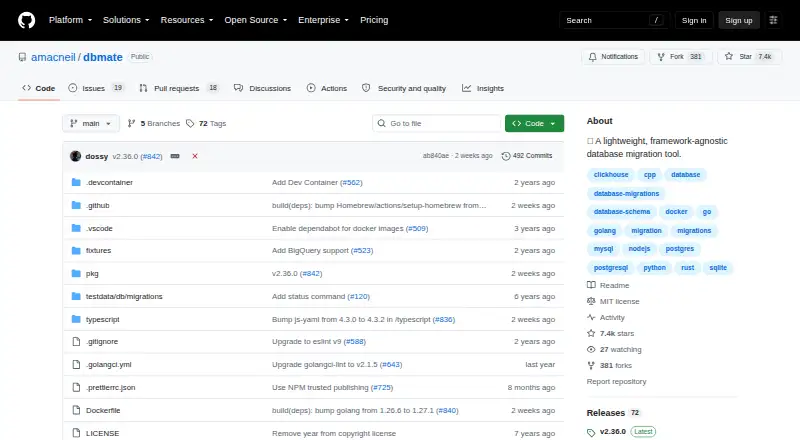
dbmate is an open-source, standalone command-line tool for keeping database schemas synchronized across developers and production servers. It is designed for teams that want application-independent migrations in plain SQL rather than a framework-specific system. Migrations use timestamped files with explicit up and down sections, while database connections are handled through database URLs. The tool runs on Windows, macOS, and Linux and is distributed as a self-contained binary or Docker image.
Its strongest fit is database portability. dbmate supports MySQL, MariaDB, PostgreSQL, SQLite, and ClickHouse, along with BigQuery and PostgreSQL-dialect Spanner connections. That range gives teams a consistent migration workflow across different database environments. Beyond applying migrations, the CLI provides status, wait, create, drop, dump, and load commands. It also exports and maintains a complete schema.sql file, which gives teams a separate representation of the current schema alongside the migration history. Choose dbmate when SQL files, broad connectivity, and a framework-agnostic workflow matter more than a graphical interface or language-specific integration.
The migration model covers the core operational path: create and run timestamp-versioned migrations, define rollback steps, and execute migrations atomically inside transactions when the connected database supports them. Its open-source model keeps the product focused on the command line rather than dividing capabilities across paid tiers. Teams should consider an alternative if they need a visual migration workflow, features beyond SQL-based files, or transaction behavior that does not depend on database support. For developers and operations teams comfortable with CLI tooling, dbmate is a focused choice for portable schema changes and explicit rollback management.
Your product? Our editors can test dbmate in depth and publish a review, labelled as paid · from $149/mo →
dbmate pricing
dbmate fact sheet
| Free plan | Not verified |
|---|---|
| Paid from | Free |
| Rollback support | Yes |
| Schema diff | Yes |
| CI/CD automation | Not verified |
| Supported databases | Not verified |
| Drift detection | Not verified |
| Self-hosted option | Yes |
| Migration format | Sql |
| Deployment | Self-hosted |
| Platforms | Windows, macOS, Linux |
| Support | Community, Docs |
| Built for | Solo, Small business, Mid-market (editorial estimate) |
| Pricing | Open source |
| Website | github.com |
| Facts checked | 20 Sep 2026 |
Alternatives to dbmate
- FlywayA broad migration platform with free core commands and deeper controls in paid editions.9.4
- AtlasAffordable schema automation with strong migration controls and CI/CD support.9.2
- LiquibaseA governed migration workflow with changelogs, rollback, drift detection, and a free tier.9.1



Also Ranked In
dbmate is ranked in 2 of our directories.
Used dbmate? Be the first to review it
The editor score above is our own research. What this page doesn't have yet is a reader's view — what you used dbmate for, what worked and what didn't. No stars are seeded and no review is paid for; an editor reads every one before it appears.
Write a reviewTwo minutes · verified accounts only · read by an editor before it appears
Featured on iTechGuides

dbmate is listed in our Database Migration Tools directory. Add the badge to your site — it links back to this page.
<a href="https://www.itechguides.com/products/dbmate/"><img src="https://www.itechguides.com/best/badge/dbmate.svg" alt="Featured on iTechGuides" width="230" height="46"></a>
Reviewed by iTechGuides Editors · Editorial team · Updated Oct 2026
Advertiser disclosure: iTechGuides is reader-supported. Vendors can pay for top positions in our rankings and for a place on other products' pages, and we may earn a commission when you click some links. Bought places stand at the number bought; this page and our disclosure say so. Paying vendors may get a fuller, more detailed review from our editors, and that review can change their score. How we rank.
Last updated · How we research and update