Daystar Cloud Desktop
Daystar Cloud Desktop: A managed desktop service with security and support, sold through tailored monthly quotes. Ranked #25 of 25 in Desktop as a Service Software by our editors (6.7/10); pricing: Pricing on request; best for small businesses seeking managed cloud desktops.
At a glance
- Editor score6.7 / 10
- PricingPricing on request
- Best forSmall businesses seeking managed cloud desktops
- Facts checked23 Sep 2026
Where it wins
- Managed provisioning, configuration, optimization and patching
- Daily backups, disaster recovery planning and proactive security monitoring
- Onboarding, user training and 24/7 support by portal, email and phone
Where it doesn't
- Tailored monthly quotes make budget comparisons less immediate
- Technical evaluation requires clarifying session protocols and desktop persistence
- Application compatibility should be checked for each business workload
Our verdict on Daystar Cloud Desktop
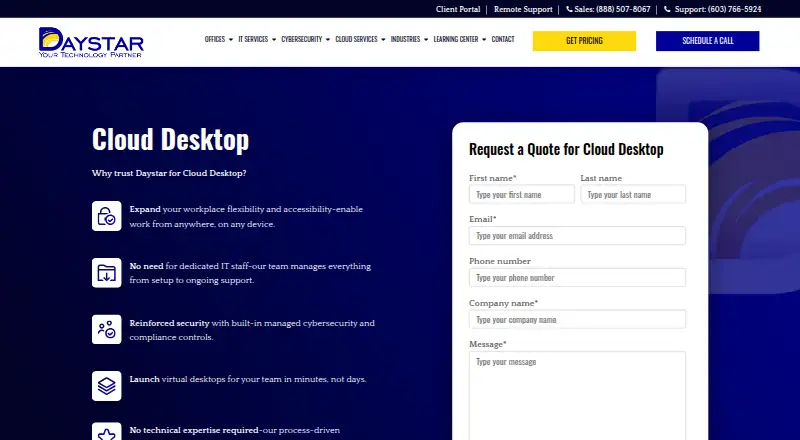
Daystar Cloud Desktop gives organizations remotely accessible virtual desktops hosted in the public cloud. Daystar manages provisioning, configuration, optimization, updates, security monitoring and backups, while centralized user management and access controls help administrators manage access. The offering is described for remote and hybrid workforces, and its stated fit spans small businesses, mid-market organizations and enterprises. Windows and macOS are supported, with desktops accessed over the internet from users’ devices. Small businesses that want a provider to handle desktop operations rather than manage the environment themselves are a natural audience; teams that need detailed technical control should assess fit before committing.
The service bundles operational work with security and continuity measures. Daystar lists endpoint protection, multi-factor authentication, proactive monitoring, patching and vulnerability scanning, alongside daily backups and disaster recovery planning. Onboarding includes migration assistance and user training, and ongoing support is available 24/7 through a portal, email and phone. This combination may suit organizations without dedicated desktop administration capacity, or those seeking a managed service for a remote or hybrid workforce. Buyers should still map the security controls and recovery approach to their own requirements before selecting a service.
According to Daystar’s pricing approach, customers receive tailored monthly quotes rather than choosing from published fixed-price plans. That makes the offering worth considering when the scope of managed service matters more than comparing set plan tiers, but less convenient for teams that require public prices during initial budgeting. The service can integrate with business applications and cloud services, though buyers should validate the applications and workflows they rely on. Teams evaluating technical fit should discuss session protocols and desktop persistence with Daystar, then compare those requirements with the service’s proposed configuration. Choose it for outsourced desktop operations, bundled security and continuing support; look elsewhere if fixed public pricing or a particular desktop configuration is a prerequisite.
Your product? Our editors can test Daystar Cloud Desktop in depth and publish a review, labelled as paid · from $149/mo →
Daystar Cloud Desktop pricing
Daystar Cloud Desktop fact sheet
| Free plan | Not verified |
|---|---|
| Paid from | Not verified |
| Desktop persistence | Not verified |
| Deployment model | Public cloud |
| Desktop operating systems | Windows, macOS |
| Session protocols | Not verified |
| User capacity | Not verified |
| Identity providers | Not verified |
| Deployment | Cloud |
| Platforms | Web |
| Compliance & security | 2FA |
| Support | Email, Phone · 24/7 |
| Built for | Small business, Mid-market, Enterprise (editorial estimate) |
| Pricing | Pricing on request |
| Website | daystarinc.com |
| Facts checked | 23 Sep 2026 |
Alternatives to Daystar Cloud Desktop
- Amazon WorkSpacesManaged Windows and Linux cloud desktops with flexible bundles and billing.9.3
- Azure Virtual DesktopAzure-based Windows desktops and apps, with pooled, persistent, and RemoteApp options.9.2
- Windows 365Managed, personal Windows Cloud PCs with Microsoft administration and security integrations.9.1



See all Daystar Cloud Desktop alternatives →
Used Daystar Cloud Desktop? Be the first to review it
The editor score above is our own research. What this page doesn't have yet is a reader's view — what you used Daystar Cloud Desktop for, what worked and what didn't. No stars are seeded and no review is paid for; an editor reads every one before it appears.
Write a reviewTwo minutes · verified accounts only · read by an editor before it appears
Featured on iTechGuides

Daystar Cloud Desktop is listed in our Desktop as a Service Software directory. Add the badge to your site — it links back to this page.
<a href="https://www.itechguides.com/products/daystar-cloud-desktop/"><img src="https://www.itechguides.com/best/badge/daystar-cloud-desktop.svg" alt="Featured on iTechGuides" width="230" height="46"></a>
Reviewed by iTechGuides Editors · Editorial team · Updated Oct 2026
Advertiser disclosure: iTechGuides is reader-supported. Vendors can pay for top positions in our rankings and for a place on other products' pages, and we may earn a commission when you click some links. Bought places stand at the number bought; this page and our disclosure say so. Paying vendors may get a fuller, more detailed review from our editors, and that review can change their score. How we rank.
Last updated · How we research and update