
Datadog DNS Monitoring
Datadog DNS Monitoring: A broad DNS observability layer for teams correlating resolution with telemetry. Ranked #19 of 37 in DNS Monitoring Software by our editors (7.1/10); pricing: 14-day trial; best for observability teams correlating DNS with telemetry.
At a glance
- Editor score7.1 / 10
- Pricing14-day trial
- Best forObservability teams correlating DNS with telemetry
- Free planNo
- Paid from$5/device/mo
- Check interval1 minutes
- Founded2010 · New York, New York, USA
- Facts checked20 Sep 2026
Where it wins
- Combines DNS server metrics with configurable resolution tests
- Correlates DNS dashboards with metrics, traces, and logs
- Supports managed and private test locations with record assertions
Where it doesn't
- No free plan is available
- DNS capabilities span Synthetic API Tests and Cloud Network Monitoring
- Cloud Network Monitoring requires Infrastructure Pro or Enterprise per host
Our verdict on Datadog DNS Monitoring
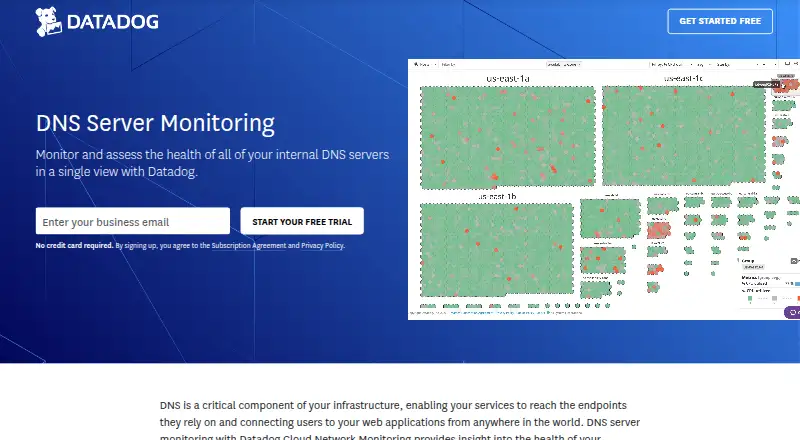
Datadog DNS Monitoring combines Cloud Network Monitoring and Synthetic DNS tests for internal DNS servers, service discovery, and external DNS resolution. It is designed for observability teams that need DNS request volume, latency, failure metrics, resolution checks, and telemetry correlation in one monitoring environment. Tests can use configurable nameservers and validate A, AAAA, CNAME, MX, NS, and TXT records from managed or private locations.
Pricing is split between two paid capabilities. Synthetic API Tests cost $5 per 10K API test runs per month with annual billing, $6 with monthly billing, or $7.20 on demand, and include DNS resolution and lookup-time monitoring. Cloud Network Monitoring costs $5 per host per month with annual billing, $6 monthly, or $7.20 on demand, and covers DNS server health and network visibility. Cloud Network Monitoring requires an Infrastructure Pro or Enterprise plan for each monitored host. A 14-day free trial is available, but there is no free plan.
The main strength is breadth: Datadog covers server-side DNS health, client-side and server-side troubleshooting, proactive record assertions, unexpected resolution slowness, and correlation with logs, traces, and metrics. Integrations include CoreDNS, PowerDNS, Amazon Route 53, Slack, PagerDuty, Microsoft Teams, and Webhooks. Teams seeking DNS monitoring alongside broader observability workflows should find the combined approach suitable. Organizations wanting a standalone DNS tool without multiple Datadog plan dependencies may prefer a narrower option.
Your product? Our editors can test Datadog DNS Monitoring in depth and publish a review, labelled as paid · from $149/mo →
Datadog DNS Monitoring pricing
All 2 Datadog DNS Monitoring plans and prices →
Datadog DNS Monitoring fact sheet
| Free plan | No |
|---|---|
| Paid from | $5/device/mo |
| Check interval | 1 minutes |
| Resolution checks | Yes |
| Propagation checks | Yes |
| Record-change alerts | Not verified |
| Nameserver health checks | Yes |
| Query locations | Not verified |
| Alert channels | email, Slack, PagerDuty, Microsoft Teams, Webhooks |
| Free trial | 14 days · no card needed |
| Deployment | Cloud |
| Platforms | Web |
| Support | Email, Live chat, Community, Docs |
| Built for | Mid-market, Enterprise (editorial estimate) |
| Integrations | 1,000+ integrations: CoreDNS, PowerDNS, Amazon Route 53, Slack, PagerDuty, Microsoft Teams … See all → |
| Pricing | 14-day trial (source) |
| Website | datadoghq.com |
| Facts checked | 20 Sep 2026 |
Datadog DNS Monitoring integrations
Datadog DNS Monitoring lists 1,000+ integrations on its own site — the 7 named here are the ones its pages call out.
- CoreDNS
- PowerDNS
- Amazon Route 53
- Slack
- PagerDuty
- Microsoft Teams
- Webhooks
See all Datadog DNS Monitoring integrations →
Alternatives to Datadog DNS Monitoring
- UpGex DNS MonitoringA low-cost DNS monitor with strong propagation checks, alerting, and API coverage.9.3
- DomainWarnA portfolio-focused DNS monitor with authoritative checks, incident detail and broad alert options.9.2
- DNS SpyA broad DNS oversight service for teams managing records, domains, and security.9.1


See all Datadog DNS Monitoring alternatives →
Used Datadog DNS Monitoring? Be the first to review it
The editor score above is our own research. What this page doesn't have yet is a reader's view — what you used Datadog DNS Monitoring for, what worked and what didn't. No stars are seeded and no review is paid for; an editor reads every one before it appears.
Write a reviewTwo minutes · verified accounts only · read by an editor before it appears
Featured on iTechGuides

Datadog DNS Monitoring is listed in our DNS Monitoring Software directory. Add the badge to your site — it links back to this page.
<a href="https://www.itechguides.com/products/datadog-dns-monitoring/"><img src="https://www.itechguides.com/best/badge/datadog-dns-monitoring.svg" alt="Featured on iTechGuides" width="230" height="46"></a>
Reviewed by iTechGuides Editors · Editorial team · Updated Oct 2026
Advertiser disclosure: iTechGuides is reader-supported. Vendors can pay for top positions in our rankings and for a place on other products' pages, and we may earn a commission when you click some links. Bought places stand at the number bought; this page and our disclosure say so. Paying vendors may get a fuller, more detailed review from our editors, and that review can change their score. How we rank.
Last updated · How we research and update