
Database Workbench
Database Workbench: A broad desktop database IDE for modeling, migration, SQL work, and team development. Ranked #19 of 34 in Database Design Tools by our editors (7.5/10); pricing: Free plan; best for windows teams needing database engineering depth.
At a glance
- Editor score7.5 / 10
- PricingFree plan
- Best forWindows teams needing database engineering depth
- Free planYes
- Reverse engineeringYes
- Facts checked20 Sep 2026
Where it wins
- Covers logical, physical, and reverse-engineered database models
- Supports nine database systems with migration and schema comparison
- Enterprise adds shared workspaces, catalogs, and version control
Where it doesn't
- Desktop deployment is limited to Windows
- Commercial pricing varies by database modules and excludes VAT
- Enterprise collaboration features require the Enterprise edition
Our verdict on Database Workbench
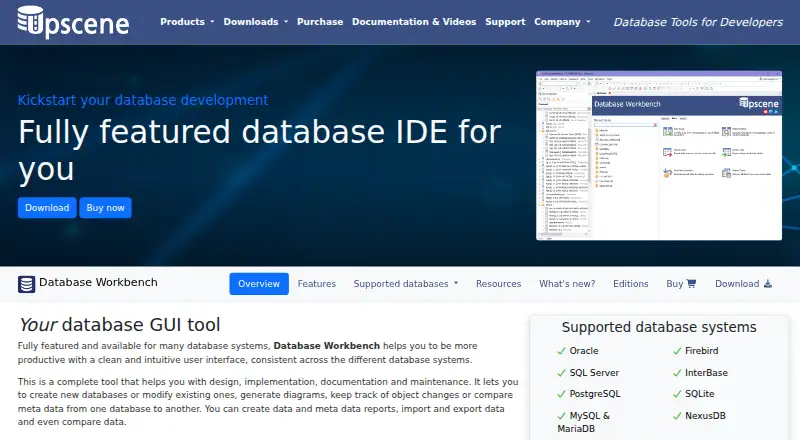
Database Workbench is a Windows desktop database IDE from Upscene Productions for developers and database administrators. It combines logical and physical modeling with reverse engineering, SQL development, schema comparison, migration, data operations, testing, debugging, reporting, and documentation. Selectable modules support Oracle, Firebird, SQL Server, InterBase, PostgreSQL, SQLite, MySQL, MariaDB, and NexusDB. A free Lite edition is available for personal, non-commercial use, while Basic, Professional, and Enterprise editions target commercial and team development.
The product’s main strength is breadth across the database engineering workflow. Basic includes a Visual Query Builder, SQL completion, database comparison and migration, reverse engineering to diagrams, and data import and export. Professional adds conceptual and physical design, stored routine debugging, ODBC and ADO connectivity, data comparison, and additional productivity tools. Modeling can generate SQL scripts, while schema comparison can produce update scripts. These capabilities make Database Workbench a strong fit for teams that need more than a diagramming tool, particularly when existing databases must be reverse-engineered or moved across supported systems.
Enterprise focuses on shared development: shared servers and databases, non-local workspaces, team-based to-do lists, shared SQL and code catalogs, and built-in version control. That makes the higher edition relevant to coordinated database work rather than individual modeling alone. The trade-off is a Windows-only desktop deployment, and commercial pricing depends on the selected database modules; listed prices are in euros and exclude VAT. Choose Database Workbench when database design, SQL operations, migration, and debugging need to live in one Windows application. Teams seeking browser-based access or a platform-neutral deployment should consider an alternative.
Your product? Our editors can test Database Workbench in depth and publish a review, labelled as paid · from $149/mo →
Database Workbench pricing
All 3 Database Workbench plans and prices →
Database Workbench fact sheet
| Free plan | Yes |
|---|---|
| Paid from | Not verified |
| Reverse engineering | Yes |
| Forward engineering | Yes |
| SQL export | Yes |
| Supported databases | Oracle, Firebird, SQL Server, InterBase, PostgreSQL, SQLite, MySQL, MariaDB, NexusDB |
| Team collaboration | Yes |
| Version history | Yes |
| Deployment | Desktop |
| Deployment | Desktop |
| Platforms | Windows |
| Support | Docs |
| Built for | Solo, Small business, Mid-market, Enterprise (editorial estimate) |
| Pricing | Free plan (source) |
| Website | upscene.com |
| Facts checked | 20 Sep 2026 |
Alternatives to Database Workbench
- DbSchemaA broad cross-platform modeler for database design, migration, documentation, and review.9.4
- SqlDBMA broad modeling workspace for teams aligning schemas, warehouses, lineage, and documentation.9.2
- Hackolade StudioA broad modeling workspace for teams managing complex, multi-model data architecture.9.1


See all Database Workbench alternatives →
Also Ranked In
Database Workbench is ranked in 2 of our directories.
Used Database Workbench? Be the first to review it
The editor score above is our own research. What this page doesn't have yet is a reader's view — what you used Database Workbench for, what worked and what didn't. No stars are seeded and no review is paid for; an editor reads every one before it appears.
Write a reviewTwo minutes · verified accounts only · read by an editor before it appears
Featured on iTechGuides

Database Workbench is listed in our Database Design Tools directory. Add the badge to your site — it links back to this page.
<a href="https://www.itechguides.com/products/database-workbench/"><img src="https://www.itechguides.com/best/badge/database-workbench.svg" alt="Featured on iTechGuides" width="230" height="46"></a>
Reviewed by iTechGuides Editors · Editorial team · Updated Oct 2026
Advertiser disclosure: iTechGuides is reader-supported. Vendors can pay for top positions in our rankings and for a place on other products' pages, and we may earn a commission when you click some links. Bought places stand at the number bought; this page and our disclosure say so. Paying vendors may get a fuller, more detailed review from our editors, and that review can change their score. How we rank.
Last updated · How we research and update