
DaisyDisk
DaisyDisk: A polished Mac disk mapper with cloud scans and a $9.99 lifetime license. Ranked #28 of 104 in Disk Space Analyzers by our editors (6.0/10); pricing: Paid; best for polished Mac cloud and disk mapping.
At a glance
- Editor score6.0 / 10
- PricingPaid
- Best forPolished Mac cloud and disk mapping
- Free planNo
- Paid from$9.99 one-time
- Desktop platformsmacos
- Facts checked23 Sep 2026
Where it wins
- Interactive circular map makes large files and folders easy to locate
- Scans internal, external, network, virtual, removable, and cloud storage
- Selective deletion includes safety stoppers for system components
Where it doesn't
- Available only for macOS, with no Windows or iOS version
- No free plan; the time-unlimited trial has restricted features
- Cloud scanning is limited to Dropbox, Google Drive, OneDrive, and Box
Our verdict on DaisyDisk
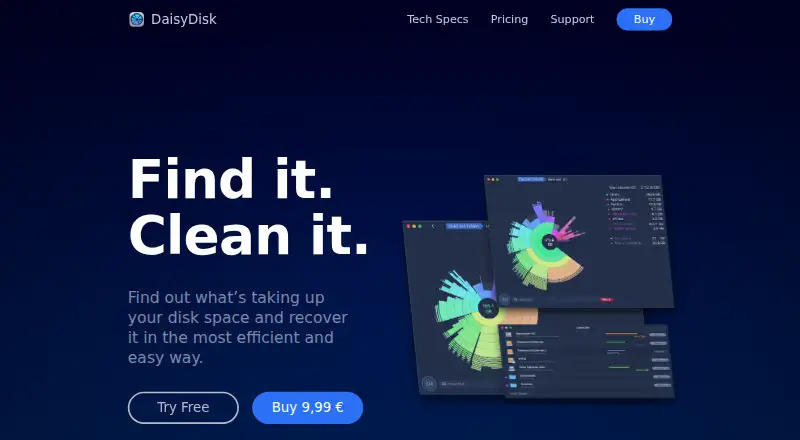
DaisyDisk is a macOS disk-space analyzer for people who want a visual way to understand storage use across a Mac and connected locations. Its interactive circular disk map presents files and folders by storage footprint, helping users locate large items, inspect hidden or purgeable space, preview files, and remove selected content. It supports Apple Silicon and Intel Macs, and is suited to individuals managing internal, external, removable, network, virtual, and supported cloud storage.
Pricing is straightforward: the Lifetime License costs $9.99 as a one-time payment. It includes lifetime access, minor updates and bug fixes, use on up to five personal Macs, and a 30-day money-back guarantee. A time-unlimited trial is available with restricted features, but DaisyDisk does not offer a free plan. For users who expect to keep using the product on personal Macs, the one-time model is simpler than a recurring subscription. Buyers who want unrestricted functionality without paying should look elsewhere.
Its scope extends beyond a Mac’s internal drive. DaisyDisk scans Dropbox, Google Drive, Microsoft OneDrive, and Box, alongside external, removable, network, and virtual disks. Administrator-mode scanning can inspect restricted files and folders, while metadata-only scanning does not transmit scanned data. Built-in Quick Look previews and guarded deletion make the cleanup workflow more controlled. DaisyDisk is a strong fit for Mac users who value visual storage mapping and cloud visibility; it is not suitable for Windows or iOS environments, or for teams seeking a cross-platform disk-analysis tool.
Your product? Our editors can test DaisyDisk in depth and publish a review, labelled as paid · from $149/mo →
DaisyDisk pricing
All 1 DaisyDisk plans and prices →
DaisyDisk fact sheet
| Free plan | No |
|---|---|
| Paid from | $9.99 one-time |
| Desktop platforms | macos |
| Treemap view | Yes |
| Application sizes | Not verified |
| File-type breakdown | Not verified |
| External drive scans | Yes |
| Exportable reports | Not verified |
| Scan scope | Files_folders |
| Money-back guarantee | 30 days |
| Deployment | Desktop |
| Platforms | macOS |
| Support | Email, Docs · 24/7 |
| Built for | Solo, Small business (editorial estimate) |
| Integrations | 4 integrations: Dropbox, Google Drive, Microsoft OneDrive, Box |
| Pricing | Paid (source) |
| Website | web.daisydiskapp.com |
| Facts checked | 23 Sep 2026 |
DaisyDisk integrations
DaisyDisk lists 4 integrations on its own site.
- Dropbox
- Google Drive
- Microsoft OneDrive
- Box
Alternatives to DaisyDisk
- TreeSizeA broad Windows analyzer with strong free features and tiered automation tools.9.3
- WinDirStatA classic Windows analyzer with treemaps, file breakdowns, duplicate detection, and CSV export.9.1
- FilelightA free, open-source disk analyzer with strong KDE integrations and ring-based visuals.9.0



See all DaisyDisk alternatives →
Also Ranked In
DaisyDisk is ranked in 2 of our directories.
Used DaisyDisk? Be the first to review it
The editor score above is our own research. What this page doesn't have yet is a reader's view — what you used DaisyDisk for, what worked and what didn't. No stars are seeded and no review is paid for; an editor reads every one before it appears.
Write a reviewTwo minutes · verified accounts only · read by an editor before it appears
Featured on iTechGuides

DaisyDisk is listed in our Disk Space Analyzers directory. Add the badge to your site — it links back to this page.
<a href="https://www.itechguides.com/products/daisydisk/"><img src="https://www.itechguides.com/best/badge/daisydisk.svg" alt="Featured on iTechGuides" width="230" height="46"></a>
Reviewed by iTechGuides Editors · Editorial team · Updated Oct 2026
Advertiser disclosure: iTechGuides is reader-supported. Vendors can pay for top positions in our rankings and for a place on other products' pages, and we may earn a commission when you click some links. Bought places stand at the number bought; this page and our disclosure say so. Paying vendors may get a fuller, more detailed review from our editors, and that review can change their score. How we rank.
Last updated · How we research and update