Ctrl+Paint
Ctrl+Paint: A low-cost, structured path for beginners learning digital painting independently. Ranked #9 of 27 in Art Learning Apps by our editors (6.8/10); pricing: Free plan · paid from $10; best for self-paced digital-painting beginners on a budget.
At a glance
- Editor score6.8 / 10
- PricingFree plan · paid from $10
- Best forSelf-paced digital-painting beginners on a budget
- Free planYes
- Instructor feedbackNo
- Facts checked21 Sep 2026
Where it wins
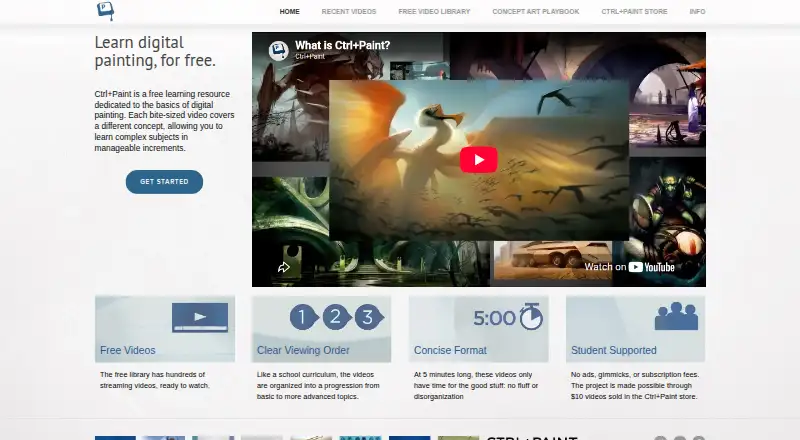
- Hundreds of free, short lessons in an ordered curriculum
- Covers drawing, color, perspective, composition, and rendering
- One-time $10 premium downloads include useful practice assets
Where it doesn't
- No instructor feedback for reviewing assignments or exercises
- Web-only access with no mobile apps
- No verified progress tracking for monitoring course completion
Our verdict on Ctrl+Paint
Ctrl+Paint is a web-based digital painting education resource created by concept artist Matt Kohr. It is designed primarily for beginners and developing digital artists who want a self-paced path from foundational drawing through digital painting techniques. The curriculum covers drawing, composition, reference use, Photoshop workflows, painting, color, perspective, and rendering. A beginner getting-started path, homework assignments, exercises, and practice drills give the library more structure than a collection of unrelated tutorials. The intended setup is a desktop or laptop with a pressure-sensitive stylus.
The free video library is the central offering, with hundreds of streaming videos arranged in an ordered curriculum-style library. Lessons are generally about five minutes, which supports incremental study and focused practice. Premium video series cost $10 as a one-time purchase and add in-depth downloadable collections covering beginner-to-intermediate subjects. Starter kits bundle premium series with digital downloads such as worksheets, images, or PSD files. Free brush and practice-sheet downloads, along with premium Photoshop brush presets, line art, reference images, worksheets, and PSD files, extend the lessons into practical exercises.
Ctrl+Paint fits learners who value a clear curriculum and low upfront cost over live instruction or progress management. Its narrow focus on digital drawing and painting is useful for beginners building fundamentals, while the downloadable materials support offline practice. The tradeoff is that learning remains self-directed: there is no instructor feedback, verified progress tracking, or mobile app experience, and the site advises against iPad, iPhone, and Android devices. Choose it for structured desktop-based study and affordable resource downloads; look elsewhere if feedback, mobile learning, or tracked course progress is essential.
Ctrl+Paint pricing
All 3 Ctrl+Paint plans and prices →
Ctrl+Paint fact sheet
| Free plan | Yes |
|---|---|
| Paid from | Not verified |
| Guided projects | Yes |
| Instructor feedback | No |
| Live classes | Not verified |
| Progress tracking | Not verified |
| Offline access | Yes |
| Mobile platforms | none |
| Art history lessons | Yes |
| Deployment | Cloud |
| Platforms | Web |
| Support | Email, Docs |
| Built for | Solo, Small business (editorial estimate) |
| Pricing | Free plan · paid from $10 (source) |
| Website | ctrlpaint.com |
| Facts checked | 21 Sep 2026 |
Alternatives to Ctrl+Paint
- Art ProfA broad art-learning platform combining adaptive study, feedback, and live mentoring.9.3
- DigitalPainting.SchoolA focused learning platform for artists who want guided practice and professional feedback.8.5
- Creature Art TeacherA broad art-learning library with mobile access, workshops, and instructor critique.8.4

See all Ctrl+Paint alternatives →
Used Ctrl+Paint? Be the first to review it
The editor score above is our own research. What this page doesn't have yet is a reader's view — what you used Ctrl+Paint for, what worked and what didn't. No stars are seeded and no review is paid for; an editor reads every one before it appears.
Write a reviewTwo minutes · verified accounts only · read by an editor before it appears
Featured on iTechGuides

Ctrl+Paint is listed in our Art Learning Apps directory. Add the badge to your site — it links back to this page.
<a href="https://www.itechguides.com/products/ctrl-paint/"><img src="https://www.itechguides.com/best/badge/ctrl-paint.svg" alt="Featured on iTechGuides" width="230" height="46"></a>
Reviewed by iTechGuides Editors · Editorial team · Updated Sep 2026
Advertiser disclosure: iTechGuides is reader-supported. We may earn a commission when you click some links. How we rank.
Last updated · How we research and update