
CRX Extractor
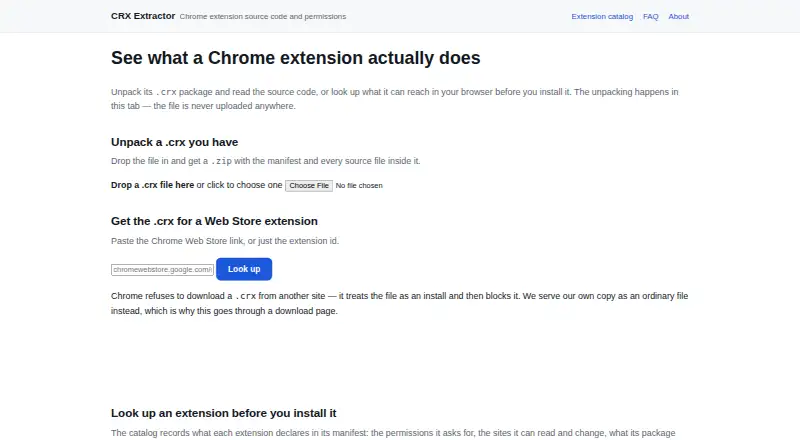
CRX Extractor: A focused, privacy-minded tool for extracting and reviewing Chrome extension packages. Ranked #65 of 69 in File Conversion Software by our editors (3.0/10); pricing: Free plan; best for local Chrome extension package extraction.
At a glance
- Editor score3.0 / 10
- PricingFree plan
- Best forLocal Chrome extension package extraction
- Free planYes
- Paid fromFree
- Facts checked22 Sep 2026
Where it wins
- Processes CRX files locally without uploading them
- Inspects manifests, permissions, hosts, and source files
- Free, open-source browser tool with offline extraction
Where it doesn't
- Supports one specialized package type: .crx files
- Provides web deployment rather than a desktop application
- Support is limited to email and documentation
Our verdict on CRX Extractor
CRX Extractor is a browser-based tool for unpacking Chrome extension packages. It is designed for people who need to examine a .crx file, retrieve an extension from a Chrome Web Store link or extension ID, or review an extension’s contents before working with it. The output is a .zip archive containing the manifest and source files, while the interface catalogs declared permissions, host access, package contents, and referenced external hosts. Its focused scope makes it a fit for solo users and small teams handling Chrome extension files rather than broad file-conversion workflows.
The strongest distinction is local processing. CRX Extractor processes files in the browser without uploading them and can work offline for local CRX extraction. That makes its workflow appropriate when package contents need to remain on the user’s device. The tool can also show the package structure and extract source files, giving users a practical way to inspect what an extension contains. These capabilities are centered on visibility and extraction rather than general-purpose conversion, so users looking to convert many unrelated file formats should choose a broader tool instead.
CRX Extractor is free and provides open-source code under the GPL v3 license. Its deployment is web-based, with email and documentation listed as support channels. The product is a strong choice for local Chrome extension analysis, manifest review, and CRX-to-ZIP extraction without an upload step. It is less suitable for teams that need enterprise administration, extensive integrations, or a wider conversion catalog. Choose it when Chrome extension packages are the specific problem; choose an alternative when the workflow extends beyond that narrow file type.
Your product? Our editors can test CRX Extractor in depth and publish a review, labelled as paid · from $149/mo →
CRX Extractor pricing
CRX Extractor fact sheet
| Free plan | Yes |
|---|---|
| Paid from | Free |
| Max file size | Not verified |
| Batch conversion | Not verified |
| Cloud conversion | No |
| API access | Not verified |
| OCR conversion | Not verified |
| Deployment | Web |
| Deployment | Cloud |
| Platforms | Web |
| Support | Email, Docs |
| Built for | Solo, Small business (editorial estimate) |
| Pricing | Free plan |
| Website | crxextractor.com |
| Facts checked | 22 Sep 2026 |
Alternatives to CRX Extractor
- PandocA broad, programmable converter for technical documents, markup, and publishing workflows.9.3
- ConvertioA broad converter for documents, media, batch jobs, OCR, and automated workflows.9.1
- Zamzar APIA broad, asynchronous conversion API with flexible imports, exports, and extraction workflows.9.0



See all CRX Extractor alternatives →
Used CRX Extractor? Be the first to review it
The editor score above is our own research. What this page doesn't have yet is a reader's view — what you used CRX Extractor for, what worked and what didn't. No stars are seeded and no review is paid for; an editor reads every one before it appears.
Write a reviewTwo minutes · verified accounts only · read by an editor before it appears
Featured on iTechGuides

CRX Extractor is listed in our File Conversion Software directory. Add the badge to your site — it links back to this page.
<a href="https://www.itechguides.com/products/crx-extractor/"><img src="https://www.itechguides.com/best/badge/crx-extractor.svg" alt="Featured on iTechGuides" width="230" height="46"></a>
Reviewed by iTechGuides Editors · Editorial team · Updated Oct 2026
Advertiser disclosure: iTechGuides is reader-supported. Vendors can pay for top positions in our rankings and for a place on other products' pages, and we may earn a commission when you click some links. Bought places stand at the number bought; this page and our disclosure say so. Paying vendors may get a fuller, more detailed review from our editors, and that review can change their score. How we rank.
Last updated · How we research and update