
Craig
Craig: A low-cost Discord recorder for separate tracks, exports, notes, and transcripts. Ranked #13 of 22 in Podcast Recording Software by our editors (6.5/10); pricing: Free plan · paid from $1/mo; best for discord communities needing ultra-low-cost recording.
At a glance
- Editor score6.5 / 10
- PricingFree plan · paid from $1/mo
- Best forDiscord communities needing ultra-low-cost recording
- Free planYes
- Separate participant tracksYes
- Facts checked21 Sep 2026
Where it wins
- Separate audio track for each speaking user
- Free recording with up to 6-hour sessions
- Exports to cloud storage and editing projects
Where it doesn't
- Focused on Discord voice and stage channels
- No verified video recording
- MP3 export is unavailable
Our verdict on Craig
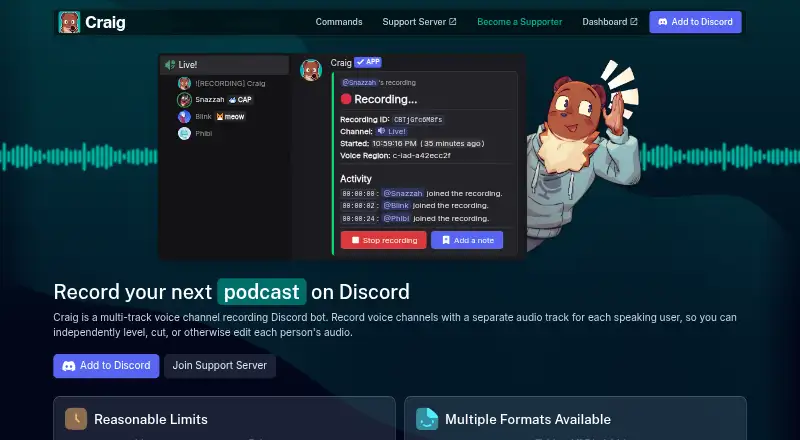
Craig is a Discord recording bot for podcasts, interviews, meetings, and other voice-channel conversations. It records each speaking participant on a separate audio track, supports voice and stage channels, and offers recordings up to 6 hours with 7-day default retention. Users can start recordings with the /join command, add timestamped notes, configure access roles, and use a browser-based webapp for additional tracks. It fits Discord communities that want structured audio capture without adopting a broader podcast production platform.
The free plan covers the core recording workflow, including separate tracks, multiple download formats, Audacity and Adobe Audition projects, timestamped notes, automatic recording rules, and transcription exports in WebVTT, SRT, and plain text. Tier 1 costs $1 per month and adds 14-day recording storage, avatar overlays, cloud backup, and one extra supporter-only bot. Tier 2 costs $4 per month, extending storage to 30 days and adding a 24-hour recording limit, continuous webapp mode, automatic recording, and four extra bots. Tier 3 costs $8 per month and adds 24-bit FLAC webapp recording, transcription exports, and seven extra bots.
Its ecosystem fit is clear: Discord is the recording environment, while Google Drive, Microsoft OneDrive, and Dropbox support automatic uploads. Downloads include FLAC and MPEG-4 AAC, alongside project files for Audacity and Adobe Audition. Avatar overlay video generation adds a visual option, but Craig remains centered on Discord audio rather than general-purpose video podcasting. Choose it for Discord-first recording, separate speaker tracks, long sessions, and very low monthly pricing. Choose an alternative if your workflow depends on verified video recording, local recording, or a broader platform beyond Discord.
Craig pricing
All 3 Craig plans and prices →
Craig fact sheet
| Free plan | Yes |
|---|---|
| Paid from | Not verified |
| Separate participant tracks | Yes |
| Local recording | Yes |
| Maximum participants | Not verified |
| Audio export format | Not verified |
| Video recording | No |
| Automatic transcription | Yes |
| Recording platform | Browser |
| Deployment | Cloud, Browser extension |
| Platforms | Web |
| Support | Email, Community, Docs |
| Built for | Solo, Small business, Mid-market (editorial estimate) |
| Integrations | 5 integrations: Google Drive, Microsoft OneDrive, Dropbox, Box, Discord |
| Pricing | Free plan · paid from $1/mo (source) |
| Website | craig.chat |
| Facts checked | 21 Sep 2026 |
Craig integrations
Craig lists 5 integrations on its own site.
- Google Drive
- Microsoft OneDrive
- Dropbox
- Box
- Discord
Alternatives to Craig
- RiversideA full recording-to-publishing workspace for creators who want polished remote production.10.0
- Adobe PodcastA capable browser studio for remote recording and AI-assisted podcast editing.8.9
- AsyncA full podcast workflow with a free plan and scalable recording, editing, and AI tools.8.5



Used Craig? Be the first to review it
The editor score above is our own research. What this page doesn't have yet is a reader's view — what you used Craig for, what worked and what didn't. No stars are seeded and no review is paid for; an editor reads every one before it appears.
Write a reviewTwo minutes · verified accounts only · read by an editor before it appears
Featured on iTechGuides

Craig is listed in our Podcast Recording Software directory. Add the badge to your site — it links back to this page.
<a href="https://www.itechguides.com/products/craig/"><img src="https://www.itechguides.com/best/badge/craig.svg" alt="Featured on iTechGuides" width="230" height="46"></a>
Guides on podcast recording software
Reviewed by iTechGuides Editors · Editorial team · Updated Sep 2026
Advertiser disclosure: iTechGuides is reader-supported. We may earn a commission when you click some links. How we rank.
Last updated · How we research and update