
Compare and Merge
Compare and Merge: A focused Windows file comparison tool with strong editing, merging, and automation features. Ranked #26 of 32 in File Comparison Software by our editors (6.2/10); pricing: Paid; best for budget Windows users comparing files and folders.
At a glance
- Editor score6.2 / 10
- PricingPaid
- Best forBudget Windows users comparing files and folders
- Free planNo
- Paid from$39.95/device one-time
- Facts checked20 Sep 2026
Where it wins
- Compares entire folders with character-level difference highlighting
- Supports in-place editing and click-or-drag merging of lines or blocks
- Includes HTML export, printing, and command-line automation
Where it doesn't
- Runs on Windows rather than across multiple desktop platforms
- The license is priced per computer, not per user
- The free evaluation is limited to up to 50 file comparisons
Our verdict on Compare and Merge
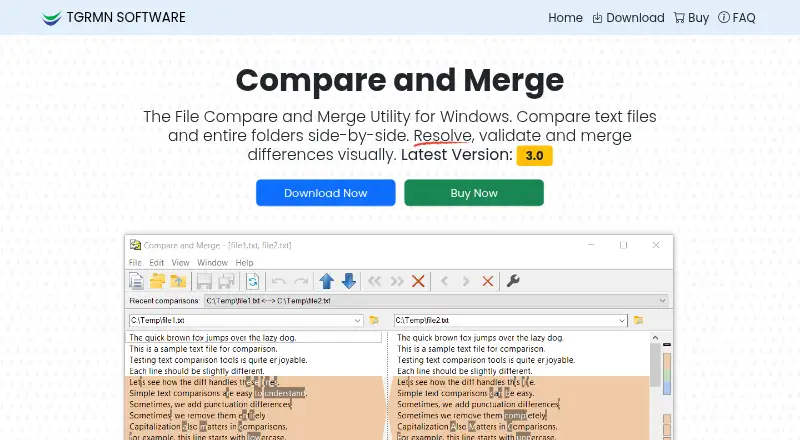
Compare and Merge is a Windows desktop utility for comparing text files, source code, web pages, and folders. It is aimed at developers and other users who need to review, validate, edit, or reconcile file differences. Side-by-side comparison covers individual files and entire folders, while character-level highlighting helps identify precise changes. The interface also supports in-place editing, dynamic re-comparison, and merging lines or blocks through clicks or drag-and-drop.
Pricing is straightforward: the Standard License costs $39.95 per computer as a one-time payment. There is no recurring per-user or per-month plan described here. The license includes text-file and folder comparison, line or block merging, in-place editing, command-line usage, and HTML export. A free evaluation is available for up to 50 file comparisons, giving prospective buyers a defined way to review the workflow before purchasing. For an individual Windows user or developer who prefers a one-time license, the pricing structure is easy to understand; teams managing multiple computers should account for each licensed installation.
The strongest feature set centers on detailed comparison and controlled reconciliation. Users can configure how case, whitespace, and line endings are handled, then review changes with multi-level undo and redo. Results can be exported to HTML or printed, and command-line automation supports repeatable comparison tasks. Version-control workflow integration is also part of the product’s positioning. Compare and Merge is a focused choice for Windows users who need file and folder comparison, editing, merging, and reporting without a subscription. It is less suitable for buyers who require a cross-platform desktop tool or prefer pricing that is not tied to each computer.
Your product? Our editors can test Compare and Merge in depth and publish a review, labelled as paid · from $149/mo →
Compare and Merge pricing
All 1 Compare and Merge plans and prices →
Compare and Merge fact sheet
| Free plan | No |
|---|---|
| Paid from | $39.95/device one-time |
| Three-way merge | Not verified |
| Folder comparison | Yes |
| Merge conflict tools | Yes |
| Binary comparison | Not verified |
| Supported platforms | Windows 11, 10, 8, 7, Vista, Windows on ARM, and Windows Server |
| Version-control support | Yes |
| Deployment | Desktop |
| Platforms | Windows |
| Support | |
| Built for | Solo, Small business, Mid-market (editorial estimate) |
| Pricing | Paid (source) |
| Website | compareandmerge.com |
| Facts checked | 20 Sep 2026 |
Alternatives to Compare and Merge
- P4MergeA free desktop diff and merge tool with Git and Perforce workflow support.9.1
- MeldA free Git-aware comparison tool with strong merge workflows, limited to Windows and Linux.9.0
- KDiff3A free, open-source desktop utility for detailed two- and three-way file merging.8.8



See all Compare and Merge alternatives →
Used Compare and Merge? Be the first to review it
The editor score above is our own research. What this page doesn't have yet is a reader's view — what you used Compare and Merge for, what worked and what didn't. No stars are seeded and no review is paid for; an editor reads every one before it appears.
Write a reviewTwo minutes · verified accounts only · read by an editor before it appears
Featured on iTechGuides

Compare and Merge is listed in our File Comparison Software directory. Add the badge to your site — it links back to this page.
<a href="https://www.itechguides.com/products/compare-and-merge/"><img src="https://www.itechguides.com/best/badge/compare-and-merge.svg" alt="Featured on iTechGuides" width="230" height="46"></a>
Reviewed by iTechGuides Editors · Editorial team · Updated Oct 2026
Advertiser disclosure: iTechGuides is reader-supported. Vendors can pay for top positions in our rankings and for a place on other products' pages, and we may earn a commission when you click some links. Bought places stand at the number bought; this page and our disclosure say so. Paying vendors may get a fuller, more detailed review from our editors, and that review can change their score. How we rank.
Last updated · How we research and update