
ComfyUI
ComfyUI: A flexible open-source workflow engine for creators who need deep control. Ranked #8 of 123 in AI Image Generators by our editors (8.8/10); pricing: Free plan; best for advanced workflow builders.
At a glance
- Editor score8.8 / 10
- PricingFree plan
- Best forAdvanced workflow builders
- Free planYes
- Paid from$192/yr
- Text-to-imageYes
- Facts checked20 Sep 2026
Where it wins
- Free open-source core with local and self-hosted execution
- Supports generation, editing, compositing, model merging, and upscaling
- Offers custom nodes, local APIs, reusable subgraphs, and workflow templates
Where it doesn't
- Standard does not include importing custom models
- Cloud workflows have runtime limits on Standard, Creator, and Pro
- Broad support across media types may exceed the needs of focused image users
Our verdict on ComfyUI
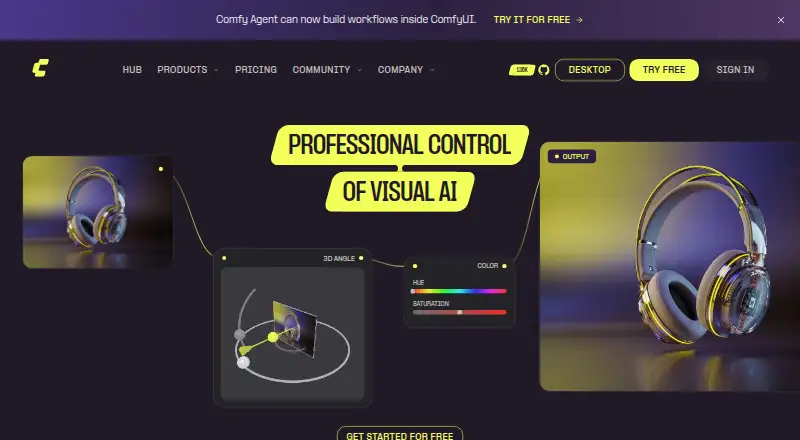
ComfyUI is an open-source, node-based AI creation engine for visual professionals, developers, and creators who want editable control over image-generation workflows. Users connect models, parameters, processing steps, and outputs in a visual graph. The product supports text-to-image generation, reference-image workflows, image-to-image generation, inpainting, outpainting, masking, compositing, model merging, and upscaling. It also extends to video, audio, 3D, and text workflows.
The core is free for local and self-hosted use. Comfy Cloud plans start with Standard at $20 per month, including a 30-minute maximum workflow runtime and additional credit purchases, but no custom-model importing. Creator costs $35 per month and adds custom-model importing while retaining the 30-minute limit. Pro costs $100 per month, includes custom models, and allows workflows of up to one hour. Team is $700 per month with shared credits, member invites, concurrent execution, and role-based permissions. Enterprise offers custom features and flexibility through sales contact.
Platform coverage is a major part of ComfyUI’s fit: it runs on Windows, macOS, and Linux, is available on the web through Comfy Cloud, and provides API access for local and headless workflow execution. Custom nodes, Partner Nodes, workflow templates, reusable subgraphs, App Mode, and workflow metadata handling support repeatable production pipelines. Choose ComfyUI when you need compositing, custom models, extensible graphs, or application integration. Choose another tool if you want a narrowly focused image generator with less workflow configuration.
Your product? Our editors can test ComfyUI in depth and publish a review, labelled as paid · from $149/mo →
ComfyUI pricing
All 4 ComfyUI plans and prices →
ComfyUI fact sheet
| Free plan | Yes |
|---|---|
| Paid from | $192/yr |
| Text-to-image | Yes |
| Reference images | Yes |
| Image editing | Yes |
| Monthly credits | Not verified |
| Commercial use | Not verified |
| API access | Yes |
| Output formats | PNG, EXR, AVIF |
| Deployment | Cloud, Self-hosted, Desktop |
| Platforms | Web, Windows, macOS, Linux |
| Support | Community, Docs |
| Built for | Solo, Small business, Mid-market, Enterprise (editorial estimate) |
| Integrations | 4 integrations: Photoshop, Nuke, Blender, Houdini |
| Pricing | Free plan (source) |
| Website | comfy.org |
| Facts checked | 20 Sep 2026 |
ComfyUI integrations
ComfyUI lists 4 integrations on its own site.
- Photoshop
- Nuke
- Blender
- Houdini
Alternatives to ComfyUI
- ShutterstockA stock library with a built-in AI image generator; credits come with the Unlimited plans.9.7
- Adobe FireflyA broad image-generation and editing toolkit for teams centered on Adobe.9.4
- RecraftA versatile image workspace spanning generation, editing, vector output, and API access.9.3



See all ComfyUI alternatives →
ComfyUI vs the competition
- ComfyUI vs Shutterstock
- ComfyUI vs Recraft
- ComfyUI vs Midjourney
- ComfyUI vs Leonardo.Ai
- ComfyUI vs Ideogram
- ComfyUI vs AUTOMATIC1111 Stable Diffusion WebUI


Compare ComfyUI with any tool side by side →
Also Ranked In
ComfyUI is ranked in 5 of our directories.
Used ComfyUI? Be the first to review it
The editor score above is our own research. What this page doesn't have yet is a reader's view — what you used ComfyUI for, what worked and what didn't. No stars are seeded and no review is paid for; an editor reads every one before it appears.
Write a reviewTwo minutes · verified accounts only · read by an editor before it appears
Featured on iTechGuides

ComfyUI is listed in our AI Image Generators directory. Add the badge to your site — it links back to this page.
<a href="https://www.itechguides.com/products/comfyui/"><img src="https://www.itechguides.com/best/badge/comfyui.svg" alt="Featured on iTechGuides" width="230" height="46"></a>
Reviewed by iTechGuides Editors · Editorial team · Updated Oct 2026
Advertiser disclosure: iTechGuides is reader-supported. Vendors can pay for top positions in our rankings and for a place on other products' pages, and we may earn a commission when you click some links. Bought places stand at the number bought; this page and our disclosure say so. Paying vendors may get a fuller, more detailed review from our editors, and that review can change their score. How we rank.
Last updated · How we research and update