ComfyUI Video Stabilizer
ComfyUI Video Stabilizer: A configurable local stabilizer for ComfyUI video-processing workflows. Ranked #8 of 33 in AI Video Stabilization Software by our editors (8.4/10); pricing: Open source; best for comfyUI users wanting configurable local workflows.
At a glance
- Editor score8.4 / 10
- PricingOpen source
- Best forComfyUI users wanting configurable local workflows
- Paid fromFree
- Facts checked22 Sep 2026
Where it wins
- Offers feature-tracking and dense optical-flow stabilization
- Includes camera lock, crop, padding, and field-of-view controls
- Supports motion restoration and deterministic artificial shake
Where it doesn't
- Requires a ComfyUI-based local workflow
- Framing choices add crop, padding, or expansion decisions
- Horizon controls apply to generated shake rather than automatic correction
Our verdict on ComfyUI Video Stabilizer
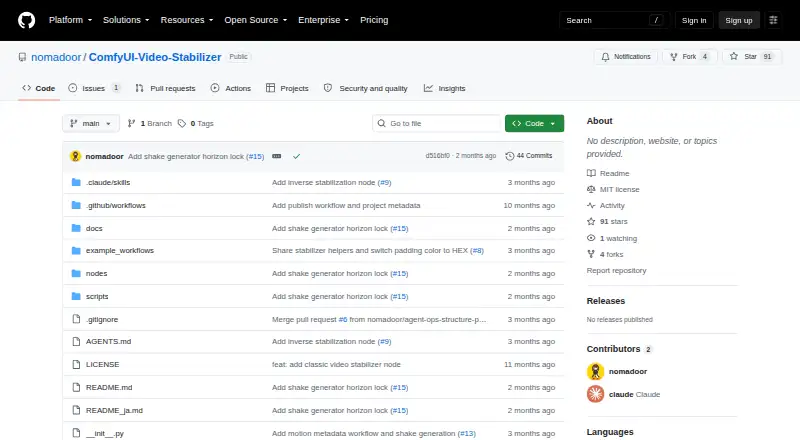
ComfyUI Video Stabilizer is an open-source custom-node package from nomadoor for stabilizing camera movement in video frame sequences. It is aimed at ComfyUI users building local video-processing or AI-video workflows who want control over how movement is analyzed, reduced, restored, or introduced. The package offers two primary approaches: Video Stabilizer Classic uses feature tracking, while Video Stabilizer Flow uses dense optical flow. Both are presented alongside configurable stabilization strength and temporal smoothing, giving users control over the balance between correction and retained motion.
Its strongest fit is a configurable ComfyUI ecosystem. Integration with ComfyUI and ComfyUI Manager keeps the package within that node-based environment, while camera-lock mode can produce a tripod-like result. Crop, crop-and-pad, and expand framing modes address the image-area changes that can accompany stabilization, and field-of-view preservation controls provide another way to manage the resulting composition. This breadth makes the package more suitable for users who want to adjust stabilization and framing inside an existing workflow than for people seeking a standalone application.
The package also goes beyond removing movement. Motion metadata can restore camera motion that stabilization removed, and deterministic artificial shake can add repeatable movement through manual pan, tilt, roll, and zoom controls. That combination supports workflows requiring both correction and designed motion, but it also makes the tool more specialized than a simple one-purpose stabilizer. Choose it if your work already runs in ComfyUI and you value local, adjustable node-based processing. Choose an alternative if you need a platform outside ComfyUI, a standalone workflow, or automatic horizon correction rather than controls focused on generated shake.
Your product? Our editors can test ComfyUI Video Stabilizer in depth and publish a review, labelled as paid · from $149/mo →
ComfyUI Video Stabilizer pricing
ComfyUI Video Stabilizer fact sheet
| Free plan | Not verified |
|---|---|
| Paid from | Free |
| Horizon leveling | Not verified |
| Rolling-shutter correction | Not verified |
| Batch processing | Not verified |
| Maximum output resolution | Not verified |
| Processing mode | Local |
| Supported platforms | ComfyUI |
| Deployment | Self-hosted |
| Support | Docs |
| Built for | Solo, Small business (editorial estimate) |
| Integrations | 2 integrations: ComfyUI, ComfyUI Manager |
| Pricing | Open source |
| Website | github.com |
| Facts checked | 22 Sep 2026 |
ComfyUI Video Stabilizer integrations
ComfyUI Video Stabilizer lists 2 integrations on its own site.
- ComfyUI
- ComfyUI Manager
Alternatives to ComfyUI Video Stabilizer
- GyroflowA free, open-source stabilizer with deep correction controls and broad editor support.9.4
- EmulsioA focused Apple app for adjustable stabilization, correction, slow motion, and 4K upscaling.9.1
- proDAD Mercalli V6 SALA focused Windows tool for correcting shake, rolling shutter, and wide-angle footage.8.9

See all ComfyUI Video Stabilizer alternatives →
ComfyUI Video Stabilizer vs the competition
- ComfyUI Video Stabilizer vs Gyroflow
- ComfyUI Video Stabilizer vs Emulsio
- ComfyUI Video Stabilizer vs proDAD Mercalli V6 SAL
- ComfyUI Video Stabilizer vs Vidhance Video Stabilization
- ComfyUI Video Stabilizer vs UniFab Video Stabilizer AI
- ComfyUI Video Stabilizer vs VidHex AI Video Stabilizer



Compare ComfyUI Video Stabilizer with any tool side by side →
Used ComfyUI Video Stabilizer? Be the first to review it
The editor score above is our own research. What this page doesn't have yet is a reader's view — what you used ComfyUI Video Stabilizer for, what worked and what didn't. No stars are seeded and no review is paid for; an editor reads every one before it appears.
Write a reviewTwo minutes · verified accounts only · read by an editor before it appears
Featured on iTechGuides

ComfyUI Video Stabilizer is listed in our AI Video Stabilization Software directory. Add the badge to your site — it links back to this page.
<a href="https://www.itechguides.com/products/comfyui-video-stabilizer/"><img src="https://www.itechguides.com/best/badge/comfyui-video-stabilizer.svg" alt="Featured on iTechGuides" width="230" height="46"></a>
Reviewed by iTechGuides Editors · Editorial team · Updated Oct 2026
Advertiser disclosure: iTechGuides is reader-supported. Vendors can pay for top positions in our rankings and for a place on other products' pages, and we may earn a commission when you click some links. Bought places stand at the number bought; this page and our disclosure say so. Paying vendors may get a fuller, more detailed review from our editors, and that review can change their score. How we rank.
Last updated · How we research and update