
Clockoli
Clockoli: A focused, free time-billing extension for GitHub-based teams. Ranked #31 of 31 in Time Billing Software by our editors (6.1/10); pricing: Free plan; best for gitHub-based teams tracking developer time.
At a glance
- Editor score6.1 / 10
- PricingFree plan
- Best forGitHub-based teams tracking developer time
- Free planYes
- Paid fromFree
- Invoice generationYes
- Facts checked20 Sep 2026
Where it wins
- Tracks GitHub issues, pull requests, and arbitrary website URLs
- Includes reports, exports, billable rates, and invoice generation
- Free forever with no seat or usage limits
Where it doesn't
- Limited to a Chrome/Chromium browser extension
- GitHub-focused scope may not fit broader billing workflows
- Distributed as an unpacked extension during open beta
Our verdict on Clockoli
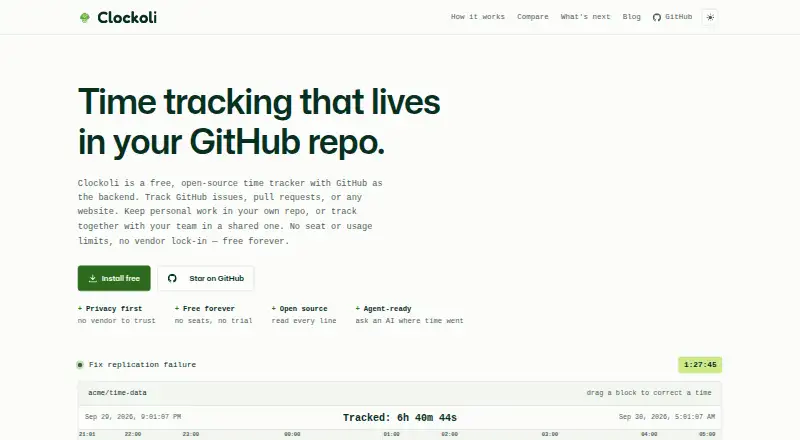
Clockoli is an open-source time-tracking browser extension for individuals and teams that manage work through GitHub. It records time against GitHub issues and pull requests, while also allowing arbitrary website URLs to serve as tasks. The product combines timers, inline time editing, calendar and draggable timeline views, cross-repository team reports, browser-local billable hourly rates, exports, and invoice generation. Its strongest fit is a GitHub-based development team that wants time data stored in its own GitHub repository rather than in a separate tracking server or per-seat subscription service.
Pricing is straightforward: the Free plan costs 0 and is free forever. It includes open-source access, no seat or usage limits, time tracking, reporting, exports, and invoicing. The plan also covers CSV, JSON, and PDF exports, plus invoice generation from filtered reports. Because Clockoli has one listed plan and an open-source model, teams can evaluate its full stated feature set without comparing paid tiers. Repository storage with Git history gives the product a distinct data-management approach, while browser-local billable rates keep hourly rate information within the browser context.
The main trade-off is focus. Clockoli integrates with GitHub and is delivered as a Chrome/Chromium extension, so its workflow is closely tied to that browser and ecosystem. Its feature set reaches beyond basic timers with mixed time capture, editable records, reporting, and billing outputs, but the product is still positioned around GitHub work rather than broad, multi-platform time billing. It should suit teams whose work already lives in GitHub and who value open-source control. Organizations seeking wider platform coverage or a less GitHub-centered workflow should consider an alternative.
Your product? Our editors can test Clockoli in depth and publish a review, labelled as paid · from $149/mo →
Clockoli pricing
All 1 Clockoli plans and prices →
Clockoli fact sheet
| Free plan | Yes |
|---|---|
| Paid from | Free |
| Invoice generation | Yes |
| Time capture | Mixed |
| Billable rates | Yes |
| Time approval | Not verified |
| Expense billing | Not verified |
| Recurring invoices | Not verified |
| Client portal | Not verified |
| Deployment | Browser extension |
| Platforms | Chrome extension |
| Support | Email, Community |
| Built for | Solo, Small business (editorial estimate) |
| Integrations | 1 integrations: GitHub |
| Pricing | Free plan (source) |
| Website | clockoli.com |
| Facts checked | 20 Sep 2026 |
Clockoli integrations
Clockoli lists 1 integrations on its own site.
- GitHub
Alternatives to Clockoli
- ScoroA broad time-billing and professional services suite for end-to-end financial control.9.2
- FreshBooksA strong invoicing-led choice with time tracking, payments, and client collaboration.9.0
- HarvestA focused time-billing suite with broad tracking, reporting, and invoicing coverage.8.8



See all Clockoli alternatives →
Used Clockoli? Be the first to review it
The editor score above is our own research. What this page doesn't have yet is a reader's view — what you used Clockoli for, what worked and what didn't. No stars are seeded and no review is paid for; an editor reads every one before it appears.
Write a reviewTwo minutes · verified accounts only · read by an editor before it appears
Featured on iTechGuides

Clockoli is listed in our Time Billing Software directory. Add the badge to your site — it links back to this page.
<a href="https://www.itechguides.com/products/clockoli/"><img src="https://www.itechguides.com/best/badge/clockoli.svg" alt="Featured on iTechGuides" width="230" height="46"></a>
Reviewed by iTechGuides Editors · Editorial team · Updated Oct 2026
Advertiser disclosure: iTechGuides is reader-supported. Vendors can pay for top positions in our rankings and for a place on other products' pages, and we may earn a commission when you click some links. Bought places stand at the number bought; this page and our disclosure say so. Paying vendors may get a fuller, more detailed review from our editors, and that review can change their score. How we rank.
Last updated · How we research and update