
ClipCast
ClipCast: An affordable browser recorder with strong sharing, editing, and team features. Ranked #24 of 131 in Screen Recording Software by our editors (6.7/10); pricing: Free plan · 14-day trial; best for teams wanting affordable browser-based sharing.
At a glance
- Editor score6.7 / 10
- PricingFree plan · 14-day trial
- Best forTeams wanting affordable browser-based sharing
- Free planYes
- Paid from$5/mo
- Webcam recordingYes
- Facts checked22 Sep 2026
Where it wins
- Free plan includes unlimited share links and comments
- Pro adds editing, AI transcripts, summaries, and password protection
- Team includes analytics, admin roles, audit logs, and API access
Where it doesn't
- Free recordings are limited to 5 minutes and 720p
- Paid recording quality tops out at 1080p
- Integrations are limited to Dropbox, Google Drive, and Box
Our verdict on ClipCast
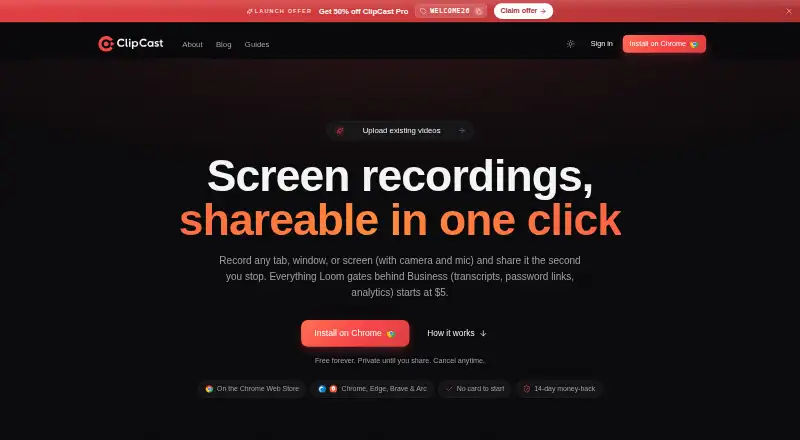
ClipCast is a browser-based screen recorder for individuals, freelancers, teams, educators, and support or sales workflows. It records browser tabs, application windows, full screens, or selected areas, with optional webcam, microphone, and browser tab or system audio. Each recording can create an instant shareable browser link and remain in a private cloud library. Recording is provided through a Chrome-compatible browser extension rather than a standalone desktop or mobile application, with access across web, Windows, macOS, Linux, and Chrome extension environments.
The plan structure makes ClipCast accessible for lightweight sharing. Free includes unlimited share links, five-minute recordings, 720p quality, 200 MB of storage, 30-day video retention, comments, reactions, and video replies. Pro costs $5 per month and adds recordings up to two hours, 1080p and source quality, 20 GB of storage, a video editor, AI transcripts and summaries, and password-protected links. Team costs $12 per seat per month and adds a shared workspace library, client review folders, admin roles, an audit log, a custom domain for share links, a full analytics dashboard, and API access.
ClipCast’s strongest fit is browser-based communication where fast sharing and review matter more than a broad ecosystem. Paid editing includes trimming, cutting, zoom, blur, text, captions, backgrounds, and music; viewers can leave timestamped comments, reactions, threaded replies, and video replies. Password protection, expiry dates, viewer analytics, and email capture support controlled distribution. Dropbox, Google Drive, and Box cover common storage connections, while MP4 and WebM uploads are available on Pro and Team. Choose ClipCast for affordable sharing and collaboration; consider an alternative if you need recording above 1080p, a standalone desktop or mobile app, or a larger integration set.
Your product? Our editors can test ClipCast in depth and publish a review, labelled as paid · from $149/mo →
ClipCast pricing
All 3 ClipCast plans and prices →
ClipCast fact sheet
| Free plan | Yes |
|---|---|
| Paid from | $5/mo |
| Webcam recording | Yes |
| System audio | Yes |
| Microphone recording | Yes |
| Max recording length | 240 minutes |
| Maximum video quality | 1080p |
| Supported platforms | web, windows, macos, linux, chrome_extension |
| Free trial | 14 days · no card needed |
| Money-back guarantee | 14 days |
| Deployment | Cloud, Browser extension |
| Platforms | Web, Windows, macOS, Linux, Chrome extension |
| Support | Email, Docs |
| Built for | Solo, Small business (editorial estimate) |
| Integrations | 3 integrations: Dropbox, Google Drive, Box |
| Pricing | Free plan · 14-day trial (source) |
| Website | clipcast.tech |
| Facts checked | 22 Sep 2026 |
ClipCast integrations
ClipCast lists 3 integrations on its own site.
- Dropbox
- Google Drive
- Box
Alternatives to ClipCast
- CamtasiaA deep desktop toolkit for training videos, tutorials, and structured learning content.9.3
- ScreenPalA feature-rich choice for budget-conscious creators who need more than basic recording.9.1
- LoomA broad screen recorder for teams that communicate through polished async video.9.0



See all ClipCast alternatives →
Also Ranked In
ClipCast is ranked in 2 of our directories.
Used ClipCast? Be the first to review it
The editor score above is our own research. What this page doesn't have yet is a reader's view — what you used ClipCast for, what worked and what didn't. No stars are seeded and no review is paid for; an editor reads every one before it appears.
Write a reviewTwo minutes · verified accounts only · read by an editor before it appears
Featured on iTechGuides

ClipCast is listed in our Screen Recording Software directory. Add the badge to your site — it links back to this page.
<a href="https://www.itechguides.com/products/clipcast/"><img src="https://www.itechguides.com/best/badge/clipcast.svg" alt="Featured on iTechGuides" width="230" height="46"></a>
Reviewed by iTechGuides Editors · Editorial team · Updated Oct 2026
Advertiser disclosure: iTechGuides is reader-supported. Vendors can pay for top positions in our rankings and for a place on other products' pages, and we may earn a commission when you click some links. Bought places stand at the number bought; this page and our disclosure say so. Paying vendors may get a fuller, more detailed review from our editors, and that review can change their score. How we rank.
Last updated · How we research and update