
Client Hub
Client Hub: A feature-rich client portal for accounting firms that need deeper workflow control. Ranked #9 of 31 in Customer Portal Software by our editors (8.5/10); pricing: 14-day trial; best for established practices needing workflow depth.
At a glance
- Editor score8.5 / 10
- Pricing14-day trial
- Best forEstablished practices needing workflow depth
- Free planNo
- Paid from$49/user/mo
- Work trackingYes
- Founded2017 · Ocala, Florida, United States
- Facts checked23 Sep 2026
Where it wins
- Requests, workflows, reminders, dashboards, and reporting in one system
- Two-way QuickBooks Online and Xero integrations
- Web, iOS, and Android coverage with AI-assisted features
Where it doesn't
- Starts at $49 per user per month with annual billing
- No free plan is available
- Several tiers and repeated Practice Manager names may require comparison
Our verdict on Client Hub
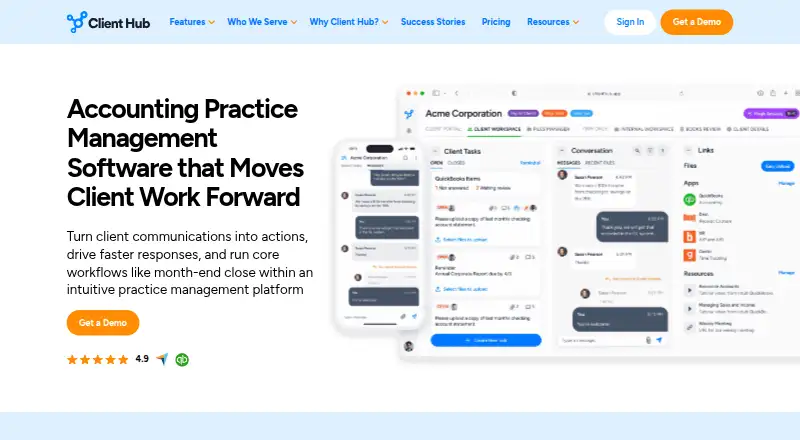
Client Hub is practice management and client portal software for bookkeeping, CPA, tax, and client accounting firms. It brings client workspaces, requests, secure messaging, file sharing, e-signatures, task management, dashboards, and reporting into one system. Firms can assign requests, set owners and deadlines, track statuses, collect documents, manage conversations, and support recurring workflows. The platform is available on web, iOS, and Android, with pricing based on firm users rather than clients and unlimited clients included in the plans shown.
Pricing is structured around annual billing. Solopreneur costs $49 per user per month and is limited to solo user firms, while including all features. Practice Manager costs $59 per firm user per month and adds complete practice management with a client portal. The $79 and $99 Practice Manager options include QuickBooks and Xero integrations. A guided 14-day trial provides an evaluation period, but firms seeking a free plan will need a different pricing model. The user-based structure may fit practices that want client access without per-client pricing, while the annual commitment deserves attention during budgeting.
The standout strength is breadth: Client Hub combines request intake, workflow and task tracking, shared folders, bulk downloads, signatures, reminders, recurring workflows, workload dashboards, and client reporting. AI assistance covers reply drafting, thread summaries, workflow generation, and report insights. Integrations with QuickBooks Online, Xero, Zapier, Microsoft 365, and Google Mail support an accounting-focused ecosystem, with two-way QuickBooks Online and Xero connections on applicable plans. Established practices that need workflow depth and coordinated client communication should find the feature coverage relevant. Smaller firms wanting a simpler portal or no-cost entry point may prefer a narrower option.
Your product? Our editors can test Client Hub in depth and publish a review, labelled as paid · from $149/mo →
Client Hub pricing
All 2 Client Hub plans and prices →
Client Hub fact sheet
| Free plan | No |
|---|---|
| Paid from | $49/user/mo |
| Client user limit | Not verified |
| Request intake | Yes |
| Work tracking | Yes |
| File sharing | Yes |
| Custom domain | Yes |
| Single sign-on | Not verified |
| Free trial | 14 days |
| Deployment | Cloud, Mobile |
| Platforms | Web, iOS, Android |
| Compliance & security | SOC 2, ISO 27001 |
| Support | Phone, Email, Live chat, Community |
| Built for | Solo, Small business, Mid-market (editorial estimate) |
| Integrations | 5,000+ integrations: QuickBooks Online, Xero, Anchor, Gmail, Microsoft Outlook, Zapier See all → |
| Pricing | 14-day trial (source) |
| Website | clienthub.app |
| Facts checked | 23 Sep 2026 |
Client Hub integrations
Client Hub lists 5,000+ integrations on its own site — the 6 named here are the ones its pages call out.
- QuickBooks Online
- Xero
- Anchor
- Gmail
- Microsoft Outlook
- Zapier
See all Client Hub integrations →
Alternatives to Client Hub
- AssemblyA broad client portal with onboarding, billing, files, workflows, and a free plan.9.4
- PlutioA broad client portal suite for small firms that want projects, billing, forms, and automation together.9.2
- SuiteDashA broad client-service suite combining portals, CRM, projects, billing, and communication.9.1



See all Client Hub alternatives →
Used Client Hub? Be the first to review it
The editor score above is our own research. What this page doesn't have yet is a reader's view — what you used Client Hub for, what worked and what didn't. No stars are seeded and no review is paid for; an editor reads every one before it appears.
Write a reviewTwo minutes · verified accounts only · read by an editor before it appears
Featured on iTechGuides

Client Hub is listed in our Customer Portal Software directory. Add the badge to your site — it links back to this page.
<a href="https://www.itechguides.com/products/client-hub/"><img src="https://www.itechguides.com/best/badge/client-hub.svg" alt="Featured on iTechGuides" width="230" height="46"></a>
Reviewed by iTechGuides Editors · Editorial team · Updated Oct 2026
Advertiser disclosure: iTechGuides is reader-supported. Vendors can pay for top positions in our rankings and for a place on other products' pages, and we may earn a commission when you click some links. Bought places stand at the number bought; this page and our disclosure say so. Paying vendors may get a fuller, more detailed review from our editors, and that review can change their score. How we rank.
Last updated · How we research and update