Clean Master
Clean Master: A broad Windows 10 utility suite with free essentials and paid advanced tools. Ranked #44 of 97 in PC Optimization Software by our editors (5.1/10); pricing: Free plan; best for windows 10 users wanting broad free utilities.
At a glance
- Editor score5.1 / 10
- PricingFree plan
- Best forWindows 10 users wanting broad free utilities
- Free planYes
- Junk cleanupYes
- Facts checked21 Sep 2026
Where it wins
- Covers junk cleaning, startup management, privacy, drivers, and recovery
- Standard includes junk cleaning, PC boost, and privacy cleaning
- Professional adds recovery, shredding, auto-cleaning, and driver updates
Where it doesn't
- Platform support is limited to Windows
- Documented Windows support spans XP, 7, 8, and 10
- Several advanced features require the Professional edition
Our verdict on Clean Master
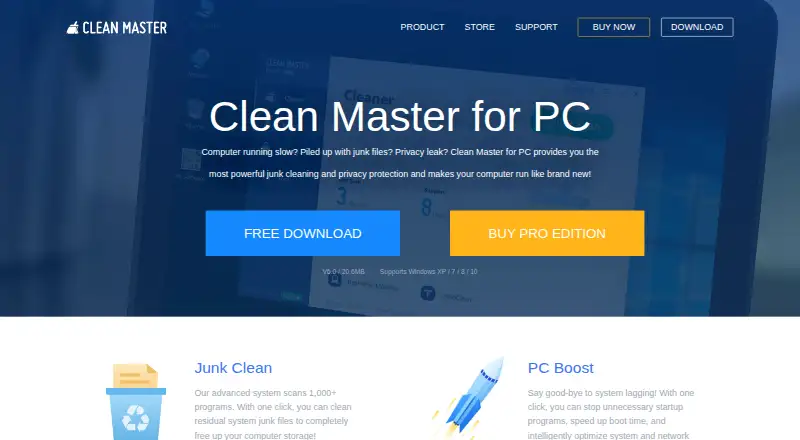
Clean Master for PC is a Windows utility suite aimed at people who want several maintenance tasks in one application. It removes system, residual, registry, application, and browser junk; manages startup programs; supports PC and network optimization; cleans browsing traces; scans and updates drivers; recovers files; and shreds sensitive data. The free Standard edition covers the core cleanup, boosting, and privacy functions, making it a practical fit for Windows 10 users seeking broad free utilities rather than a narrowly focused cleaner.
The feature range is the main attraction. Standard includes Junk cleaning, PC boost, and Privacy cleaning, while Professional adds File recovery, Driver booster, Automatic updates, Junk auto-clean, File shredder, and Browser auto-clean. Driver updates also include Windows restore-point creation, which adds a rollback step to that part of maintenance. This combination gives Clean Master a wider remit than a basic junk-file remover, especially for users who want startup controls, privacy cleanup, recovery, and file deletion alongside routine maintenance.
The trade-off is platform scope and edition separation. The documented Windows support covers Windows XP, 7, 8, and 10, and the platform listing is Windows-only, so it is not suited to users seeking a cross-platform utility. Users who only need junk cleanup, startup management, and privacy cleaning should look at Standard; those needing recovery, driver automation, shredding, or automatic browser and junk cleaning need Professional. Clean Master is therefore a sensible choice for Windows 10 users who value breadth, but less suitable for users on other platforms or those wanting a single-purpose optimizer.
Your product? Our editors can test Clean Master in depth and publish a review, labelled as paid · from $149/mo →
Clean Master pricing
All 2 Clean Master plans and prices →
Clean Master fact sheet
| Free plan | Yes |
|---|---|
| Paid from | Not verified |
| Junk cleanup | Yes |
| Startup manager | Yes |
| Driver updates | Yes |
| Scheduled maintenance | Not verified |
| Windows support | Windows 10 |
| Device limit | Not verified |
| Restore-point tools | Yes |
| Money-back guarantee | 30 days |
| Deployment | Desktop |
| Platforms | Windows |
| Support | Docs |
| Built for | Solo, Small business (editorial estimate) |
| Pricing | Free plan (source) |
| Website | cleanmasterofficial.com |
| Facts checked | 21 Sep 2026 |
Alternatives to Clean Master
- Microsoft PC ManagerA broad free toolkit for routine Windows cleanup, health checks, and maintenance.9.4
- CCleanerA mature PC cleaner with broad maintenance tools and a useful free plan.9.3
- Advanced SystemCareA broad Windows optimizer with a capable free plan and one-device scope.9.2


See all Clean Master alternatives →
Used Clean Master? Be the first to review it
The editor score above is our own research. What this page doesn't have yet is a reader's view — what you used Clean Master for, what worked and what didn't. No stars are seeded and no review is paid for; an editor reads every one before it appears.
Write a reviewTwo minutes · verified accounts only · read by an editor before it appears
Featured on iTechGuides

Clean Master is listed in our PC Optimization Software directory. Add the badge to your site — it links back to this page.
<a href="https://www.itechguides.com/products/clean-master/"><img src="https://www.itechguides.com/best/badge/clean-master.svg" alt="Featured on iTechGuides" width="230" height="46"></a>
Reviewed by iTechGuides Editors · Editorial team · Updated Oct 2026
Advertiser disclosure: iTechGuides is reader-supported. Vendors can pay for top positions in our rankings and for a place on other products' pages, and we may earn a commission when you click some links. Bought places stand at the number bought; this page and our disclosure say so. Paying vendors may get a fuller, more detailed review from our editors, and that review can change their score. How we rank.
Last updated · How we research and update