
Cibus KDS
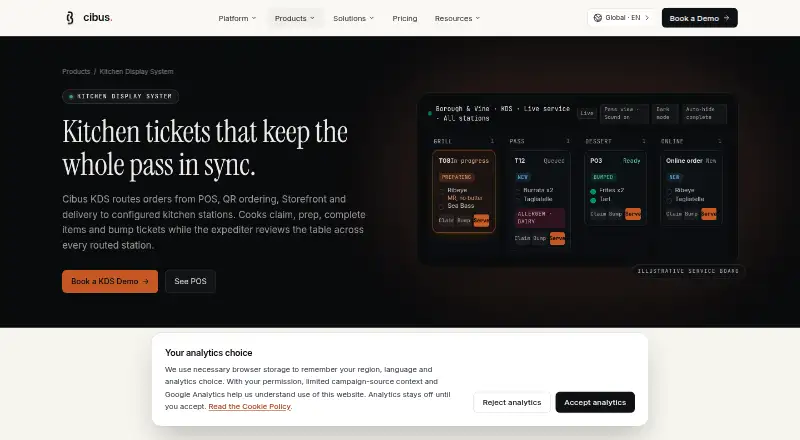
Cibus KDS: A detailed KDS for restaurants that need station routing, readiness tracking and expo control. Ranked #30 of 49 in Kitchen Display System Software by our editors (6.2/10); pricing: Pricing on request; best for teams needing detailed ticket controls.
At a glance
- Editor score6.2 / 10
- PricingPricing on request
- Best forTeams needing detailed ticket controls
- Station routingYes
- Facts checked20 Sep 2026
Where it wins
- Routes orders by station and tracks tickets from new through served
- Combines item readiness, expediter views, timers and priority badges
- Displays modifiers, allergen notes, alerts, reprints and ticket history
Where it doesn't
- Pricing requires a sales conversation tailored to operational needs
- Its detailed controls may exceed the needs of simpler kitchens
- Payment and hardware requirements are part of the purchasing discussion
Our verdict on Cibus KDS
Cibus KDS is a kitchen display system for restaurants and hospitality teams managing orders across kitchen stations. It routes POS, QR ordering, Storefront and delivery orders to configured destinations, while staff can claim tickets, track preparation, mark individual items ready, bump tickets and serve completed orders. Teams needing detailed ticket controls will find coverage for station routing, order status tracking and an all-stations expediter view.
The operating model connects Cibus KDS with POS, QR ordering, Storefront, delivery, Staff Mobile, Admin Dashboard, and Payments & Receipts. That gives it a wider restaurant-system role than a display focused only on incoming tickets. The expediter view groups readiness across stations, helping teams follow incomplete orders across the kitchen rather than relying only on a single station screen. Prep timers, timing thresholds, priority badges, configurable sound alerts and screen lock add control over how tickets are surfaced during service.
Pricing is handled through a sales conversation and depends on product mix, location count, payment setup, hardware needs and support level. That approach suits restaurant teams whose deployment requirements vary, but it makes the buying process less direct than a fixed-plan product. Cibus KDS is a strong fit for operations that need item-level readiness, allergen notes, internal instructions, reprints and historical ticket review in one workflow. Teams seeking only a basic order queue may prefer a simpler tool with fewer operational controls and a more straightforward purchasing path.
Your product? Our editors can test Cibus KDS in depth and publish a review, labelled as paid · from $149/mo →
Cibus KDS pricing
Cibus KDS fact sheet
| Free plan | Not verified |
|---|---|
| Paid from | Not verified |
| Station routing | Yes |
| Order status tracking | Yes |
| Expo screen | Yes |
| Display platforms | Not verified |
| Offline mode | Not verified |
| Deployment | Not verified |
| Maximum stations | Not verified |
| Compliance & security | GDPR |
| Support | |
| Built for | Small business, Mid-market, Enterprise (editorial estimate) |
| Integrations | 7 integrations: POS, QR ordering, Storefront, delivery, Staff Mobile, Admin Dashboard … |
| Pricing | Pricing on request (source) |
| Website | cibus.ai |
| Facts checked | 20 Sep 2026 |
Cibus KDS integrations
Cibus KDS lists 7 integrations on its own site.
- POS
- QR ordering
- Storefront
- delivery
- Staff Mobile
- Admin Dashboard
- Payments & Receipts
Alternatives to Cibus KDS
- Epson TrueOrder KDSA focused on-premise KDS for Epson-centered routing, expo, printing, and analytics.9.3
- Oracle MICROS Simphony KDSA specialized KDS for coordinating complex restaurant production workflows.9.1
- Clover Kitchen Display SystemA Clover-focused KDS for routing kitchen orders and tracking fulfillment on dedicated displays.8.9


See all Cibus KDS alternatives →
Used Cibus KDS? Be the first to review it
The editor score above is our own research. What this page doesn't have yet is a reader's view — what you used Cibus KDS for, what worked and what didn't. No stars are seeded and no review is paid for; an editor reads every one before it appears.
Write a reviewTwo minutes · verified accounts only · read by an editor before it appears
Featured on iTechGuides

Cibus KDS is listed in our Kitchen Display System Software directory. Add the badge to your site — it links back to this page.
<a href="https://www.itechguides.com/products/cibus-kds/"><img src="https://www.itechguides.com/best/badge/cibus-kds.svg" alt="Featured on iTechGuides" width="230" height="46"></a>
Reviewed by iTechGuides Editors · Editorial team · Updated Oct 2026
Advertiser disclosure: iTechGuides is reader-supported. Vendors can pay for top positions in our rankings and for a place on other products' pages, and we may earn a commission when you click some links. Bought places stand at the number bought; this page and our disclosure say so. Paying vendors may get a fuller, more detailed review from our editors, and that review can change their score. How we rank.
Last updated · How we research and update