ChromaCam
ChromaCam: A capable Windows and macOS webcam tool for AI backgrounds across desktop apps. Ranked #34 of 41 in Webcam Software by our editors (4.9/10); pricing: Free plan; best for AI background replacement across desktop apps.
At a glance
- Editor score4.9 / 10
- PricingFree plan
- Best forAI background replacement across desktop apps
- Free planYes
- Virtual cameraYes
- Facts checked20 Sep 2026
Where it wins
- Replaces or blurs backgrounds without a green screen
- Works with Zoom, Teams, Google Meet, OBS, Twitch, and more
- Processes webcam video on the device
Where it doesn't
- Support is limited to Windows and macOS
- Pricing pages use volume-pricing structures
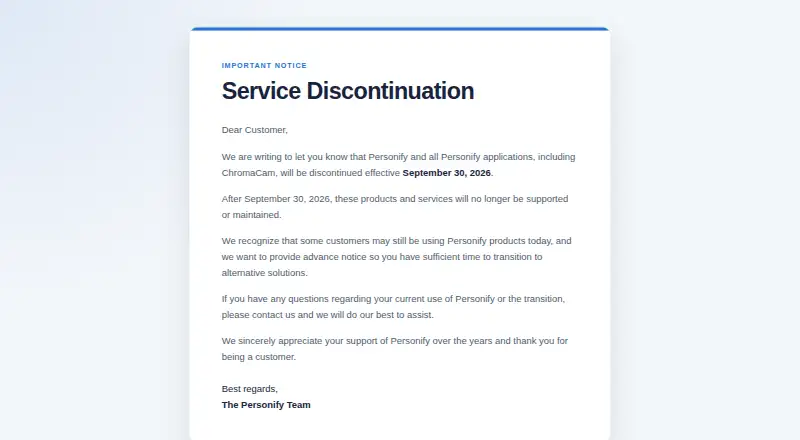
- The product is scheduled for discontinuation on September 30, 2026
Our verdict on ChromaCam
ChromaCam is an AI-based webcam application for video conferencing, online learning, streaming, and presentations. It replaces or blurs webcam backgrounds without a green screen, supports custom images and logos, and adds video backgrounds, streaming effects, 3D avatars, facial tracking, and presentation slides. Its virtual camera compatibility lets it work with desktop video applications, making it a fit for people who want consistent visual effects across meetings, classes, streams, and presentations. Official documentation identifies Windows and macOS support.
The published plans show a free ChromaCam Lite option with a virtual green screen, limited background blur, and standard image backgrounds. ChromaCam Pro adds full background blur, custom backgrounds and logos, removal of the ChromaCam watermark, PowerPoint slideshow upload, Twitch bot support, and streaming effects. ChromaCam Lifetime provides a lifetime license. The category listing shows a starting price of 24.99, while the vendor’s pricing pages are structured around volume pricing. That makes the plan differences clear, but the pricing format may be less useful for individual buyers comparing personal subscriptions.
ChromaCam’s strongest fit is its breadth across common conferencing and streaming tools, including Skype, Zoom, WebEx, Google Meet, Hangouts, Microsoft Teams, GoToMeeting, Twitch, XSplit, OBS, and Gameshow. On-device video processing is also a useful part of its positioning. However, Personify has announced that ChromaCam and its other applications will be discontinued effective September 30, 2026. Buyers who need background replacement and effects before that date may find the feature set suitable, while organizations seeking a long-term webcam platform should choose an alternative with ongoing availability.
Your product? Our editors can test ChromaCam in depth and publish a review, labelled as paid · from $149/mo →
ChromaCam pricing
All 3 ChromaCam plans and prices →
ChromaCam fact sheet
| Free plan | Yes |
|---|---|
| Paid from | Not verified |
| Virtual camera | Yes |
| Background tools | Remove |
| Video effects | Yes |
| Camera controls | Not verified |
| Webcam recording | Not verified |
| Supported platforms | Windows, macOS |
| Deployment | Desktop |
| Platforms | Windows, macOS |
| Compliance & security | GDPR |
| Support | Docs |
| Built for | Solo, Small business, Mid-market, Enterprise (editorial estimate) |
| Integrations | 11 integrations: Skype, Zoom, WebEx, Google Meet, Hangouts, Microsoft Teams … |
| Pricing | Free plan (source) |
| Website | chromacam.me |
| Facts checked | 20 Sep 2026 |
ChromaCam integrations
ChromaCam lists 11 integrations on its own site.
- Skype
- Zoom
- WebEx
- Google Meet
- Hangouts
- Microsoft Teams
- GoToMeeting
- Twitch
- XSplit
- OBS
- Gameshow
Alternatives to ChromaCam
- NVIDIA BroadcastA free Windows tool for RTX users who want AI audio cleanup and webcam effects.9.2
- SplitCam MultistreamA free encoder for scene-based production, virtual cameras, audio mixing and multistreaming.8.8
- ManyCamA flexible webcam studio for layered scenes, streaming, audio routing, and video calls.8.5



See all ChromaCam alternatives →
Used ChromaCam? Be the first to review it
The editor score above is our own research. What this page doesn't have yet is a reader's view — what you used ChromaCam for, what worked and what didn't. No stars are seeded and no review is paid for; an editor reads every one before it appears.
Write a reviewTwo minutes · verified accounts only · read by an editor before it appears
Featured on iTechGuides

ChromaCam is listed in our Webcam Software directory. Add the badge to your site — it links back to this page.
<a href="https://www.itechguides.com/products/chromacam-webcam-software/"><img src="https://www.itechguides.com/best/badge/chromacam-webcam-software.svg" alt="Featured on iTechGuides" width="230" height="46"></a>
Reviewed by iTechGuides Editors · Editorial team · Updated Oct 2026
Advertiser disclosure: iTechGuides is reader-supported. Vendors can pay for top positions in our rankings and for a place on other products' pages, and we may earn a commission when you click some links. Bought places stand at the number bought; this page and our disclosure say so. Paying vendors may get a fuller, more detailed review from our editors, and that review can change their score. How we rank.
Last updated · How we research and update