
CHECKMAGIC
CHECKMAGIC: A low-cost Windows check printer for Quicken and QuickBooks workflows. Ranked #14 of 28 in Check Printing Software by our editors (8.0/10); pricing: Paid; best for quicken or QuickBooks users on a budget.
At a glance
- Editor score8.0 / 10
- PricingPaid
- Best forQuicken or QuickBooks users on a budget
- Free planNo
- Paid from$19.95 one-time
- MICR printingYes
- Facts checked21 Sep 2026
Where it wins
- Prints checks on blank paper with MICR characters
- Supports logos, signatures, deposit slips, and multiple accounts
- Works with laser and inkjet printers
Where it doesn't
- Windows desktop software only
- QuickBooks Online and Mac are not supported
- The lower-priced edition supports Quicken only
Our verdict on CHECKMAGIC
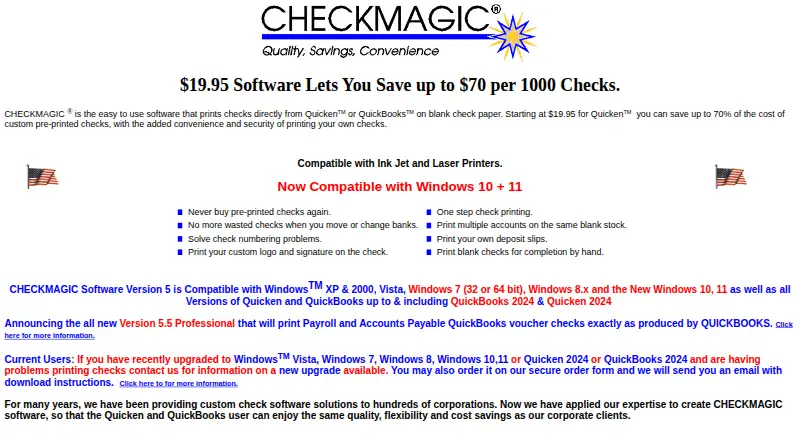
CHECKMAGIC is Windows desktop software for printing checks from Quicken or QuickBooks onto blank check paper. It adds bank details, check numbers, routing information, and MICR characters in a single print pass. It also supports logos, signatures, deposit slips, several check formats, multiple checking accounts, and laser or inkjet printers. The product fits individuals and businesses that already work in Quicken or QuickBooks and need desktop check printing rather than a recurring subscription service.
The published plans show two one-time purchase options. CHECKMAGIC for Quicken Version 5.1 costs $19.95 and supports Quicken, up to 10 checking accounts, and Windows desktop use. CHECKMAGIC Professional Version 5.5 costs $95.95 and adds QuickBooks support, up to 999 checking accounts, and network operation while retaining Windows desktop delivery. That makes the lower-priced edition suitable for Quicken users with simpler account needs, while the Professional edition is aimed at QuickBooks users, larger account setups, or networked environments.
Its strongest fit is a focused workflow: import or print from Quicken or QuickBooks, use blank check stock, and produce checks with MICR printing in one pass. Multiple-account support, deposit slips, signatures, logos, and printer compatibility extend that core function without changing its desktop orientation. The trade-off is platform and ecosystem scope. CHECKMAGIC does not support QuickBooks Online or Mac, and the Quicken edition does not support QuickBooks. Choose it if Windows compatibility and a one-time purchase match your accounting setup; choose another product if you need Mac, QuickBooks Online, or broader platform coverage.
Questions about CHECKMAGIC
What does CHECKMAGIC run on? Windows. It runs as a desktop app.
What does CHECKMAGIC integrate with? 2 integrations: Quicken and QuickBooks.
Who is CHECKMAGIC built for? Solo users and small businesses (our editorial estimate).
Your product? Our editors can test CHECKMAGIC in depth and publish a review, labelled as paid · from $149/mo →
CHECKMAGIC pricing
All 2 CHECKMAGIC plans and prices →
CHECKMAGIC fact sheet
| Free plan | No |
|---|---|
| Paid from | $19.95 one-time |
| Delivery model | Desktop |
| MICR printing | Yes |
| Blank-check support | Yes |
| Accounting import | Direct |
| Layout customization | Customizable |
| User limit | Not verified |
| Deployment | Desktop |
| Platforms | Windows |
| Support | Email, Phone, Docs |
| Built for | Solo, Small business (editorial estimate) |
| Integrations | 2 integrations: Quicken, QuickBooks |
| Pricing | Paid (source) |
| Website | checkmagic.com |
| Facts checked | 21 Sep 2026 |
CHECKMAGIC integrations
CHECKMAGIC lists 2 integrations on its own site.
- Quicken
- QuickBooks
Alternatives to CHECKMAGIC
- Zil MoneyA free web-based platform for customizable checks, payments, imports, and business workflows.9.4
- OnlineCheckWriter.comA web-based check and payment platform with broad accounting integrations.9.2
- CheckrunA control-focused QuickBooks Online payment tool with meaningful setup and usage fees.9.1



See all CHECKMAGIC alternatives →
Used CHECKMAGIC? Be the first to review it
The editor score above is our own research. What this page doesn't have yet is a reader's view — what you used CHECKMAGIC for, what worked and what didn't. No stars are seeded and no review is paid for; an editor reads every one before it appears.
Write a reviewTwo minutes · verified accounts only · read by an editor before it appears
Featured on iTechGuides

CHECKMAGIC is listed in our Check Printing Software directory. Add the badge to your site — it links back to this page.
<a href="https://www.itechguides.com/products/checkmagic/"><img src="https://www.itechguides.com/best/badge/checkmagic.svg" alt="Featured on iTechGuides" width="230" height="46"></a>
Reviewed by iTechGuides Editors · Editorial team · Updated Nov 2026
Advertiser disclosure: iTechGuides is reader-supported. Vendors can pay for top positions in our rankings and for a place on other products' pages, and we may earn a commission when you click some links. Bought places stand at the number bought; this page and our disclosure say so. Paying vendors may get a fuller, more detailed review from our editors, and that review can change their score. How we rank.
Last updated · How we research and update