
CFS 941/940
CFS 941/940: A Windows tool for QuickBooks-based preparation of Forms 940 and 941. Ranked #17 of 31 in Payroll Tax Software by our editors (6.7/10); pricing: Paid; best for quickBooks users preparing Forms 940 and 941.
At a glance
- Editor score6.7 / 10
- PricingPaid
- Best forQuickBooks users preparing Forms 940 and 941
- Free planNo
- Paid from$194 one-time
- Jurisdiction coverageFederal_state
- Facts checked20 Sep 2026
Where it wins
- Prepares Forms 940, 941, 943, 944 and 945
- Imports employer, employee, paycheck and 1099-MISC data from QuickBooks
- Calculates payroll taxes and prepares supported state forms
Where it doesn't
- Federal e-filing requires manual upload to the IRS MeF website
- State form coverage is focused on 22 specifically listed states
- No tax-payment support is included
Our verdict on CFS 941/940
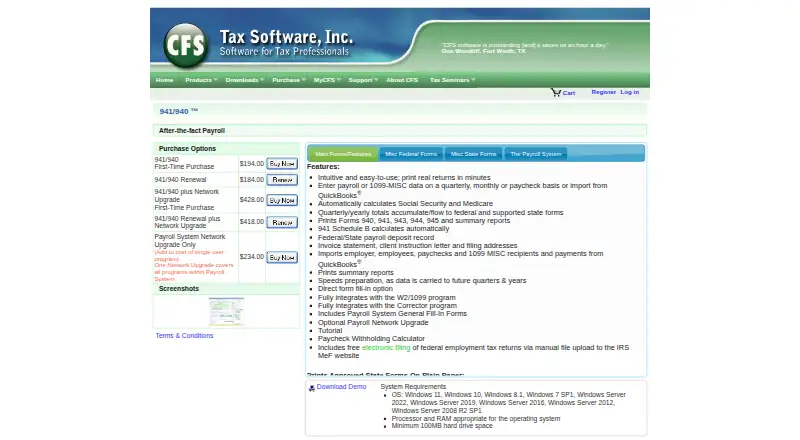
CFS 941/940 is Windows desktop software for tax professionals and payroll firms handling after-the-fact payroll processing. It imports employer, employee, paycheck and 1099-MISC data from QuickBooks, calculates Social Security and Medicare, and prepares Forms 940, 941, 943, 944 and 945. It also produces payroll deposit records, summary reports and supported state payroll forms, making it suited to firms that already maintain payroll records elsewhere.
The published plans show a $194 one-time price for the 941/940 PSAF First-Time Purchase and a $184 one-time renewal. A first-time purchase with the network upgrade costs $428 and adds multi-user access and a central client database; the renewal with that upgrade costs $418. The network upgrade alone costs $234 and includes multi-user access and file locking. These options make the product more practical for shared payroll workflows than the base edition, while the base plan fits individual users handling form preparation.
QuickBooks is the primary data connection, with additional integration for CFS W2/1099 and CFS Payroll Corrector. Federal employment-tax e-filing is available through manual IRS MeF upload rather than an automated filing workflow. State output covers 22 specifically listed states, alongside generic quarterly printouts for other states. Choose CFS 941/940 if you need desktop form preparation, payroll-tax calculations and QuickBooks imports. Choose an alternative if your workflow requires automated IRS submission, tax payments or broader state coverage.
Your product? Our editors can test CFS 941/940 in depth and publish a review, labelled as paid · from $149/mo →
CFS 941/940 pricing
All 5 CFS 941/940 plans and prices →
CFS 941/940 fact sheet
| Free plan | No |
|---|---|
| Paid from | $194 one-time |
| Tax filing | Yes |
| Tax payment support | Not verified |
| Tax form preparation | Yes |
| Jurisdiction coverage | Federal_state |
| Tax reconciliation | Not verified |
| Year-end forms | Not verified |
| States covered | 22 states |
| Deployment | Desktop |
| Platforms | Windows |
| Support | Live chat, Phone, Tickets, Docs |
| Built for | Small business, Mid-market (editorial estimate) |
| Integrations | 3 integrations: QuickBooks, CFS W2/1099, CFS Payroll Corrector |
| Pricing | Paid (source) |
| Website | taxtools.com |
| Facts checked | 20 Sep 2026 |
CFS 941/940 integrations
CFS 941/940 lists 3 integrations on its own site.
- QuickBooks
- CFS W2/1099
- CFS Payroll Corrector
Alternatives to CFS 941/940
- TaxBanditsA low-cost U.S. payroll tax platform with federal, state, reconciliation, and API workflows.8.9
- Sovos Withholding ComplianceA mature withholding operations platform for complex federal, state and local workflows.8.7
- HMRC Basic PAYE ToolsA focused free option for UK PAYE calculations, filings, payslips and year-end records.8.5



See all CFS 941/940 alternatives →
Used CFS 941/940? Be the first to review it
The editor score above is our own research. What this page doesn't have yet is a reader's view — what you used CFS 941/940 for, what worked and what didn't. No stars are seeded and no review is paid for; an editor reads every one before it appears.
Write a reviewTwo minutes · verified accounts only · read by an editor before it appears
Featured on iTechGuides

CFS 941/940 is listed in our Payroll Tax Software directory. Add the badge to your site — it links back to this page.
<a href="https://www.itechguides.com/products/cfs-941-940/"><img src="https://www.itechguides.com/best/badge/cfs-941-940.svg" alt="Featured on iTechGuides" width="230" height="46"></a>
Reviewed by iTechGuides Editors · Editorial team · Updated Oct 2026
Advertiser disclosure: iTechGuides is reader-supported. Vendors can pay for top positions in our rankings and for a place on other products' pages, and we may earn a commission when you click some links. Bought places stand at the number bought; this page and our disclosure say so. Paying vendors may get a fuller, more detailed review from our editors, and that review can change their score. How we rank.
Last updated · How we research and update