Celeste
Celeste: A capable Linux sync client whose archived, effectively unmaintained status limits its appeal. Ranked #24 of 26 in WebDAV Client Software by our editors (6.7/10); pricing: Open source; best for linux synchronization across cloud accounts.
At a glance
- Editor score6.7 / 10
- PricingOpen source
- Best forLinux synchronization across cloud accounts
- Paid fromNone
- Facts checked21 Sep 2026
Where it wins
- Two-way sync includes prompts for local and remote conflicts
- Connects multiple cloud providers at the same time
- Supports exclusions plus WebDAV through rclone
Where it doesn't
- Linux-only, with no mobile apps
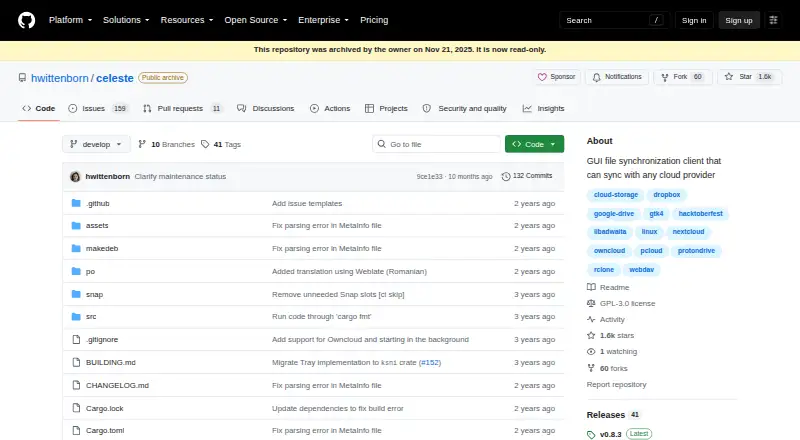
- Repository archived on November 21, 2025
- Effectively unmaintained according to its maintainer
Our verdict on Celeste
Celeste is a GTK-based desktop file synchronization client for Linux, built around rclone and intended for people who need to synchronize folders across cloud storage accounts or WebDAV locations. It supports two-way file synchronization, conflict prompts when local and remote files both change, file and folder exclusions, and simultaneous connections to multiple providers. Supported services include Dropbox, Google Drive, Nextcloud, ownCloud, pCloud, Proton Drive, and WebDAV.
Its main strength is breadth within a focused desktop workflow. Users can connect multiple cloud providers and apply synchronization rules that exclude selected files or folders. Two-way synchronization and conflict prompts are useful when local and remote copies can both change, while rclone-backed connectivity gives the client access to the listed cloud and WebDAV services. Celeste is distributed as open-source software through Flatpak, Snap, and package-based installation methods, making it a fit for Linux users who prefer a desktop interface over command-line synchronization.
Project status is the central consideration. The repository was archived on November 21, 2025, and the maintainer describes Celeste as effectively unmaintained. That makes it a better choice for users who value open-source Linux software and its existing synchronization features than for organizations seeking an actively maintained client. Choose Celeste for multi-account Linux synchronization with exclusions and conflict handling; consider an alternative if ongoing maintenance, broader platform coverage, mobile access, or confidence in future development is important.
Celeste pricing
Celeste fact sheet
| Free plan | Not verified |
|---|---|
| Paid from | None |
| Supported platforms | linux |
| Drive mounting | Not verified |
| Folder synchronisation | Yes |
| Offline file access | Not verified |
| Mobile apps | No |
| Scheduled synchronisation | Not verified |
| Deployment | Desktop |
| Platforms | Linux |
| Support | Community, Docs |
| Built for | Solo, Small business (editorial estimate) |
| Integrations | 7 integrations: Dropbox, Google Drive, Nextcloud, ownCloud, pCloud, Proton Drive … |
| Pricing | Open source |
| Website | github.com |
| Facts checked | 21 Sep 2026 |
Celeste integrations
Celeste lists 7 integrations on its own site.
- Dropbox
- Google Drive
- Nextcloud
- ownCloud
- pCloud
- Proton Drive
- WebDAV
Alternatives to Celeste
- rcloneA flexible, open-source WebDAV tool for scripting, synchronization, mounting, and transfers.9.4
- CloudDrive2A flexible multi-cloud manager for mounting, transfers, backups, and WebDAV access.9.2
- filexA broad open-source file platform for teams managing self-hosted and connected storage.9.0



See all Celeste alternatives →
Also listed in
Used Celeste? Be the first to review it
The editor score above is our own research. What this page doesn't have yet is a reader's view — what you used Celeste for, what worked and what didn't. No stars are seeded and no review is paid for; an editor reads every one before it appears.
Write a reviewTwo minutes · verified accounts only · read by an editor before it appears
Featured on iTechGuides

Celeste is listed in our WebDAV Client Software directory. Add the badge to your site — it links back to this page.
<a href="https://www.itechguides.com/products/celeste/"><img src="https://www.itechguides.com/best/badge/celeste.svg" alt="Featured on iTechGuides" width="230" height="46"></a>
Reviewed by iTechGuides Editors · Editorial team · Updated Oct 2026
Advertiser disclosure: iTechGuides is reader-supported. We may earn a commission when you click some links. How we rank.
Last updated · How we research and update