CCFinderSW
CCFinderSW: A focused open-source Java CLI for token-based clone reports on Windows. Ranked #16 of 23 in Code Clone Detection Tools by our editors (7.6/10); pricing: Open source; best for windows users needing token clone reports.
At a glance
- Editor score7.6 / 10
- PricingOpen source
- Best forWindows users needing token clone reports
- Paid fromFree
- Clone detection methodToken
- Founded2017
- Facts checked20 Sep 2026
Where it wins
- Reports both clone pairs and clone sets
- Configures token thresholds and file-detection ranges
- Supports CCFinder, CCFinderX, CCFSW, and JSON output
Where it doesn't
- Platform coverage is limited to Windows
- Requires Java 8 or later
- Does not include AI features
Our verdict on CCFinderSW
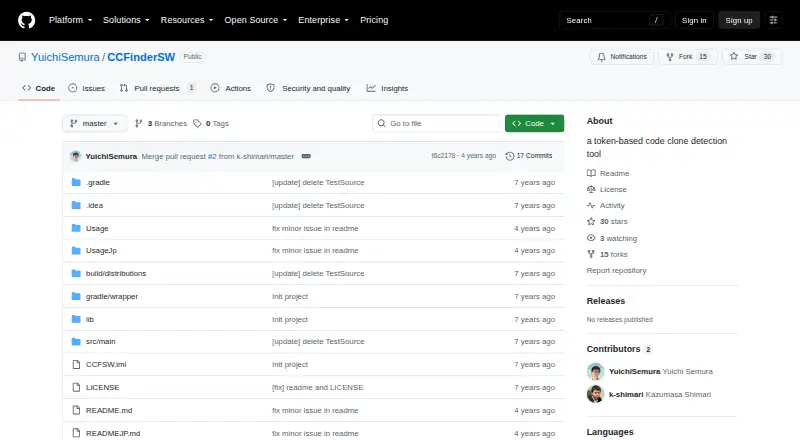
CCFinderSW is an open-source Java command-line tool for detecting code clones in source-code directories. It is aimed at Windows users who need token-based analysis with configurable reporting. The tool tokenizes source files, transforms identifiers and other lexical elements through language-specific option files, and produces either clone pairs or clone sets. Its self-hosted command-line design suits technical users who prefer configurable local processing over a broader application interface.
Its strongest area is control over clone analysis. Users can set the minimum token threshold and choose within-file or between-file detection ranges. Language-specific comment-rule files and reserved-word files support Type-2 clone detection, while optional ANTLR grammar-based processing extends lexical handling. Source-file character encoding is configurable, and results can be emitted in CCFinder, CCFinderX, CCFSW, or JSON formats. Gemini and GemX integrations connect with the CCFinder and CCFinderX formats, respectively.
CCFinderSW requires Java 8 or later, and its documented environment is Windows 10 Pro. That makes the setup more appropriate for users comfortable with command-line tools, Java requirements, and configuration files than for teams seeking a browser-based workflow or broad platform coverage. Choose it when token-level clone pairs, clone sets, output-format flexibility, and local control matter most. Consider an alternative when you need platforms beyond Windows, AI-assisted capabilities, or a less technical onboarding path.
Your product? Our editors can test CCFinderSW in depth and publish a review, labelled as paid · from $149/mo →
CCFinderSW pricing
CCFinderSW fact sheet
| Free plan | Not verified |
|---|---|
| Paid from | Free |
| Clone detection method | Token |
| Scan scope | Not verified |
| CI integration | Not verified |
| IDE integration | Not verified |
| Self-hosted option | Yes |
| Supported languages | Not verified |
| Deployment | Self-hosted |
| Platforms | Windows |
| Support | Docs, Community |
| Built for | Solo, Small business, Mid-market (editorial estimate) |
| Integrations | 2 integrations: Gemini (CCFinder), GemX (CCFinderX) |
| Pricing | Open source |
| Website | github.com |
| Facts checked | 20 Sep 2026 |
CCFinderSW integrations
CCFinderSW lists 2 integrations on its own site.
- Gemini (CCFinder)
- GemX (CCFinderX)
Alternatives to CCFinderSW
- jscpdA broad, self-hosted clone detector with strong CI, reporting, and history analysis.9.4
- art-duplA focused, self-hosted clone analyzer for Go teams building duplication checks into CI.9.2
- PMDA strong open-source choice for teams pairing clone detection with broad static analysis.9.0

See all CCFinderSW alternatives →
Used CCFinderSW? Be the first to review it
The editor score above is our own research. What this page doesn't have yet is a reader's view — what you used CCFinderSW for, what worked and what didn't. No stars are seeded and no review is paid for; an editor reads every one before it appears.
Write a reviewTwo minutes · verified accounts only · read by an editor before it appears
Featured on iTechGuides

CCFinderSW is listed in our Code Clone Detection Tools directory. Add the badge to your site — it links back to this page.
<a href="https://www.itechguides.com/products/ccfindersw/"><img src="https://www.itechguides.com/best/badge/ccfindersw.svg" alt="Featured on iTechGuides" width="230" height="46"></a>
Reviewed by iTechGuides Editors · Editorial team · Updated Oct 2026
Advertiser disclosure: iTechGuides is reader-supported. Vendors can pay for top positions in our rankings and for a place on other products' pages, and we may earn a commission when you click some links. Bought places stand at the number bought; this page and our disclosure say so. Paying vendors may get a fuller, more detailed review from our editors, and that review can change their score. How we rank.
Last updated · How we research and update