
Captika
Captika: A capable Windows capture stack, but the Professional license carries a high upfront cost. Ranked #29 of 40 in OCR Software by our editors (5.8/10); pricing: Free plan; best for windows enterprise capture automation.
At a glance
- Editor score5.8 / 10
- PricingFree plan
- Best forWindows enterprise capture automation
- Free planYes
- Paid from$515/seat one-time
- Facts checked23 Sep 2026
Where it wins
- Captures from scanners, email, FTP/SFTP, SharePoint and folders
- Supports metadata, templates, handwriting, barcodes and visual review
- Publishes to SQL, SharePoint, S3, FTP, FileSystem and Thuban
Where it doesn't
- Windows-only platform coverage
- Professional requires a USD 515 one-time fee per seat
- Free Edition requires Thuban Cloud and allows three capture jobs
Our verdict on Captika
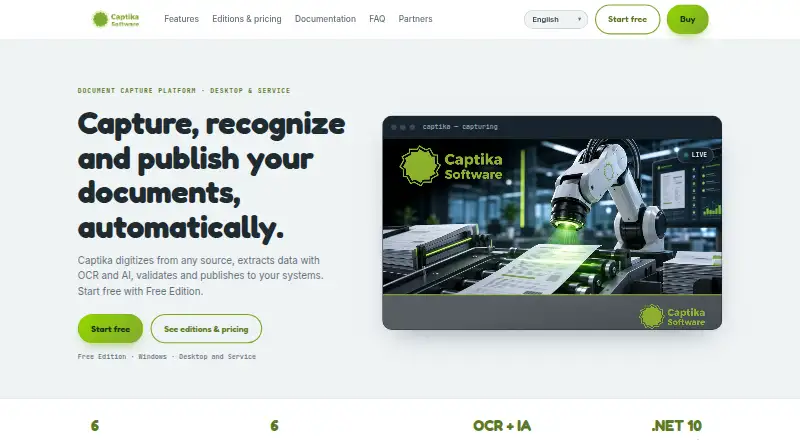
Captika is a Windows document-capture and OCR platform for organizations processing scanned and electronic documents. It supports capture from TWAIN scanners, folders, email, FTP/SFTP, SharePoint and Thuban, then applies OCR and recognition to extract information. Teams can use metadata fields, validation, document templates, extraction rules, barcode reading, PatchCode reading and visual review. The product is suited to businesses that need assisted document processing on a workstation or unattended, scheduled bulk processing through a Windows service.
Its freemium structure provides a practical entry point. The Free Edition includes OCR and recognition, supports up to 100 pages per day and allows up to three capture jobs, but requires Thuban Cloud access. The Professional plan costs USD 515 one time per seat and covers one workstation, unlimited capture and scanning, all sources and destinations, OCR, AI, .NET scripting, visual validation and quality control. The Server edition adds unattended 24/7 service, automated bulk processing, multithreading, task scheduling, error handling and traceability. Its pricing is available through the vendor rather than stated as a fixed amount here, while the published plan details identify both perpetual-license and monthly-subscription options.
Captika fits environments with established Windows workflows and varied document destinations. Its integration set includes Amazon Textract, Google Vision AI, OpenAI, Amazon Bedrock, Microsoft SharePoint, Amazon S3, SQL, FTP/SFTP, Thuban, FileSystem and Microsoft 365 email. Native Tesseract OCR provides a local recognition option, while cloud engines and Amazon Textract support additional extraction and handwriting recognition. The main trade-off is platform scope: organizations needing macOS, Linux or browser-based coverage should choose another product. Captika is a strong match for Windows teams that value configurable capture, validation and publishing, especially when scheduled service processing matters.
Your product? Our editors can test Captika in depth and publish a review, labelled as paid · from $149/mo →
Captika pricing
All 3 Captika plans and prices →
Captika fact sheet
| Free plan | Yes |
|---|---|
| Paid from | $515/seat one-time |
| Searchable PDF | Yes |
| Word export | Not verified |
| Handwriting OCR | Yes |
| Supported languages | Not verified |
| Monthly page limit | Not verified |
| Primary platform | Desktop |
| Supported inputs | Both |
| Deployment | Desktop, Self-hosted |
| Platforms | Windows |
| Support | |
| Built for | Small business, Mid-market, Enterprise (editorial estimate) |
| Integrations | 10 integrations: Office 365, SharePoint, Thuban, Amazon S3, SQL databases, FTP/SFTP … |
| Pricing | Free plan (source) |
| Website | captika.com |
| Facts checked | 23 Sep 2026 |
Captika integrations
Captika lists 10 integrations on its own site.
- Office 365
- SharePoint
- Thuban
- Amazon S3
- SQL databases
- FTP/SFTP
- Amazon Textract
- Google Vision
- OpenAI
- Bedrock
Alternatives to Captika
- PaddleOCRA developer-focused OCR toolkit with multilingual, handwriting, and document parsing workflows.9.3
- Tesseract OCRA mature, developer-focused OCR engine with broad outputs and self-hosting flexibility.9.1
- ABBYY FineReader PDFA broad desktop PDF suite for OCR, editing, conversion, forms, and document control.9.0

See all Captika alternatives →
Used Captika? Be the first to review it
The editor score above is our own research. What this page doesn't have yet is a reader's view — what you used Captika for, what worked and what didn't. No stars are seeded and no review is paid for; an editor reads every one before it appears.
Write a reviewTwo minutes · verified accounts only · read by an editor before it appears
Featured on iTechGuides

Captika is listed in our OCR Software directory. Add the badge to your site — it links back to this page.
<a href="https://www.itechguides.com/products/captika/"><img src="https://www.itechguides.com/best/badge/captika.svg" alt="Featured on iTechGuides" width="230" height="46"></a>
Reviewed by iTechGuides Editors · Editorial team · Updated Oct 2026
Advertiser disclosure: iTechGuides is reader-supported. Vendors can pay for top positions in our rankings and for a place on other products' pages, and we may earn a commission when you click some links. Bought places stand at the number bought; this page and our disclosure say so. Paying vendors may get a fuller, more detailed review from our editors, and that review can change their score. How we rank.
Last updated · How we research and update