Candy Browser
Candy Browser: A privacy-focused Android browser with unusually deep tab, profile, and sync controls. Ranked #67 of 145 in Web Browsers by our editors (3.9/10); pricing: Free plan; best for privacy-focused Android power users.
At a glance
- Editor score3.9 / 10
- PricingFree plan
- Best forPrivacy-focused Android power users
- Free planYes
- Paid fromFree
- Browser engineGecko
- Facts checked20 Sep 2026
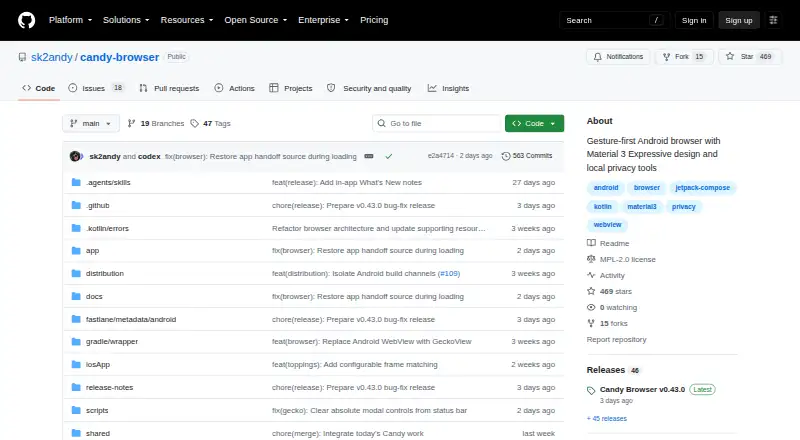
Where it wins
- Local ad, tracker, cookie, and cosmetic filtering
- Mozilla-signed Firefox extension support on Android
- Self-hosted encrypted synchronization across browser profiles
Where it doesn't
- Android-only current distribution limits platform breadth
- Self-hosted sync requires operating a synchronization server
- Advanced tab and profile controls may demand more setup
Our verdict on Candy Browser
Candy Browser is an open-source Android web browser for users who want gesture-driven navigation, local privacy controls, and extensive tab management. It uses GeckoView by default and can also use Android System WebView, while supporting compatible Mozilla-signed Firefox extensions on Android. Private tabs keep session data in memory, profiles isolate browser-engine storage, and Reader Studio supports offline saves and text-to-speech. The result is a mobile browser aimed at privacy-focused power users rather than people seeking a simple, platform-wide browsing setup.
Its strongest area is control over browsing data and tabs. Local ad, tracker, cookie, and cosmetic filtering are built in, and tab grouping, snoozing, pinning, multiple layouts, gesture-based switching, and gesture navigation give users several ways to manage a busy mobile session. Profiles add separation between browsing contexts, while private tabs provide a distinct session mode. Extension support broadens the browser beyond its built-in tools, though compatibility is tied to Mozilla-signed Firefox extensions on Android.
Candy Browser is free and open source, with no paid tiers described in its published product details. Cross-device synchronization is available through Candy Sync, connecting Android, Chromium, and Firefox profiles with a self-hosted, end-to-end encrypted synchronization server. That approach suits users who want control over where synchronization runs, but it also adds operational responsibility compared with a browser-managed sync service. The current product focus is Android, with Android distribution requiring Android 13 or newer; iOS is described as a target rather than the main available platform. Choose Candy Browser for privacy controls, customization, and tab depth on Android. Choose another browser if desktop or iOS availability is central to your workflow.
Your product? Our editors can test Candy Browser in depth and publish a review, labelled as paid · from $149/mo →
Candy Browser pricing
Candy Browser fact sheet
| Free plan | Yes |
|---|---|
| Paid from | Free |
| Supported platforms | Mobile |
| Browser engine | Gecko |
| Built-in ad blocking | Yes |
| Tracking protection | Not verified |
| Extension support | Not verified |
| Cross-device sync | Yes |
| Open source | Yes |
| Deployment | Mobile, Self-hosted |
| Platforms | Android |
| Support | Docs |
| Built for | Solo, Small business (editorial estimate) |
| Pricing | Free plan |
| Website | github.com |
| Facts checked | 20 Sep 2026 |
Alternatives to Candy Browser
- Google ChromeA complete free browser with broad platform coverage, sync, extensions, and built-in security.9.3
- Microsoft EdgeA free, cross-platform browser suited to Microsoft users who want broad compatibility.9.2
- Mozilla FirefoxA mature, privacy-focused browser for everyday browsing across desktop and mobile.9.1


See all Candy Browser alternatives →
Used Candy Browser? Be the first to review it
The editor score above is our own research. What this page doesn't have yet is a reader's view — what you used Candy Browser for, what worked and what didn't. No stars are seeded and no review is paid for; an editor reads every one before it appears.
Write a reviewTwo minutes · verified accounts only · read by an editor before it appears
Featured on iTechGuides

Candy Browser is listed in our Web Browsers directory. Add the badge to your site — it links back to this page.
<a href="https://www.itechguides.com/products/candy-browser/"><img src="https://www.itechguides.com/best/badge/candy-browser.svg" alt="Featured on iTechGuides" width="230" height="46"></a>
Reviewed by iTechGuides Editors · Editorial team · Updated Oct 2026
Advertiser disclosure: iTechGuides is reader-supported. Vendors can pay for top positions in our rankings and for a place on other products' pages, and we may earn a commission when you click some links. Bought places stand at the number bought; this page and our disclosure say so. Paying vendors may get a fuller, more detailed review from our editors, and that review can change their score. How we rank.
Last updated · How we research and update